
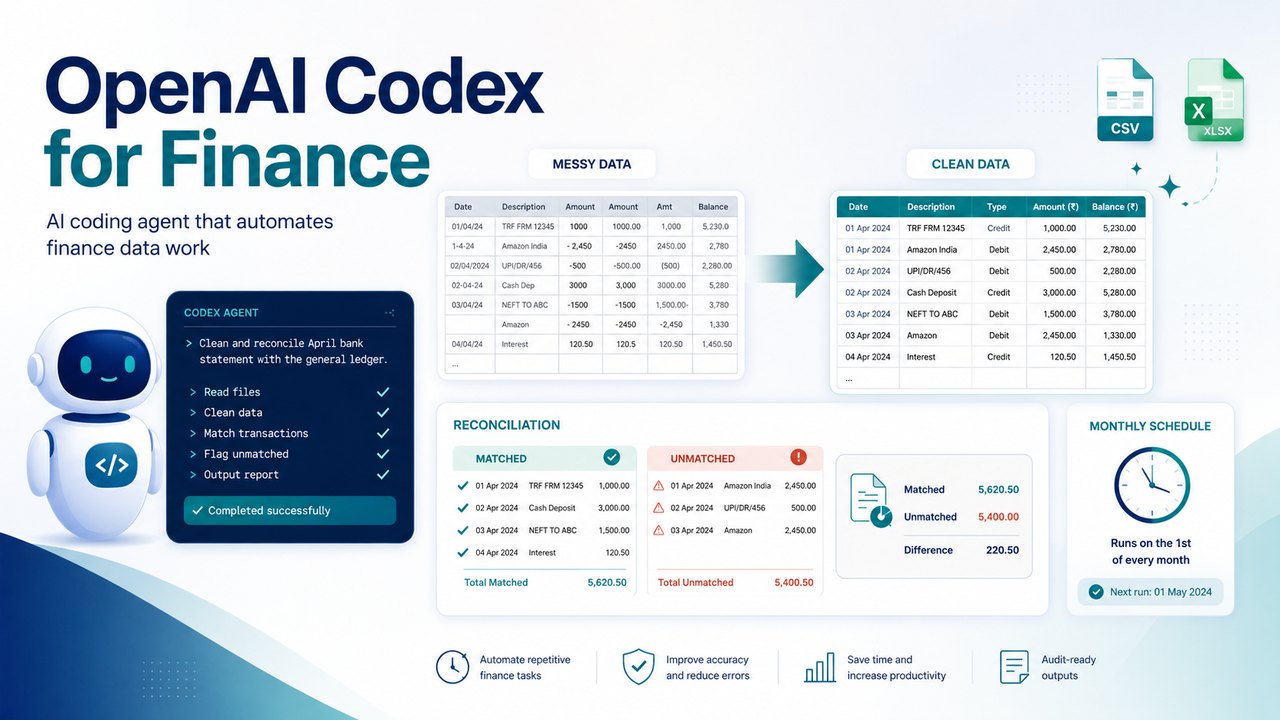
OpenAI Codex for finance is best understood not as developer software but as an agent you talk to in plain English that cleans, transforms and reconciles your data files. You describe a data or spreadsheet task, Codex writes and runs the code (usually Python) to do it, then shows you both the result and the script. This is the hands-on guide: for each job, you get what it does, the exact steps, a real example you can copy, and what to double check. It pairs with our AI in Finance and Accounting guide, our AI prompts for finance guide, and our Claude for finance and accounting guide.
Codex is one product across four surfaces that share the same login and the same GPT family models: a web and cloud experience, a command-line tool (the Codex CLI) that runs on your own machine, an extension for code editors, and a desktop app. For finance work the CLI and the desktop app matter most, because they can run on your own files.
Clean a messy data export
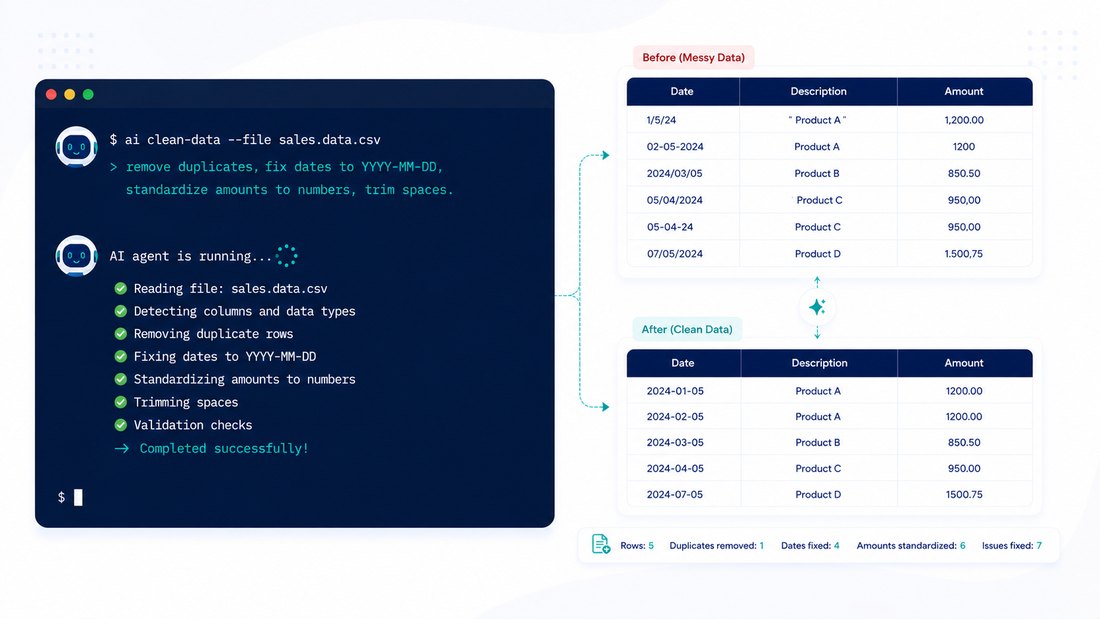
The first and most useful job. Point Codex at a messy CSV or spreadsheet export and tell it, in plain words, how to tidy it.
What it does for finance.
- Dedupes rows, standardises date and number formats, splits or merges columns, and fixes amount signs
- Reads a bank or ledger export and flags anomalies or blanks
- Outputs a clean spreadsheet or CSV plus the script it used
- Accepts a screenshot of the layout you want as a guide
How to do it, step by step.
- Install the Codex CLI. On macOS or Linux run curl -fsSL https://chatgpt.com/codex/install.sh | sh, or use npm with npm install -g @openai/codex; the desktop app is the no-terminal option.
- In your terminal, move to the folder with your file and type codex to start.
- Keep the default approval mode so Codex asks before it runs anything or touches the network.
- Describe the cleanup in plain English and let Codex propose and run the script.
- Open the output file, check a few rows against the source, and ask for corrections in plain English.
Where to be careful.
- Check the output against the original before you use it; Codex can mishandle blank rows, duplicates, rounding and date formats.
- Keep the script Codex wrote, so you can see and rerun exactly what was done.
Build a reconciliation as a reusable script
Because Codex writes a script, a reconciliation you build once reruns next period on fresh files. This is where it earns its keep at close.
What it does for finance.
- Compares two sources, books versus bank, general ledger versus subledger, your purchase register against your GST 2B, or your records versus a supplier statement
- Emits matched, unmatched and partially matched lists with the reconciling items
- Reruns on next period’s files without rebuilding the logic
- Can be told your match rules: tolerance, keys, how to treat credit notes
How to do it, step by step.
- Put both files in one folder and start Codex there.
- Tell Codex the two files, the columns to match on, and the tolerance.
- Let it write and run the matching script and produce the output workbook.
- Review the unmatched and mismatched lists and refine the rules in plain English.
- Save the script so next month you just drop in fresh files and rerun it.
Where to be careful.
- Reconcile totals back to a control figure you trust before relying on the output.
- State your edge cases (credit notes as negatives, rounding) or Codex will guess.
- The output is a workbook of values from a script, not a live formula chain, see the audit note below.
Turn a one-off into a repeatable monthly task
Once a cleanup or report-prep works, you can make it routine.
What it does for finance.
- Saves a tested instruction as a reusable task
- The desktop app can schedule recurring runs, and the cloud can run tasks in the background, including several in parallel
- Useful for monthly file processing or report-prep that repeats the same way
How to do it, step by step.
- Get the task working once and confirm the output is correct.
- In the desktop app, save it as a recurring task on the cadence you need.
- Have results land in a review queue so a person checks before anything is used.
- Re-verify the first run of each period, because source files and formats drift.
Where to be careful.
- Automation does not remove review; check the first run each period.
- If a source layout changes, the script may need a tweak before it runs clean.
Choose your surface: web, CLI, IDE or desktop app
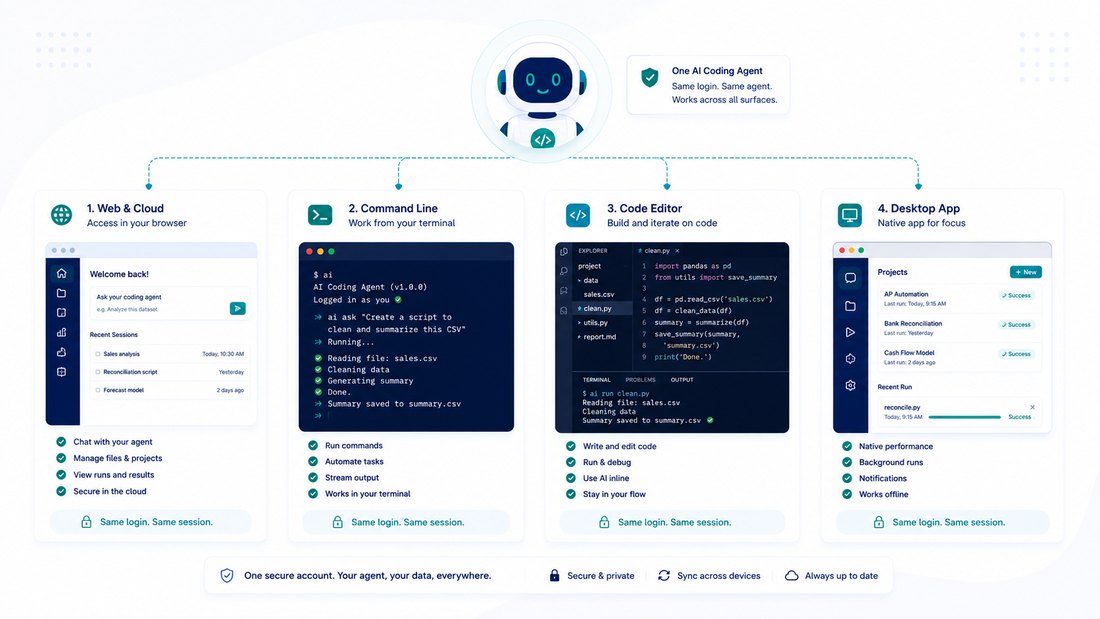
All four share one login and the same models. Pick by how private the data is and how comfortable you are with a terminal.
- Codex CLI: runs locally in your terminal on macOS, Linux and Windows. Best for sensitive client data, because the work happens on your machine.
- Desktop app: for macOS and Windows, the no-terminal option, with scheduling and parallel tasks.
- Web and cloud: runs tasks in OpenAI’s cloud, good for longer or parallel jobs, less suited to confidential files.
- IDE extension: for those who already work in a code editor, and can hand longer jobs to the cloud.
Connect your own tools with MCP
Codex can be wired to tools and data sources you configure through the Model Context Protocol, so it can fetch from or act in systems beyond your local files. This is an advanced setup, useful once you have a stable workflow and want Codex to reach a specific source you control.
Local versus cloud: two confidentiality postures
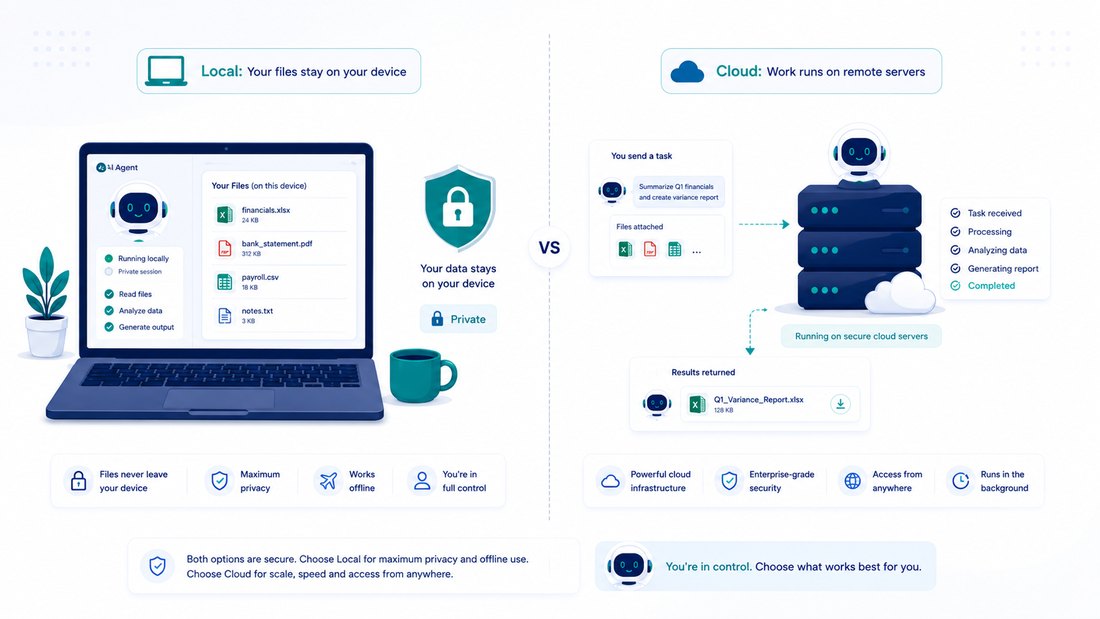
This is the decision that matters most for client data. With the local CLI, your files are read, edited and run on your own machine inside a sandbox with approval controls, so sensitive data stays with you. With the web, cloud, or cloud-delegated jobs, the work runs in OpenAI’s cloud environment. On the account side, OpenAI states that its business products do not use your inputs or outputs to train models by default, with admin-controlled retention; zero data retention and similar are contracted options rather than self-serve. For confidential work, prefer the local CLI, keep the default approval mode, and check your own engagement terms and local data protection laws before sending anything to the cloud.
Plans and how usage is metered
Codex is included with ChatGPT subscription plans, so plan users do not buy it separately. Prices are listed in US dollars and usage is metered as messages in a rolling window that varies by model, with heavier plans getting more headroom; the exact message and credit figures are given as ranges that can change, so treat them as indicative and check the live pricing page. You can also authenticate with an API key and pay per token instead. One thing for teams to verify: OpenAI changed Codex seat availability for new business buyers in mid 2026, so if you are buying for a team, confirm current seat availability with OpenAI rather than assuming.
The audit-trail caveat you must respect
Where Codex falls short
- It is a coding agent, not accounting software or tax advice, and will not know your specific treatment unless you tell it.
- It can be confidently wrong and mishandle edge cases, so reconcile to a control total first.
- Cloud runs send data to OpenAI’s servers; use the local CLI for sensitive files.
- Its output is values from a script, not auditable formulas, so keep the script and inputs for the trail.
How to get started
- Confirm your ChatGPT plan includes Codex, then pick a surface: the CLI or desktop app for files that stay on your machine.
- Install the CLI with the one-line script, or download the desktop app.
- Start with a small, safe cleanup on a copy of a real file, with approvals on.
- Once it works, save it as a reusable script or scheduled task, and always review the first run each period.
Where ReconScribe fits in
We are a small team of finance and accounting professionals who write practical guides and build free tools for finance teams and the businesses they serve. Start with our AI in Finance and Accounting guide, our Claude for finance and accounting guide, and our free calculators.
OpenAI Codex for finance FAQ
Do I need to be a programmer to use OpenAI Codex for finance?
No. You describe the task in plain English and Codex writes and runs the code for you. The most useful habit is to be specific about the rules, keep approvals on, and check the output against the source, just as you would review a junior’s work.
How do I clean a messy bank or ledger export with Codex?
Install the Codex CLI or desktop app, open the folder with your file, and tell Codex in plain words how to tidy it, for example standardise dates, remove duplicates, fix amount signs and save a clean copy. Then check a few rows against the original before you use it.
Can Codex build a reconciliation?
Yes. Tell it the two files, the columns to match on and the tolerance, and it writes a script that produces matched, unmatched and mismatched lists. Because it is a script, it reruns next period on fresh files. Always reconcile the result to a control total you trust.
Is my client data safe with Codex?
It depends on the surface. The local CLI runs on your own machine inside a sandbox, which is the most private option for confidential files. The web and cloud run the work on OpenAI’s servers. OpenAI states its business products do not use your inputs or outputs to train models by default. For sensitive data, prefer the local CLI and check your own engagement terms first.
Does Codex give me an auditable spreadsheet?
No. Codex produces scripts and computed values, not a live formula chain an auditor can click through. Treat the output as a draft, reconcile it to a known figure, and keep the prompt, the script and the input files together so the work can be reproduced and reviewed.
What does OpenAI Codex cost?
Codex is included with ChatGPT subscription plans rather than bought separately, with more usage on higher tiers. Prices are in US dollars and usage limits are given as ranges that can change, so check the official pricing page. You can also pay per token using an API key.
Which Codex surface should a finance team use?
For files that must stay private, use the local CLI or the desktop app, which run on your own machine. The web and cloud are better for longer or parallel jobs but send data to OpenAI’s cloud. Start local, then expand once you trust the workflow.
Can Codex run a task every month on its own?
The desktop app can schedule recurring tasks and the cloud can run jobs in the background. Set results to land in a review queue and always check the first run of each period, because source files and formats drift over time.