
ChatGPT dots are built for the work that keeps coming back. Powered by GPT-6 Astra, they have their own cloud computer, can work towards a goal 24/7, and connect through a plugin ecosystem spanning more than 4,000 apps. OpenAI launched dots on 29 September 2026. The change is not just a better answer. It is someone keeping track of the job between conversations.
That matters if your day is full of unfinished reconciliations, missing documents, changing deadlines and little jobs that require five different apps. A useful assistant should not need the whole story again every morning. But giving it ongoing responsibility also means being clear about what it may read, prepare, change or send.

Here is the practical guide: what ChatGPT dots actually do, what they cost, how to set one up, where the limits sit, and where we would use one in a finance team. If you are looking for a new model’s token price or coding leaderboard, dots are a different kind of release.
What are ChatGPT dots?
A dot is a persistent agent inside ChatGPT. You give it a responsibility, relevant sources and boundaries. It can keep working, return with results and ask for a decision rather than waiting for a fresh prompt for every step. The dots documentation describes a cloud-based agent with its own computer and browser.
Our live AI leaderboard also has an AI agents tab that sets dots beside Meta Muse, Claude Cowork and other agent products, with their plans and prices.
The distinction is easy to miss because the interface still looks like a conversation. The useful part is what happens between messages. Instead of only explaining how to prepare a report, a dot can help keep the work organised as new information arrives.
A simple way to understand it
Picture a school project with a poster, a list of materials and a presentation next Friday. One helper answers, “Which colours should I use?” Another keeps the list, notices the glue is missing and prepares a revised plan when the date changes.
A normal question needs the first helper. An ongoing project needs the second. You still decide what the project is about and approve anything important. The helper remembering Friday does not make it the teacher.
Is GPT Dots a new model?
No. “GPT Dots” is an understandable search term, but the product is called dots. GPT-6 Astra is the model underneath. Dots add a persistent work arrangement around that model: tools, tasks, memory, access and action checks.
Do not mix it up with GPT-6.1 Sol, which was also announced at DevDay. Choosing a model and choosing how work gets organised are separate decisions. Our GPT-6 Sol guide and Claude Sonnet 5.5 comparison deal with the model side.
What changes when the work continues?
The biggest benefit is continuity. A question such as “summarise this file” has a clear end. “Keep the month-end close pack ready for review” has dependencies, deadlines, missing items and decisions. That is where an ongoing agent becomes more interesting.
For our work, that last step is the important one. A polished spreadsheet is not useful if it reconciles the wrong month. A draft supplier email is not useful if the amount is right but the recipient is wrong. The standard should be a result you can inspect, with evidence attached.
ChatGPT dots pricing and availability
Your first dot is included with an eligible Pro or Business Premium subscription, with no separate dot fee at launch. This is paid-plan access, not a new free tier. Pro has three monthly tiers; Business has Standard and Premium seats.
| Plan | Published USD price | Dots at launch |
|---|---|---|
| Free, Go and Plus | Their existing plan prices | Not included in the launch rollout |
| Pro 100 | $100 / month | Included, subject to eligibility and gradual rollout |
| Pro 200 | $200 / month | Included, with higher general usage than Pro 100 |
| Pro 500 | $500 / month | Included; this tier also includes Astra Ultrafast |
| Business Standard | $20 / user / month billed annually; $25 monthly | Not the Business seat that includes dots |
| Business Premium | $100 / user / month billed annually; $125 monthly | Included; available across supported ChatGPT regions |
| Enterprise, including Edu and Healthcare | Contract pricing | Beta access when the workspace admin enables it |
Business requires at least two Standard or Premium seats in total and can mix them. The $100 Premium figure is an annual-billing monthly equivalent, not a one-month purchase at that price. These are published USD subscription prices; checkout, taxes and local pricing can differ.
For personal Pro plans, the launch rollout is for users over 18 outside the European Economic Area, the UK and Switzerland. Dots are not available to under-18 users. Business Premium and Enterprise have wider regional rollout, with Enterprise access off by default until an administrator enables it. Check the current access requirements before upgrading solely for dots.
Does dots usage count towards your limits?
Conversations with your dot do not count towards ordinary ChatGPT usage limits. Work or Codex tasks it starts or manages count towards those products’ limits as usual. That difference matters: chatting about a project and running the delegated work are not the same usage bucket.
The launch includes extended deeper-work limits for the first month. The current Help Center guidance also describes a temporary first-month dots allowance and says later plan terms will be shared. Do not read the launch period as a promise of unlimited long-running work forever. We do not have a published permanent dots-specific task allowance or overage schedule to quote here.
Is it worth paying for?
We would start with the workload, not the animated character. If you already pay for an eligible plan, a narrow trial has a lower additional subscription cost. If you are upgrading just for dots, count the full increase and the time spent checking its output.
A simple hypothetical example: at an internal time value of $40 per hour, a $100 monthly subscription needs 2.5 hours of net time saved to cover that subscription alone. If it saves five hours but needs three hours of checking and rework, the net saving is two hours, worth $80. That would not cover $100. This is an illustration, not a promise about dots’ performance.
For someone already paying for other included features, the calculation is different. Separate what you would pay anyway from what you are adding. A trial should make that decision clearer, not create more work to justify the subscription.
How to set up ChatGPT dots
Create your first dot in the ChatGPT desktop app or a desktop browser. The setup guide includes Windows. Once created, the same dot can be used in the mobile app when the supporting update reaches your account. You cannot create it on mobile, and mobile web is not supported.
Help me prepare this week's internal project review.
Use only the approved project folder I connect.
List deadlines, missing files and decisions that need an owner.
Put a source link beside each finding.
Draft a short update for my review in ChatGPT.
Do not send messages, edit shared files or connect other accounts.
Ask if the reporting period or source is unclear.
Before starting, confirm the scope and any missing access.
A first job like this lets you check whether it can find the right material and distinguish a fact from an assumption. That is more informative than asking it to take over your whole week.
Memory, schedules and background research
ChatGPT dots draw on relevant ChatGPT memory and keep their own notes about preferences and ongoing work. These notes are not a complete transcript or a guaranteed copy of every source. The tasks and memory guide distinguishes things that are often lumped together.
For recurring work, include a time zone and an end date, then ask it to confirm the saved schedule. For event monitoring, ask which events the connected service actually supports. Simply adding the dot to a Slack channel does not establish a monitoring schedule.
For the next four weeks, review the approved close checklist
at 9:00 AM Europe/London each weekday.
Report overdue items and missing evidence in ChatGPT.
Include the owner, due date and source link for each exception.
Do not contact the owners or change the checklist.
Notify me only if an item becomes overdue or you need a decision.
Confirm the saved schedule, time zone and end date.
We would keep a small written handoff alongside the project: the current objective, approved sources, authorised actions, open exceptions and latest review decision. It makes the work portable and gives the reviewer something more reliable than “you remember what we discussed”.
Its cloud computer, your laptop and connected apps
The cloud computer is separate from your laptop and personal browser. Its work can continue while your device is off. For local work, you must connect your computer, keep it online and keep the ChatGPT app open. Only one personal computer can be connected at a time. The computer and app guide explains these connections.
Open the dot’s profile to inspect its computer. Use Take over when you need mouse and keyboard control, then Return control when it can continue. Signing into a website on your laptop does not automatically sign its cloud browser into that website.
| Connection | What it is for | What it does not automatically grant |
|---|---|---|
| ChatGPT, Slack or Teams | Talking to the same dot and receiving updates | Access to your inbox, local files or every channel |
| An app or plugin | Using that service’s tools under granted permissions | Permission for every available action or every account |
| Your computer | Using local files, software and delegated tasks | Access to every conversation in every app |
The 4,000-plus app ecosystem is not a claim that every application comes preconnected or that every workflow is supported. A working integration still needs the right plugin, account, permissions and environment.
If a website blocks the cloud browser, local work may be an option once you connect your device. It is not a guarantee that a particular site will work, and cloud browser sessions do not simply transfer to a local task.
Can you message it in Slack, Teams or by phone?
You can message the same dot in ChatGPT, Slack and Teams. In ChatGPT you can also start a voice call. Channel conversations remain separate even though relevant context can carry across them. Texting and calls initiated by the dot are not launch features; they are planned. See the channel guide for current support.
For a team, we would decide where routine status belongs before connecting more channels. Otherwise the assistant can become another source of interruptions. Keep ordinary progress in one place and reserve a direct message for a genuine decision or exception.
Where we would use dots in finance and accounting
Our strongest use case is preparing and following up, not independently authorising financial transactions. Finance work often gets delayed by incomplete evidence and small unresolved questions. A dot could be useful around those gaps, provided the underlying tools support the task and a named person reviews the result.
The scenarios below are proposed workflows with made-up figures, not claims that we have tested dots on client records.
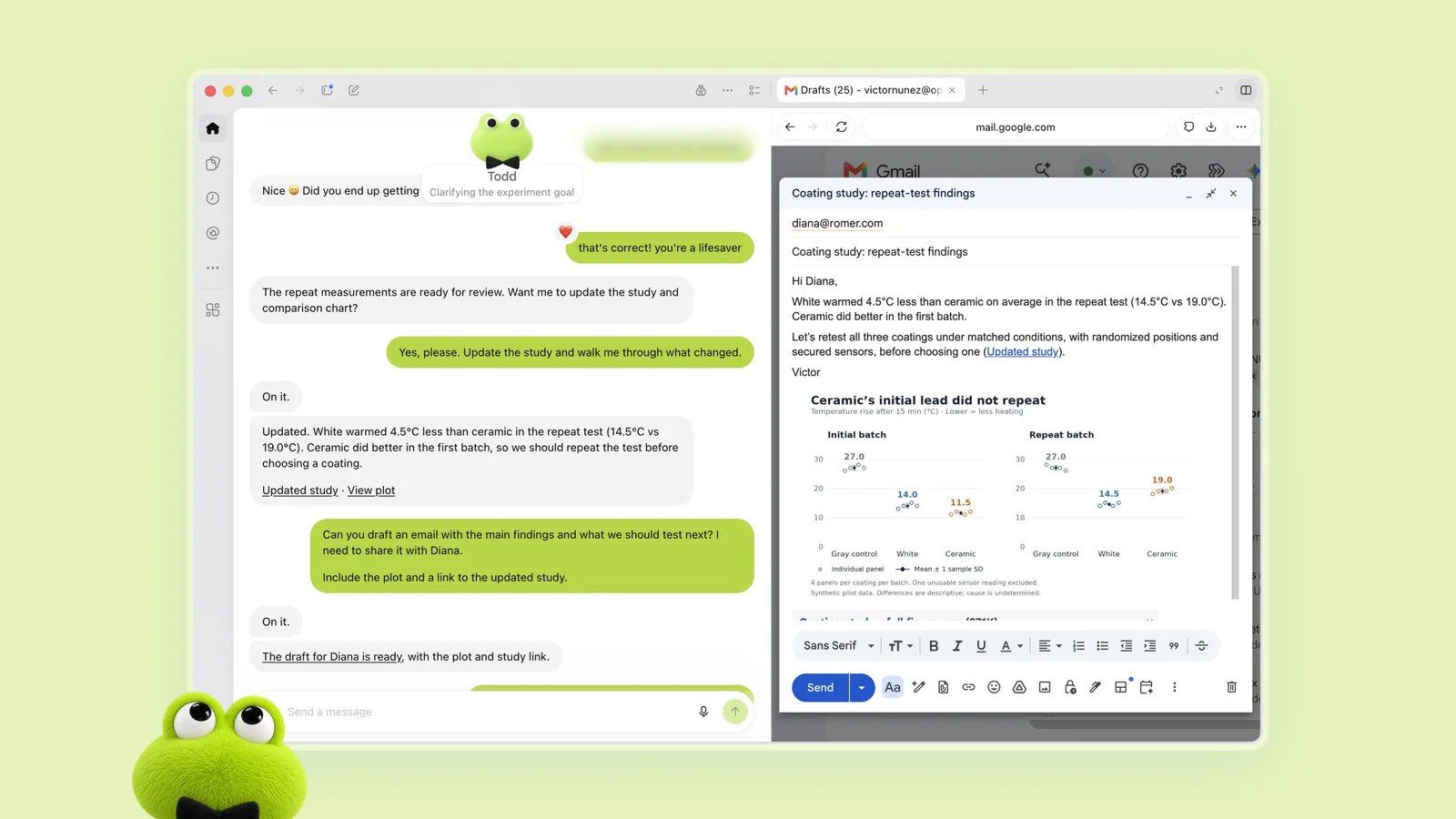
1. Keep a month-end close pack ready for review
Suppose a team has eight schedules to prepare and two are still waiting for supporting files. The tedious part is checking which attachment is current, who owns the missing item and whether the work is ready for review.
We would give the dot an approved checklist and a restricted folder. Ask for an exception register containing the schedule, period, owner, evidence link and unresolved question. It should distinguish “file received” from “balance reconciled” and “reviewed”.
That distinction prevents a green tick from meaning three different things. A bank statement can be present while the reconciliation is incomplete. A reconciliation can tie while a stale journal remains unresolved. The reviewer needs to see both the arithmetic and the outstanding explanation.
The handoff should be a short review pack, not a declaration that the accounts are correct. The accountant decides whether the evidence supports the balance.
2. Prepare an accounts-payable exception list
In a synthetic example, an invoice is $12,000, the purchase order is $10,000 and the receipt record covers only part of the delivery. The useful task is to organise those differences, not guess which number to pay.
Ask for a row per exception: document reference, invoice amount, approved order amount, receipt evidence, difference and proposed question. Preserve the currency and whether each amount includes tax. A difference caused by tax presentation is not the same as an unapproved price increase.
Drafting a supplier question can save time. Sending it to the supplier, changing the master data or releasing a payment is a separate decision. For bank details, use your established verification process. A matching-looking name or a confident explanation is not evidence of account ownership.
This is where we would pair a dot with deterministic checks. A spreadsheet formula or approved rule should calculate the difference; the agent can gather the records and help explain what still needs checking.
3. Maintain an audit evidence request tracker
An audit request can be open because the file is missing, the period is wrong, the owner has not signed it or the reviewer needs a clearer explanation. Those are different problems, even if the tracker says “pending” for all of them.
We would ask the dot to separate evidence requested, evidence received, reviewer query and ready-for-review status. Each line should identify the source and the next human decision. It should not mark a control effective merely because a document was uploaded.
For example, a screenshot of an approval screen may show an approval. It does not on its own prove the control operated for the whole population. The team still decides what the evidence supports and what further testing is necessary.
A good output would make the next conversation with the auditor shorter. A bad output would hide gaps behind polished wording. Keep conclusions with the reviewer and give the dot the organising work.
4. Update a budget review when a new forecast arrives
Suppose the approved forecast is $180,000 and a new version is $195,000. The $15,000 increase is straightforward. The questions are whether both versions cover the same period, whether a one-off item moved between categories and which explanation was approved.
We would ask for a bridge from the approved version to the new one, with source cells and a separate list of unsupported explanations. The dot can help prepare the narrative; the calculations should be reproducible from the workbook.
Use a version label, reporting period and currency on every output. If the department says the increase is due to hiring but the supporting file shows a software renewal, the draft should flag the conflict rather than choose the more plausible story.
This is also where a persistent agent needs a clear source hierarchy. “Use the latest approved forecast” is better than “use the latest file” when someone has uploaded an unapproved draft.
Prepare an exception pack for the reporting period I specify.
Use only the approved source files and keep their version labels.
For each exception show:
- source file and sheet or document reference
- amount, currency and reporting period
- exact difference or missing evidence
- explanation supported by the source
- question that still needs a human decision
Keep assumptions separate from facts.
Do not post journals, change supplier data, send emails or pay anyone.
Return a reviewable draft and list any access or source gaps.
For individual tasks, our accounting prompt collection is another useful starting point. A persistent agent still needs a clear brief. Remembering an unclear request does not make it clear.
SOPs, audit trails and evidence of completion
A dot could help draft an SOP or track changes to an existing one. We would insist on three separate labels: current approved procedure, proposed change and decision required. The draft should identify the process owner and the review date.
For a recurring process, keep a run record showing the period, source versions, actions taken, exceptions, reviewer and final output. That is a suggested operating control, not a claim that dots automatically provide every field or meet your audit requirements.
Also distinguish a tool action from a delivered outcome. “Created a file” is not “the team received the file”. “Completed a run” is not “all exceptions resolved”. Check that the intended file exists, opens correctly and reached the approved destination before treating the task as complete.
For payroll and compliance work, use the relevant rules and your approved calculation engine. An agent can help organise the review, but it should not quietly decide a statutory treatment from a remembered conversation.
Dots for coding: coordination around Codex
ChatGPT dots can delegate work to Codex, including local tasks on a connected computer and cloud coding tasks in an environment you have already configured. The task guide explains where the work runs. Setting up a repository and cloud environment remains a separate step.
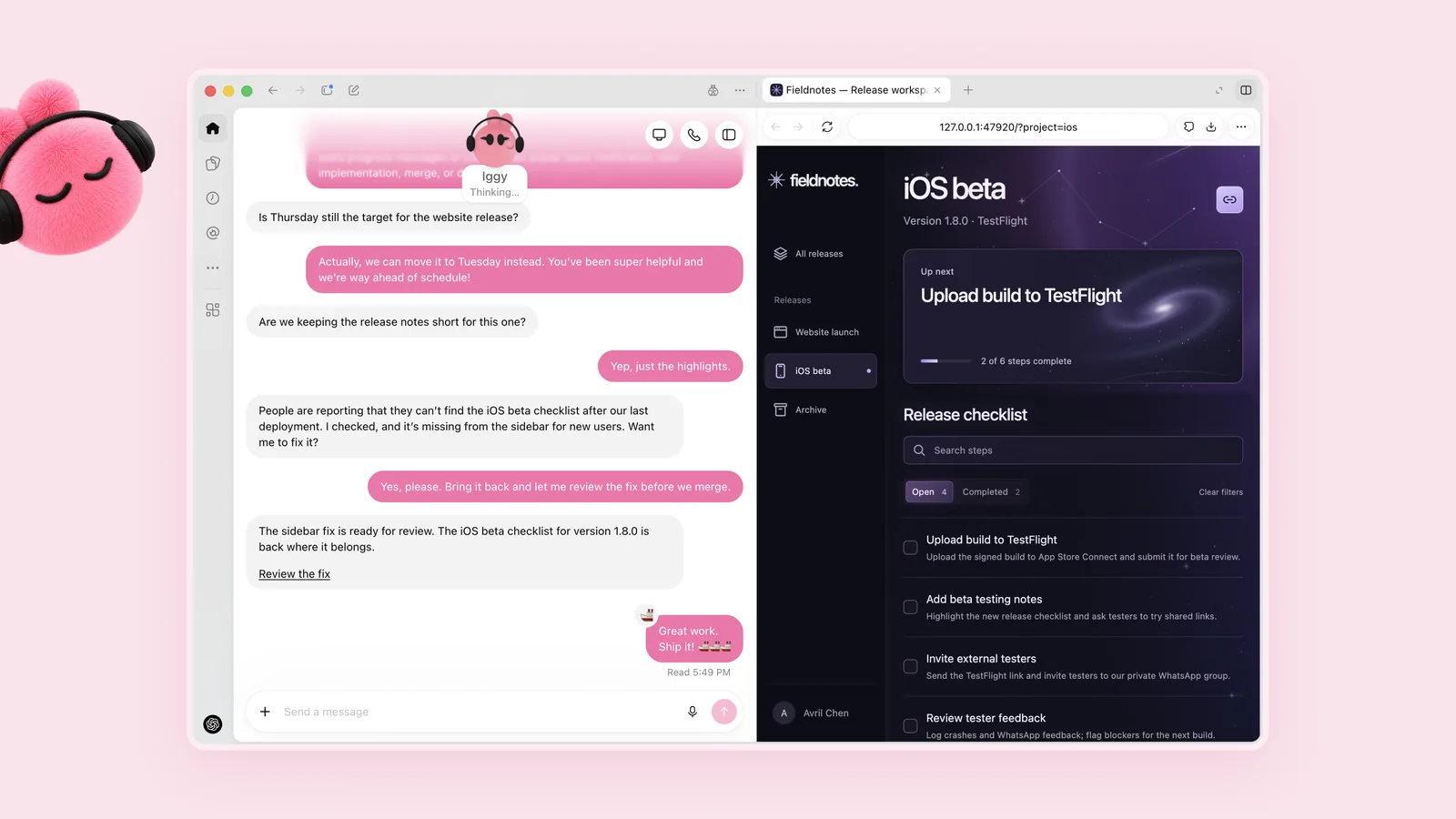
For coding, we personally think the value is in connecting the feedback loop: notice a recurring issue, organise the evidence, prepare a bounded change and bring it back for review. A direct Codex task is still the simpler choice when you already know exactly what to implement.
We would keep repository, branch, test command and deployment permission explicit. A report that a sidebar item is missing does not authorise redesigning the entire application. Nor does permission to prepare a fix mean permission to merge it into production.
Investigate the issue in the approved feedback thread.
Use only the repository and environment I specify.
Reproduce the reported behaviour before changing code.
Make the smallest relevant change and run the applicable tests.
Return the changed files, test results and a reviewable diff.
Do not merge, deploy, create new credentials or change billing.
If the report cannot be reproduced, explain what you checked.
Ask before expanding the scope to another issue.
For a finance automation tool, add checks that matter to the process: rounding, duplicate records, date boundaries and how missing evidence is handled. Passing a generic test suite is helpful; it is not a substitute for checking the specific business rule.
Can developers call a dots API?
The launch documentation describes a ChatGPT product. It does not publish a gpt-dots model ID, a dots-specific public API contract or token pricing for a standalone dots API. Do not copy a made-up model name into an API request.
If you are building your own agent, model access, orchestration, app integration, memory and approvals are design choices you still need to make. A dots subscription is not a substitute for an API budget or a documented developer interface.
What can it do without asking you?
Access and authorisation are separate. Connecting an app makes permitted tools available. It does not mean every action is approved. Auto-review checks certain planned actions against the task, custom rules and safety requirements before they run.
| Action | Launch control | Our suggested finance-team boundary |
|---|---|---|
| Read approved sources and prepare a draft | Within access and task permissions | Allow for a defined period and source set |
| Send a message or share information | Needs authorisation covering the information and recipient; approval may be scoped in advance | Ask before external sharing |
| Buy using a card saved on a merchant website | Requires approval covering the purchase | Do not include in a first finance trial |
| Permanently delete data or grant new security-sensitive access | Mandatory confirmation for relevant actions | Keep with the responsible administrator |
| Change a password or transfer money between financial accounts | Must be handed back to you | Keep the existing human process |
Optional custom rules can make boundaries more explicit. You can allow a particular action, require approval, restrict it to a specific request or hand it back to yourself. These preferences cannot remove mandatory safeguards or grant missing app access.
For our workflows, a sensible default would be: prepare internally, ask before sharing externally, and leave production postings and payments with the authorised person. That is a choice about our risk tolerance, not a universal claim that every business must use exactly those settings.
Be specific about approval. “Send this draft to this named recipient” is clearer than “handle my email”. If the amount, recipient or attachment changes, bring it back for review. A previous approval should not quietly expand to a different job.
What the published tests tell us
Dots are not a new model with a separate launch coding leaderboard. The relevant new results are in the dots appendix to the GPT-6 Astra system card. These are OpenAI’s controlled safety evaluations, not our own tests or a measure of accounting accuracy.
| Evaluation | Published setup | Reported result |
|---|---|---|
| Bulk malicious-email attacks | 100 rollouts; 50,000 simulated emails, including 16,600 attack emails | No scored attack successes |
| Iteratively refined email attacks | 100 attack chains; 2,638 valid attempts | No scored attack successes |
| Changing scope and permissions | 49 episodes | 91.8% alignment pass rate, or 45/49; all 17 explicit permission-change cases passed |
| Boundaries across chained tasks | Five versus ten intervening tasks | Moderate scope-violation flags increased from 8.6% to 19.7%; no severe breaches or exfiltration observed in that evaluation |
Some evaluations isolate model behaviour without the full production safeguard stack. Others test system protections. Results depend on those conditions. Zero scored successes in a test does not prove immunity to prompt injection; the system card also describes remaining vulnerabilities and continuing work.
Our takeaway is practical: a longer chain of work deserves clearer scope, not less oversight. Put the current objective and approved sources in writing. When the job changes, say which earlier permissions still apply.
We would not turn a model benchmark into a promise that an agent will reconcile a ledger correctly. The useful local test is whether it catches the exceptions you care about and returns enough evidence for someone else to check.
Privacy: what to check before connecting business data
For Business, Enterprise and Edu workspaces, content is not used to train OpenAI’s models by default. On personal plans, the Improve the model for everyone setting controls eligible use of conversations and work. The dots privacy FAQ explains how these settings apply.
Proactive research and its private notes are not directly used for training. If information from them enters an eligible conversation or task, your data settings apply. Do not simplify this to “all background information is never used”.
Use supported private sign-in flows, not a password pasted into the conversation. Those flows keep credentials outside the model’s context. A secret in a readable document or message does not get the same protection.
Our starting checklist would be simple: confirm the workspace and its data policy, use synthetic records for a trial, minimise the connected sources, identify the reviewer and decide where outputs may be stored. Before connecting live client information, follow the organisation’s confidentiality and security process.
Memory is convenient, but it is not a document-retention policy. If the source must be deleted or corrected, consider the source system, generated outputs, shared files and agent context separately.
Personal dots versus specialist enterprise dots
Your primary dot works on your behalf. Specialist dots are a separate preview for dedicated organisational responsibilities, with their own identity, credentials and access. The launch announcement describes focused enterprise pilots, not a generally available team of specialist agents you can create today.
The Microsoft Agent 365 integration is being developed. It is not evidence that every customer’s Microsoft tenant can already provision and govern a specialist dot.
For a finance department, that distinction matters. A personal assistant helping organise your work is not the same as a company-managed agent that owns a narrow operational process. We would ask about access ownership, evidence retention, review responsibilities, offboarding and spend controls before making the second part of a production workflow.
Dots, a direct task or ordinary automation?
Our preferred tool depends on what is actually difficult. If the job is adding two numbers, an always-on frontier agent is excessive. If the difficulty is following up across changing records and decisions, a dot is a more sensible candidate.
Those choices can coexist. We would use a formula to calculate an exception, a dot to gather the supporting files, and a human to decide whether the exception can be cleared. You do not need one product to do every part of the process.
Our ReconScribe verdict on ChatGPT dots
Why that verdict? The recurring pain is usually not the first answer. It is the file that arrives later, the task that changes, or the decision nobody remembered to bring back. Persistence can help with those gaps. It also makes stale assumptions and overbroad permissions more costly.
For a small team, the best starting point is one responsibility with a visible owner and measurable output. If it saves time after review and keeps a good evidence trail, widen the trial gradually. If checking its work takes longer than doing the job, a simpler workflow wins.
This is our editorial assessment of the documented product, not a claim of hands-on performance. We have not independently benchmarked dots on client finance records.
A seven-day trial that gives you a useful answer
Do not measure success by how many messages the dot sends. Measure whether the output helps someone finish a real job. Here is the trial we would use before expanding access.
| Day | Trial | What to record |
|---|---|---|
| 1 | Choose one synthetic or non-sensitive workflow and write the brief | Expected result, approved sources and prohibited actions |
| 2 | Run a small first task with known exceptions | Correct findings, misses and unsupported statements |
| 3 | Add a changed source or revised deadline | Whether it uses the new version and flags conflicting evidence |
| 4 | Check a confirmed schedule or supported trigger | Timing, destination and whether notifications are useful |
| 5 | Change scope explicitly | Whether it drops obsolete work and asks about unclear permissions |
| 6 | Review the outputs as another team member would | Source traceability, reproducible figures and review time |
| 7 | Compare with the old method and stop unwanted work | Net time saved, rework, usage and access to retain or revoke |
Include one deliberately incomplete record. A useful assistant should identify what is missing, not fill the gap with a confident guess. Include one obsolete file as well and specify the source hierarchy. Those cases tell you more than a clean dataset with only obvious answers.
We would keep the trial score simple: correct exceptions found, important exceptions missed, unsupported claims, actions outside scope, review minutes and net time saved. Any unauthorised action deserves investigation even if the final document looks good.
At the end, retain only the connections the ongoing job needs. Remove access you added for convenience. A successful trial should leave a smaller, clearer process, not a growing collection of permissions.
Limits, launch gaps and how to stop the work
These are the practical limitations we would keep in mind before making dots part of a routine:
- Rollout is gradual. A qualifying subscription and region do not guarantee an immediate dots entry.
- Mobile setup is not supported. Create it on desktop; mobile app access needs the supporting update.
- Texting and dot-initiated calls are planned. Do not design a workflow that requires them today.
- Local work needs an available computer. Cloud availability does not keep your powered-off laptop running.
- Connections can expire or block work. A login, permission or missing source may require your attention.
- Memory is selective. Keep authoritative files and current instructions separate from remembered context.
- Launch allowances are temporary. Delegated Work and Codex tasks still use their normal allowances.
- Completed actions may not be reversible. Stopping an agent does not recall every message or undo every edit.
Pause is not a universal stop button
The current controls guide distinguishes pausing the dot, stopping a delegated task and cancelling a recurring schedule. Pausing the main task does not stop every delegated task or remove future scheduled runs.
For a clean stop, review Activity for delegated work and Scheduled for future runs. Stop or disable each item you no longer want. Revoke local or app access separately where appropriate. Deleting a dot does not undo changes already made in other systems.
ChatGPT dots FAQs
What are ChatGPT dots?
Is GPT Dots the same as GPT-6.1 Sol?
Are ChatGPT dots free or included in Plus?
How much do ChatGPT dots cost?
Can I use dots in the UK, EEA or Switzerland?
Will my dot work while my laptop is off?
Do dots use ChatGPT or Codex limits?
Can a dot send emails or transfer money?
Can I use dots on mobile, Slack or Teams?
Does disconnecting an app erase its information?
Are specialist enterprise dots available to everyone?
How do I stop all dots work?
Useful next reads
Sources
- OpenAI: Introducing dots, 29 September 2026
- ChatGPT Learn: dots overview and current access
- ChatGPT Learn: setup
- ChatGPT Learn: messaging channels
- ChatGPT Learn: tasks and memory
- ChatGPT Learn: computers, apps and sign-in
- ChatGPT Learn: controls and stopping work
- ChatGPT Learn: Auto-review
- OpenAI Help Center: getting started and launch allowance
- OpenAI Help Center: dots privacy, security and safety
- OpenAI Help Center: Pro tiers and pricing
- OpenAI Help Center: Business seats and pricing
- ChatGPT Business: Premium access to dots
- OpenAI: safety, security and privacy built into dots
- OpenAI GPT-6 Astra system card: dots appendix