
A TDS default is rarely one number. A late deduction, a late deposit, a late statement and a missed certificate each carry their own interest, fee or penalty, and since 1 April 2026 the same payment can fall under two different Acts depending on its date. Working all of it out by hand, row by row, is where mistakes creep in.
This TDS interest calculator Excel file does that work for you. Type the payments, the dates you deducted and the dates you paid, and it works out the TDS interest for late deduction and late payment, the TDS late fee for every quarterly statement, certificate deadlines, penalty exposure and the expense you could lose to disallowance. It covers both the Income-tax Act, 1961 and the Income-tax Act, 2025, and it counts months the way TRACES does.
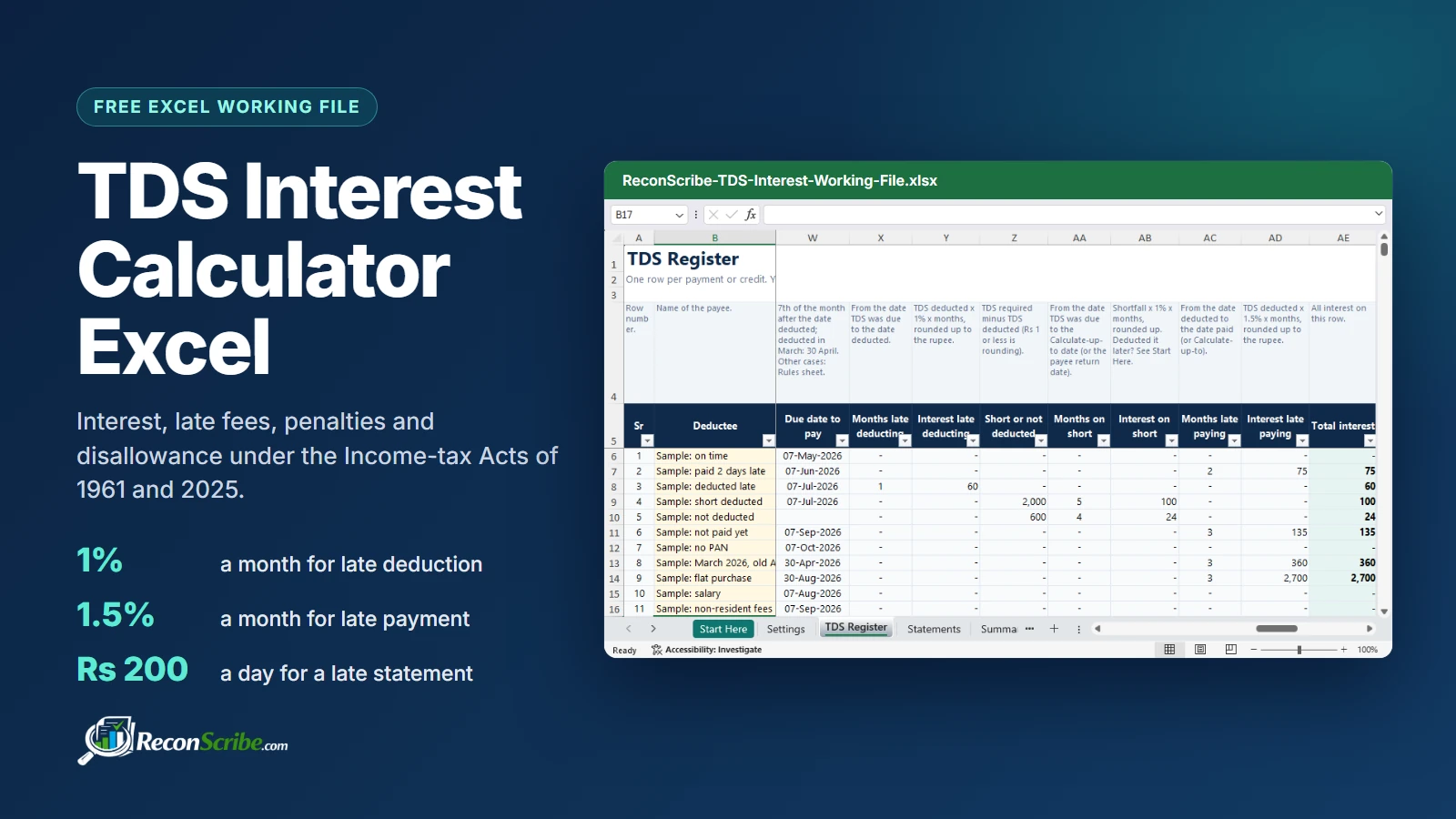
TDS interest calculator Excel: video walkthrough
Prefer to watch first? This 7 minute video covers what the file works out, the old and new sections, how interest for late deduction and late payment is calculated with worked examples, when TDS is due, the late fee and penalty rules, and how to fill in the file, row by row.
The workbook in the video holds sample data only. The sections below cover the same ground in writing.
What the TDS interest calculator Excel works out
Each row of the register is one payment or credit. The file picks the law that applies from the date, looks up the rate as it stood on that date, works out the due date for the deposit and counts the months of delay. A separate Statements sheet handles the quarterly statements and certificates, and the Summary adds everything up, keeping what you owe apart from what is only exposure.
Old and new sections in one dropdown
From 1 April 2026, TDS sits in section 393 of the Income-tax Act, 2025 (salary in section 392), and the familiar 194 series is gone for new payments. CBDT’s transition FAQs settle which law applies: the earlier of payment or credit decides. A professional fee credited on 31 March 2026 stays under section 194J even if it is paid in April; the same fee credited on 1 April 2026 falls under section 393(1) Table Sl. 6(iii).
The TDS interest calculator Excel handles this with a single dropdown. Every item carries both numbers and the rate, and in Excel for Microsoft 365 the list filters as you type, so 194C or 393 finds it quickly. The old section, the new reference, the e-Pay Tax payment code and the statement form then fill in by themselves, and the section that applies on that date is shown in bold.
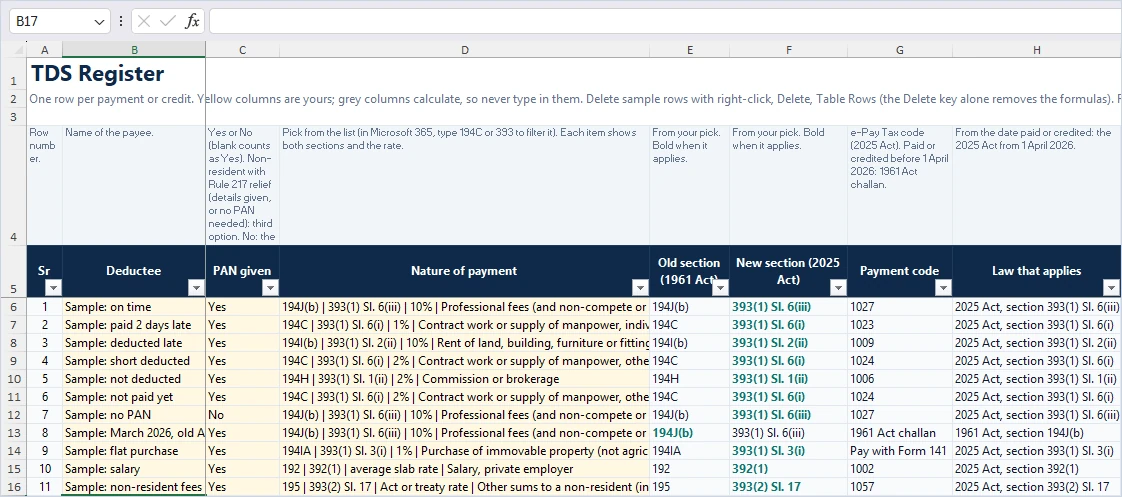
| Payment | 1961 Act | 2025 Act | Rate | Statement (old / new) |
|---|---|---|---|---|
| Contract work, others | 194C | 393(1) Sl. 6(i) | 2% | 26Q / Form 140 |
| Professional fees | 194J(b) | 393(1) Sl. 6(iii) | 10% | 26Q / Form 140 |
| Commission or brokerage | 194H | 393(1) Sl. 1(ii) | 2% | 26Q / Form 140 |
| Rent of land or building | 194I(b) | 393(1) Sl. 2(ii) | 10% | 26Q / Form 140 |
| Purchase of immovable property | 194IA | 393(1) Sl. 3(i) | 1% | 26QB / Form 141 |
| Salary | 192 | 392(1) | Average slab rate | 24Q / Form 138 |
| Other sums to a non-resident | 195 | 393(2) Sl. 17 | Act or treaty rate | 27Q / Form 144 |
Items are split wherever the rate, payment code or statement form differs, so one pick always gives one rate. Salary, EPF withdrawals, partner payments, lottery, online game and horse race winnings, lottery ticket commission and National Savings Scheme payments also have non-resident versions, which go in the non-resident statement (27Q or Form 144). Non-resident rates include the 4% cess; add surcharge in Your rate where it applies.
Rates are dated too. Commission paid in June 2024 uses the 5% that applied then, not today’s 2%. The cuts of 1 October 2024 (194DA, 194G, 194H, 194-IB, 194M and 194-O), the 23 July 2024 change for non-residents’ long-term gains under 196B and 196C, and the 1 April 2025 changes for 194D and 194LBC are all built in for payments from 1 April 2023.
How TDS interest is calculated, with worked examples
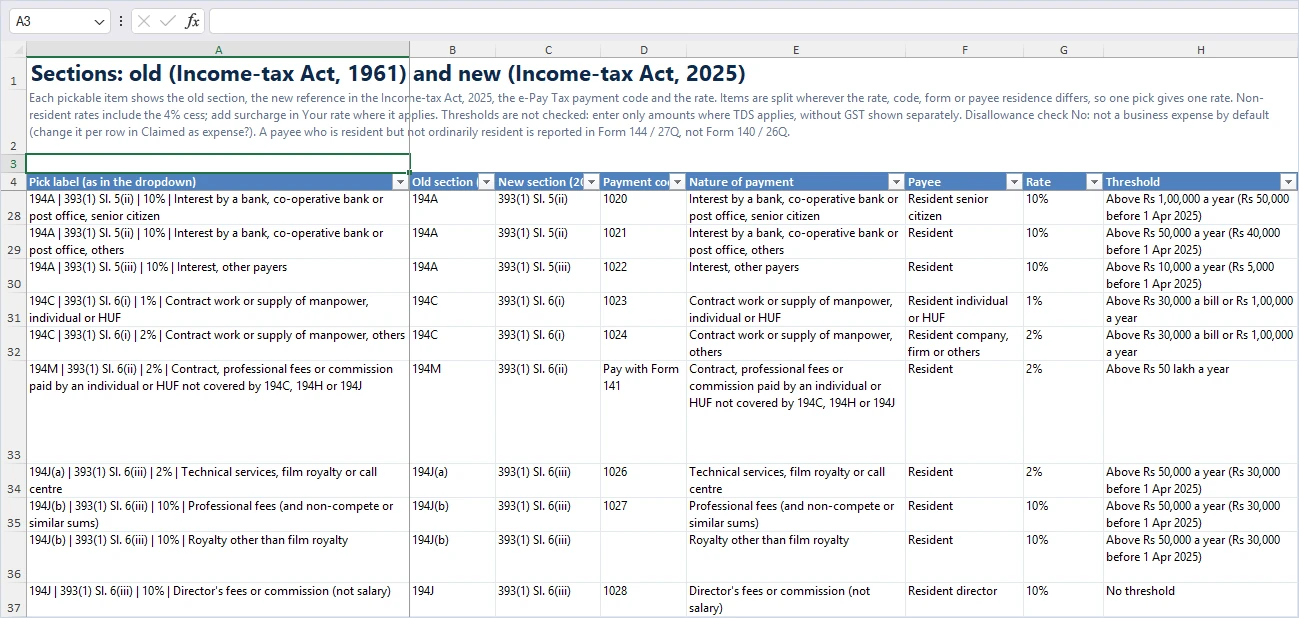
TDS interest comes from section 201(1A) of the 1961 Act and section 398(3)(a) of the Income-tax Act, 2025. There are two separate charges, and the file shows each in its own column.
Interest on late deduction of TDS: 1% a month
TDS becomes due on the earlier of payment or credit for most payments, and on the date of payment for salary, EPF withdrawals, winnings, NSS and cash withdrawals (under the 1961 Act also for life insurance payouts and land compensation; the 2025 Act uses the earlier of credit or payment for those). If you deduct later, TDS interest of 1% a month runs from that date to the date you deduct. If you never deduct, it keeps running to the date you choose on the Settings sheet.
Why no interest for late payment of TDS? The deadline to deposit runs from the month you deduct, not the month you paid the payee. Tax deducted on 6 October is due by 7 November, and it was paid the same day. TRACES works it the same way in its Form 26QB examples: a payment on 27 February deducted on 10 March is also 2 months, even though only 11 days passed.
Interest on late payment of TDS: 1.5% a month
When TDS is deducted but paid to the Government after its due date, TDS interest of 1.5% a month runs from the date of deduction to the date of payment. TRACES counts calendar months from the day after the deduction date, and part of a month counts as a full month. A deduction on the last day of a month does not count that month.
When TDS must be paid to the Government
| Case | Due date |
|---|---|
| Tax deducted in April to February | 7th of the next month |
| Tax deducted in March | 30 April |
| Government office, paid with a challan | 7th of the next month, March too (so 7 April) |
| Government office, paid by book entry | The same day |
| Quarterly payment allowed by the Assessing Officer (salary, 194A, 194D, 194H) | 7 July, 7 October, 7 January and 30 April |
| Property purchase, rent paid by individuals, contract or professional fees paid by individuals (194M), VDA paid by individuals or HUFs: all through Form 141 | 30 days from the end of the month of deduction |
| Property bought from a non-resident by a resident individual or HUF | Form 141 route for deductions from 1 October 2026; the 7th before that |
The file rounds each TDS interest figure up to the next rupee, so the Rs 198.60 above shows as Rs 199. Rule 269 of the Income-tax Rules, 2026 (and Rule 119A before it) rounds the TDS down to the nearest Rs 100 before the interest is worked out; the file uses the exact TDS by default, which can only give the same or a slightly higher figure, and you can switch to the Rs 100 base on the Settings sheet.
TDS late fee and penalties for late statements
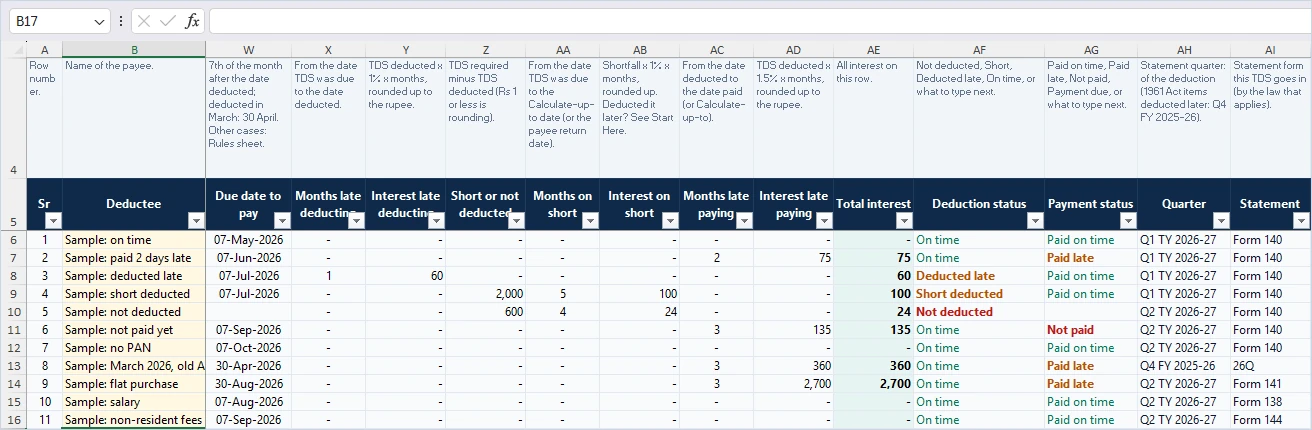
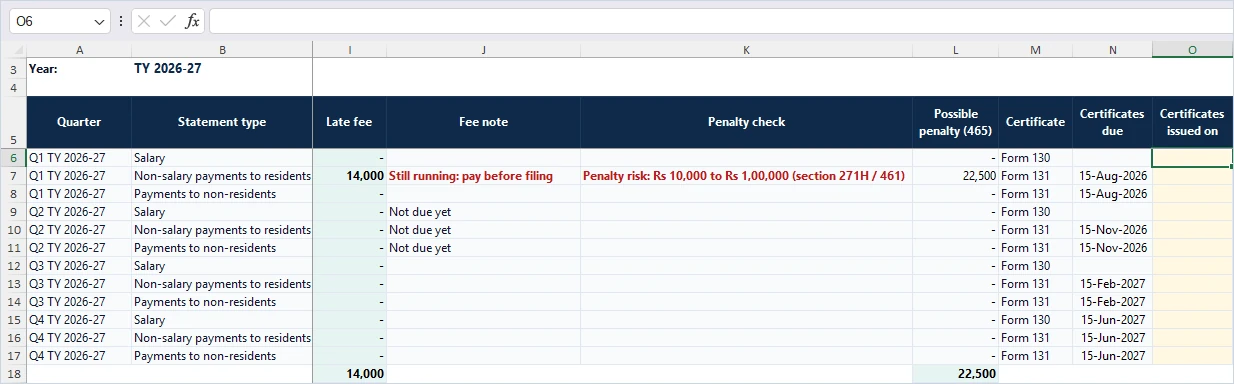
The Statements sheet lists every quarterly statement for the year you pick: salary (24Q or Form 138), other payments to residents (26Q or Form 140) and payments to non-residents (27Q or Form 144). The TDS in each statement comes straight from your register. Type the date you filed and the date you issued the certificates, and the sheet does the rest.
- TDS late fee: Rs 200 for every day after the due date (31 July, 31 October, 31 January and 31 May), never more than the TDS deductible in that statement, under section 234E and section 427. Pay it before you file. Under the 2025 Act one Form 141 covers payments of the same nature in the same month, so the file charges that fee once for rows that share the month and the payment date.
- Penalty window: no penalty under section 271H (section 461 of the 2025 Act) if you file within one month of the due date after paying the TDS, the fee and the interest. Beyond that, the penalty can be Rs 10,000 to Rs 1,00,000.
- Daily penalty under the 2025 Act: section 465(2)(k) lists Rs 500 a day for a late statement, capped at the TDS. The 1961 Act stopped its version of this penalty for statements due from 1 July 2012; the 2025 Act has no such bar. The file shows it as possible exposure and keeps it out of the total, because an officer imposes it and there is no penalty for a reasonable cause (section 470).
- Certificates: Form 16 (Form 130 from 2026) by 15 June, Form 16A (Form 131) within 15 days of the statement due date, and Form 16B to 16E (Form 132) within 15 days of the Form 141 due date. A late certificate can cost Rs 500 a day, capped at the TDS.
Disallowance: the expense you could lose
If TDS on an expense is not deducted during the year, or is deducted but not paid by the due date of your income-tax return, part of the expense is disallowed: 30% for resident payees and all of it for non-residents, under section 40(a) of the 1961 Act and section 35 of the 2025 Act. It comes back in the year you pay the TDS. Salary paid to a non-resident without TDS is disallowed in full.
The file compares each payment with your return due date, which depends on your return type. From FY 2025-26 the Finance Act, 2026 gives businesses and professionals without a tax audit until 31 August. Audit and company cases have 31 October, extended for FY 2025-26 to 21 November 2026 by CBDT Circular 07/2026.
| Year | Non-audit business or profession | Tax audit or company | Transfer pricing |
|---|---|---|---|
| FY 2023-24 | 31 July 2024 | 15 November 2024 | 15 December 2024 |
| FY 2024-25 | 16 September 2025 | 10 December 2025 | 30 November 2025 |
| FY 2025-26 | 31 August 2026 | 21 November 2026 | 30 November 2026 |
| TY 2026-27 | 31 August 2027 | 31 October 2027 | 30 November 2027 |
Only rows claimed as an expense count. Items that usually are not one, such as a property purchase, start as No in the Claimed as expense? column, and you can change any row. Short deduction is not flagged: courts have generally not disallowed the expense where some TDS was deducted and paid (for example in a rate or section dispute), though for a plain partial failure the law is not settled, so review those rows.
Row check: the file checks what you type
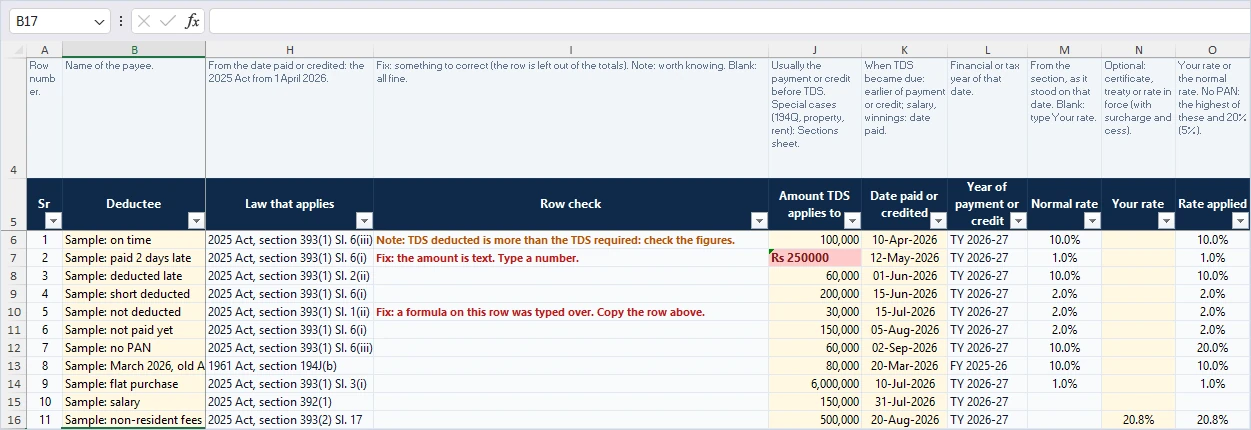
Every row of the TDS interest calculator Excel register has a Row check column next to the law that applies. It starts with Fix when something must be corrected, and those rows are left out of the totals until you fix them, so one bad entry cannot quietly change the result. It starts with Note when something is worth knowing.
- Text typed or pasted into an amount or date cell, such as “Rs 100000” or a date in text form.
- Impossible dates: deducted before the payment or credit, or paid to the Government before the deduction.
- A formula typed over by mistake. Excel also marks that cell with its own green triangle.
- TDS deducted that is more than the TDS required, usually an extra zero.
- A 1961 Act payment deducted after 31 March 2026, which still goes in a 1961 Act statement.
- A date with a time of day (often pasted from an export), a negative amount or TDS, and a rate typed as 10 instead of 10%.
- Missing dates, which show as “Type the date deducted” or “Type the date paid or credited” in the statuses.
Two mistakes wipe a row’s checks along with its formulas, so the file also watches from outside the rows. Rows that lost their formulas to the Delete key or Paste Values, and a grey column whose formula was changed for every row (Excel copies a formula typed into one grey cell down the whole column), are named at the top of the register and on the Summary.
How to use the TDS interest calculator Excel
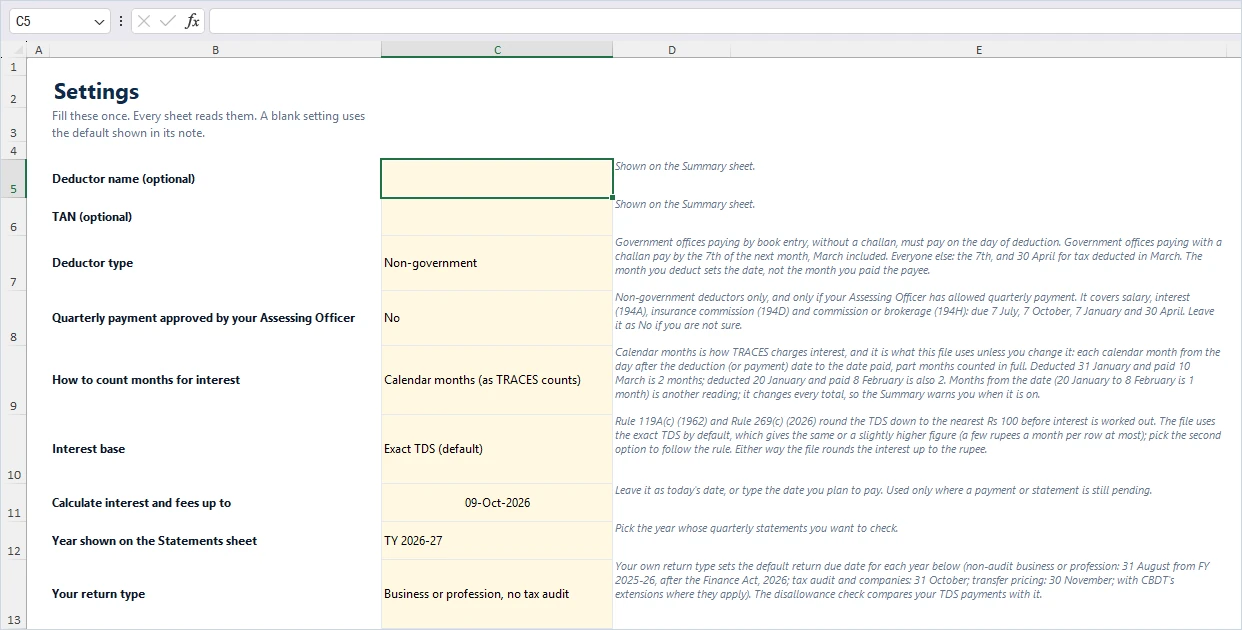
- Settings: choose your deductor type, your return type and the date to calculate up to. Keep the TRACES way of counting months.
- TDS Register: delete the sample rows (select them, right-click, Delete, Table Rows; the Delete key alone removes the formulas), then add one row per payment or credit and pick the nature of payment.
- Type the yellow cells: the amount TDS applies to, the date paid or credited, the TDS deducted, the date deducted and the date paid to the Government. Read Row check on every row.
- Statements: pick the year on Settings, then type the date you filed each statement and the date you issued all its certificates.
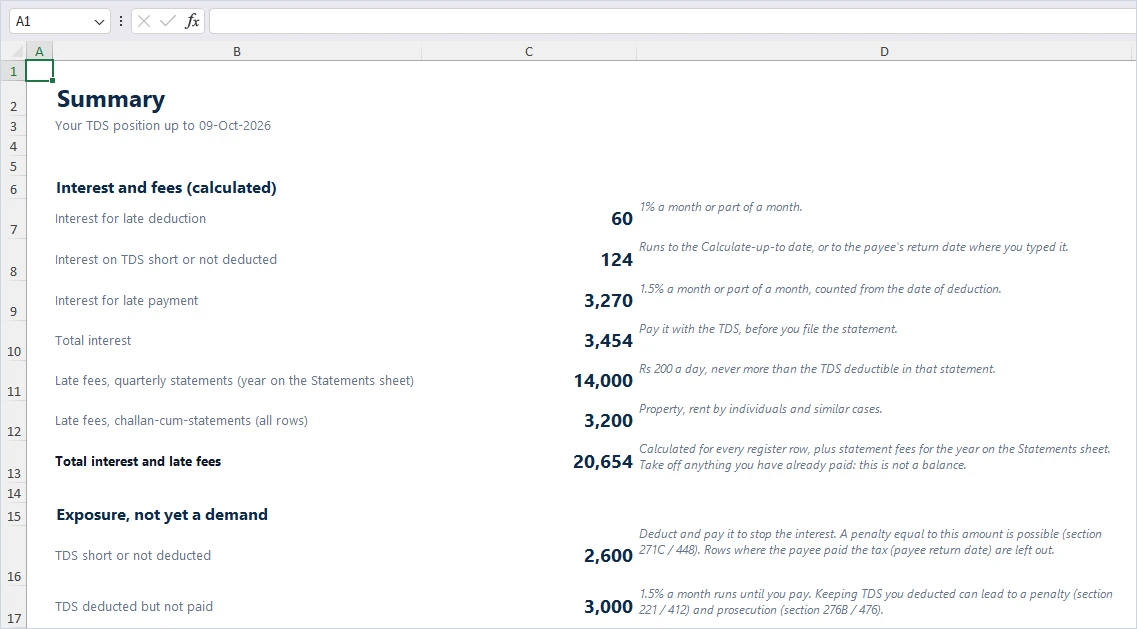
- Summary: read the TDS interest and late fees, then the exposure. Pay them before you file the statement.
Tips that save time: for rent paid by an individual or HUF under 194-IB, enter one row for the year with the total rent, dated on the last month’s credit or payment. If a payee filed a return with this income and paid the tax, and you have the accountant’s certificate in Form 26A (Form 149 from 2026), type their filing date in Payee return date: interest on TDS not deducted stops there.
What the file does not do
- It does not check thresholds. Enter only payments where TDS applies.
- It does not work out salary TDS from slabs. Type the TDS you worked out in TDS required, if different.
- It does not cover TCS, the Government book entry statement (Form 24G or Form 137) or the VDA exchange statement (Form 26QF or Form 142).
- It does not know who was a non-filer under section 206AB before 1 April 2025. Type that higher rate in Your rate.
- The TDS interest calculator Excel file is built for Microsoft Excel 2013 or later. Google Sheets and LibreOffice can open it, but some checks and the print setup may not carry over.
For a quick one-off figure without Excel, our online TDS interest and late fee calculator works out a single payment. The TDS due dates for FY 2026-27 and the section 393 old to new map go deeper on the dates and the new sections.
Please note: we update this page and the file from time to time, but tax rules change and there can be a gap between a change and our update. Check the Income Tax Department and TRACES before you pay or file. This file helps you work out estimates; it is not legal or tax advice, and ReconScribe is not responsible for decisions made on it.
TDS interest calculator Excel: frequently asked questions
How does TRACES count months for interest on late payment of TDS?
In calendar months, from the day after the date of deduction to the date of payment, with part of a month counted as a full month. Tax deducted on 10 June and paid on 8 August is 3 months (June, July and August), so Rs 10,000 of TDS costs Rs 450 at 1.5% a month. Tax deducted on 30 June and paid on 8 August is 2 months, because a deduction on the last day of a month does not count that month. The file counts the same way unless you change it on the Settings sheet.
What is the interest for late deduction of TDS?
If tax was deducted after the date it became due (the earlier of payment or credit for most payments, the date of payment for salary), interest is 1% for every month or part of a month from that date to the date it was actually deducted. Tax not deducted at all keeps running at 1% until it is deducted.
What is the due date for depositing TDS?
For most deductors it is the 7th of the month after the month in which the tax was deducted. Tax deducted in March is due by 30 April. Government offices paying by book entry pay the same day, and those paying with a challan pay by the 7th, March included. Property, rent by individuals, 194M and VDA cases paid through Form 141 are due 30 days after the end of the month of deduction.
Does the TDS interest calculator Excel work under the Income-tax Act, 2025?
Yes. Every row picks the law from its date paid or credited (the earlier of the two): the Income-tax Act, 1961 up to 31 March 2026 and the Income-tax Act, 2025 from 1 April 2026. It shows both section numbers, the payment code and the right statement form, such as Form 140 in place of 26Q.
Is the TDS late fee capped?
Yes. The TDS late fee of Rs 200 for every day a statement is late, under section 234E of the 1961 Act and section 427 of the 2025 Act, cannot exceed the TDS deductible in that statement, whether or not you actually deducted it. It must be paid before the statement is filed. The Statements sheet works out the cap for each quarter from your register.
When is there no penalty for a late TDS statement?
There is no penalty under section 271H (section 461 of the 2025 Act) if you pay the TDS, the late fee and the interest and file the statement within one month of its due date. Before 1 April 2025 the window was one year. Beyond the window, the penalty can be Rs 10,000 to Rs 1,00,000.
How much of an expense is disallowed if TDS is not deducted or paid?
30% of the expense for resident payees, and all of it for non-residents, if the tax is not deducted in the year or not paid by the due date of your income-tax return. The amount is allowed in the year you pay the TDS.
What rate applies if the payee has no PAN?
The highest of the rate in the section, the rate in force and 20% (5% for purchase of goods and e-commerce payments). A non-resident without PAN who gives the details listed in Rule 217 (old Rule 37BC) for interest, royalty, technical fees, dividends or a capital asset is not charged the higher rate.
Is the TDS interest calculator Excel free, and which Excel do I need?
Yes. It is free with a ReconScribe account. It was built and tested in Excel for Microsoft 365 on Windows and needs Excel 2013 or later. It has no macros.
Does the file replace a TRACES demand or a professional review?
No. It helps you estimate and check interest, fees and exposure before you pay or file, and to read a TRACES intimation. The final figures are the ones TRACES and the Income Tax Department compute, and complex cases need a professional review.
Related reading
- TDS interest and late fee calculator (online)
- TDS due dates FY 2026-27: complete payment calendar
- Section 393 TDS: old section map and rates
- TDS rate calculator FY 2026-27
- Form 141: TDS on property bought from an NRI
- How to pay TDS online with e-Pay Tax
- Income Tax Act 2025 section mapping finder
Sources
- Section 398: interest for late deduction and payment (Income-tax Act, 2025)
- Section 427: fee for late statements (Income-tax Act, 2025)
- Section 465: daily penalties (Income-tax Act, 2025)
- Section 393: TDS table (Income-tax Act, 2025)
- Income-tax Rules, 2026: Rules 215, 218, 219 and 269
- CBDT FAQs on the transition from the 1961 Act to the 2025 Act
- TRACES: interest on late payment
- TRACES: interest on late deduction
- TRACES: Form 26QB worked examples
- CBDT Circular 07/2026: return due date for audit cases
- Finance Act, 2026 (e-Gazette)