
Cloudflare for Startups gives early-stage companies up to $350,000 in Cloudflare credits for a year, and you do not need investors to get started. Bootstrapped founders qualify for $10,000. Startups backed by one of Cloudflare’s partner investors or accelerators can get $100,000 or $350,000, and every tier adds three enterprise domains and unlimited Pro and Business plans at no cost.
The application is one short form in four steps. Below is every screen, what to type in each field and the billing settings to check before you submit.
What is Cloudflare for Startups?
Cloudflare for Startups is Cloudflare’s program for young companies building a technology product. Approved startups get credits: a prepaid balance that Cloudflare draws down automatically as you use its usage-based products, such as Workers (code that runs on Cloudflare’s global network), R2 (file and object storage) and Workers AI (AI models your app can call). Core security and networking features come on top, at no cost, whatever your tier.
The credits last one year, or until you use them up, whichever comes first. Cloudflare recently raised the entry tier from $5,000 to $10,000 and the top tier from $250,000 to $350,000.
Cloudflare for Startups tiers and credits
Your tier depends on how much you have raised and who funded you. An affiliated partner is a venture capital fund or accelerator on Cloudflare’s partner list. On 9 October 2026 the application’s list had about 300 of them, including Y Combinator, Techstars, Antler and 500 Startups, and Indian investors such as Blume and Lightspeed India. If none of your investors are on it, you apply for Tier 3.
| Tier | Credits | Who it is for | What else you get |
|---|---|---|---|
| Tier 3 | $10,000 | Bootstrapped or self-funded, under $1M raised | Community and events, developer docs and the Discord community |
| Tier 2 | $100,000 | Under $5M raised, funded by an affiliated partner | An account manager (case by case), technical sessions with Cloudflare experts, community and events |
| Tier 1 | $350,000 | $5M or more raised, funded by an affiliated partner | An account manager, priority technical support, Solutions Architect office hours every two weeks, community and events |
Every tier also gets priority ticket support and chat. If you need an issue escalated, share your ticket number with the startup team.
What the credits pay for
Credits only pay for products billed by usage. Cloudflare deducts eligible usage from your balance automatically, and your monthly invoice shows the usage, the credits used and what was covered at no cost.
| Area | Paid from your credits | Cap |
|---|---|---|
| Compute | Workers, Workers for Platforms, Durable Objects, Workflows | None stated |
| AI | Workers AI (standard partner model pricing applies) | $2,500 on Tier 3, $10,000 on Tier 2, $50,000 on Tier 1 |
| Storage and data | Workers KV, D1, Queues, Vectorize, R2 | R2 up to $10,000 |
| Delivery | Pages, Images and Stream, Cache Reserve, Argo Smart Routing | None stated |
Included at no cost on every tier
- Domains and plans: three enterprise domains and unlimited Business and Pro plans.
- Security: DDoS and bot protection, a WAF (web application firewall) with 1,000 custom rules, Security Analytics, SSL certificates and Page Shield.
- Network: CDN and DNS, Load Balancing with 2 origins and Rate Limiting with 1 rule.
What is not covered
AI Gateway is temporarily outside the credits. Domain registration and renewal fees are never covered. Enterprise add-ons are excluded by default, though you can ask for them at startups@cloudflare.com, and Magic Transit, Enterprise Spectrum, Dedicated IPs and the China Network need a separate contract.
Who is eligible for Cloudflare for Startups?
Cloudflare lists seven conditions, and your startup must meet all of them:
- Founded within the last 10 years. Cloudflare’s wording is that your company was incorporated no more than 10 years ago. The form itself asks for the founded year, from 2016 to 2026.
- Funded up to Series B, within the last 12 months. Tier 3 needs no funding at all; it is meant for bootstrapped and self-funded companies.
- Building a technology product that you are actively developing.
- A live, publicly accessible website that Cloudflare can verify.
- Active on LinkedIn, X or GitHub, so your startup has a public presence.
- Not approved into the program before. It is for first-time applicants.
- A for-profit business with a business email on your own domain. Personal addresses such as Gmail are not accepted.
The program is not open to educational institutions, personal blogs, consultancies, service-based agencies, MSPs or resellers. Government and civic projects are pointed to Cloudflare’s Athenian Project and Project Galileo instead.
Can Indian startups apply?
Yes. The program page lists no country restriction, and Indian startups apply with the same form. The country, city and address fields are optional. What matters is the founded year, a live website for your product and a business email on your company’s domain.
What you need before you apply
- Your product’s website, live, with the full address ready (it must start with https://).
- A business email on that domain, such as founder@yourstartup.com.
- A public profile: a company LinkedIn page, an X account or GitHub.
- A Cloudflare account created with that business email, with a payment method added. The form will not move on until you connect one.
- Your founded year and funding stage. If you raised money, the total range and your key investors.
Cloudflare for Startups video walkthrough
Prefer to watch first? This 5 minute video covers the three tiers, what the credits pay for, who qualifies, the real application screen by screen, how to avoid surprise charges and the terms to read before you apply.
The screens in the video come from a real application, with personal details blurred. The steps below cover the same flow in writing.
How to apply for Cloudflare for Startups, step by step
Step 1: Open the program page and click Apply now!
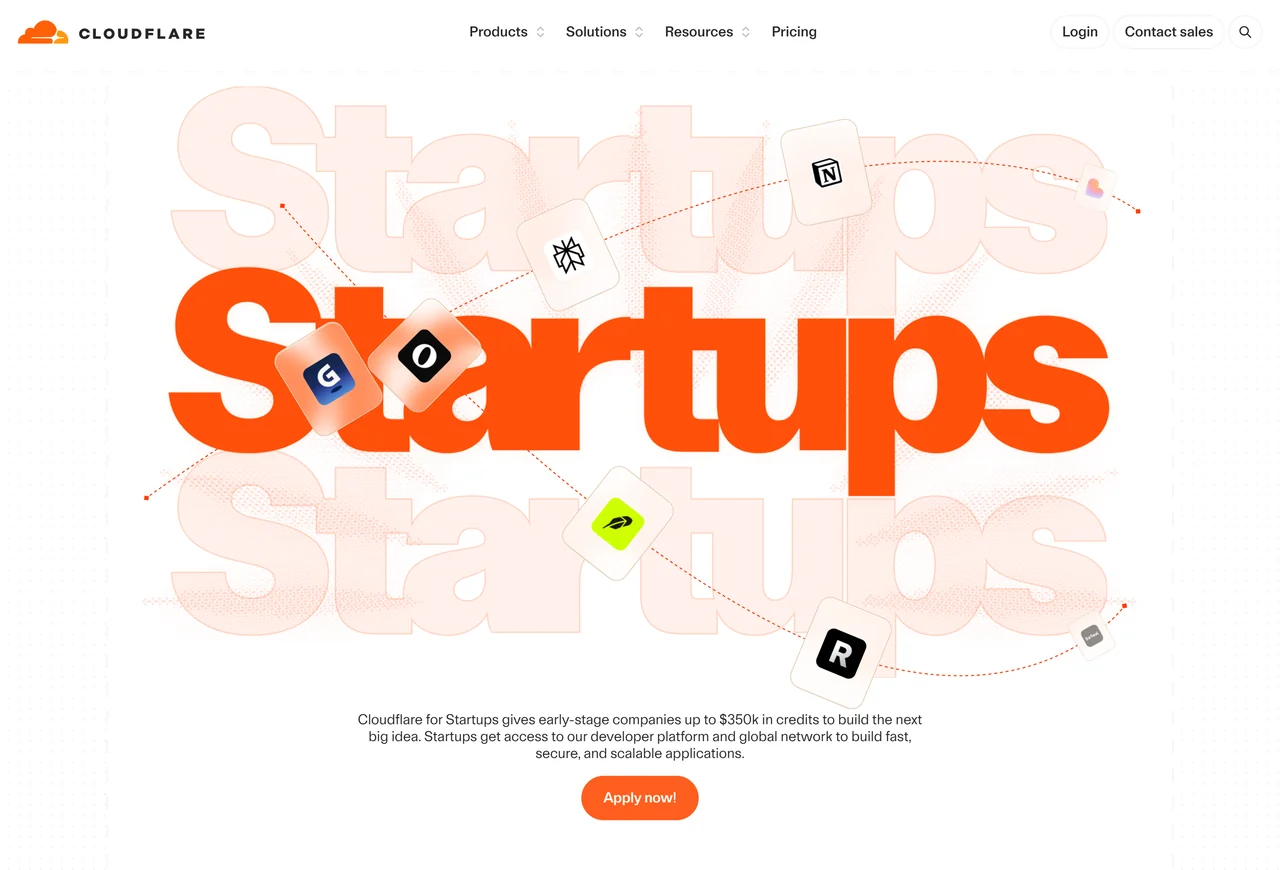
Go to the Cloudflare for Startups page and click the orange Apply now! button at the top. The form opens in a window over the page, titled “Apply to Cloudflare for Startups”, with a progress bar for its four steps: Company, Contact, Funding and Accelerator.
Step 2: Fill in About your company
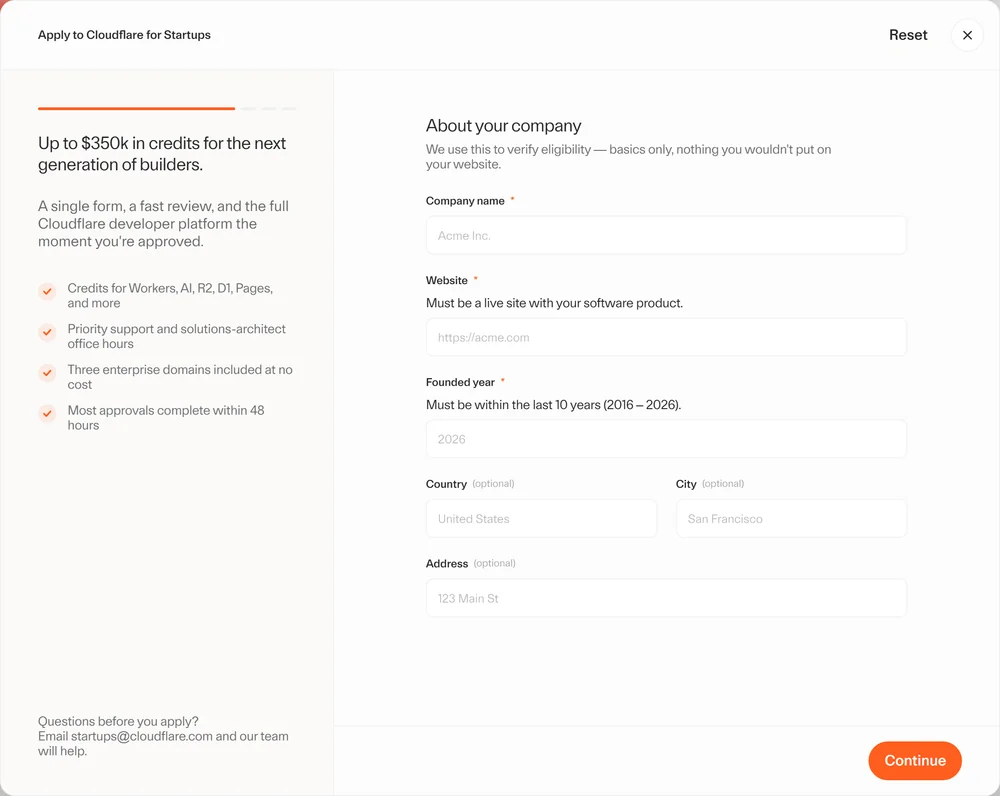
- Company name: your startup’s name.
- Website: the full address, starting with https://. The form notes it “must be a live site with your software product”.
- Founded year: any year from 2016 to 2026.
- Country, City and Address are optional.
- Click Continue.
Step 3: Create a Cloudflare account and add a payment method
If you do not have a Cloudflare account for your startup yet, open a new browser tab and sign up at dash.cloudflare.com with your business email. Keep the application tab open: if you use it for the sign-up, the form loses what you typed. Verify your email, and you land on the Cloudflare dashboard.
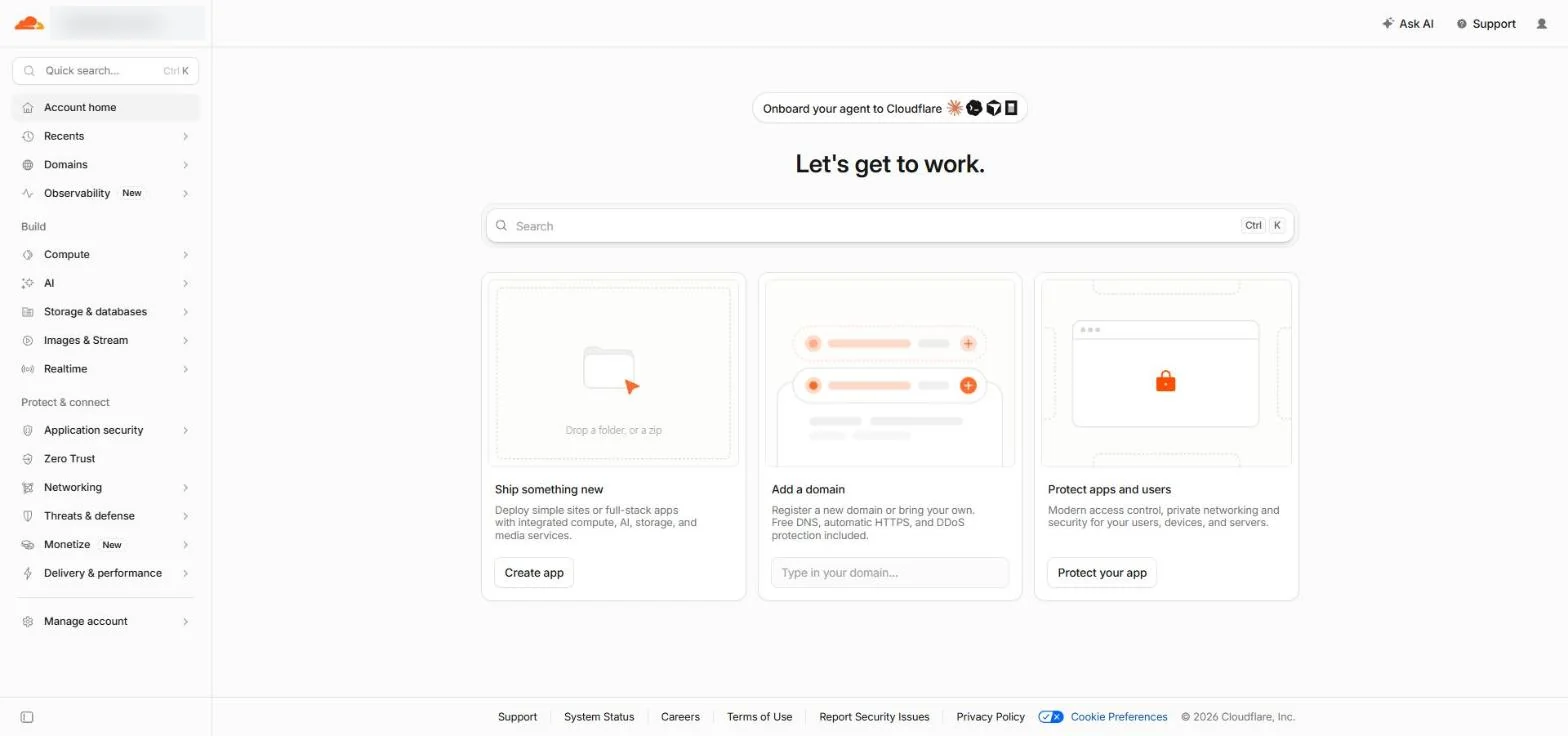
Then open Manage Account, then Billing, and add a payment method. The application asks for an account that “has a payment method attached”, and the program terms require “a valid payment method on file”. A new account starts on free plans, so you pay nothing unless you switch on a paid plan or use more than your credits cover.
Step 4: Connect your Cloudflare account
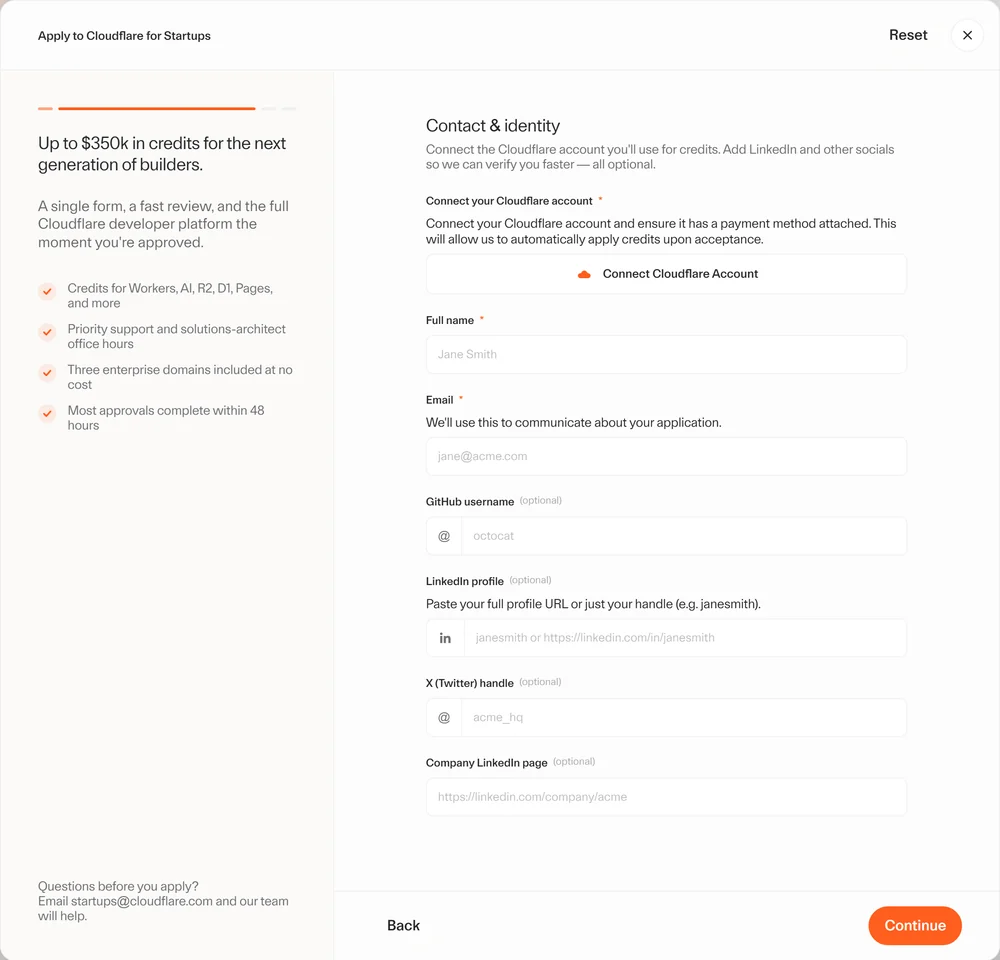
Back in the application, the Contact and identity step starts with “Connect your Cloudflare account”. Click Connect Cloudflare Account.
Cloudflare opens a consent screen: “Cloudflare for Startups wants to access your account”, marked “This application is owned and managed by Cloudflare”. It asks for four read-only permissions: Profile Information and Background Access, plus User Read and Account Read. Check that the account on the right is your startup’s account, then click Authorize.
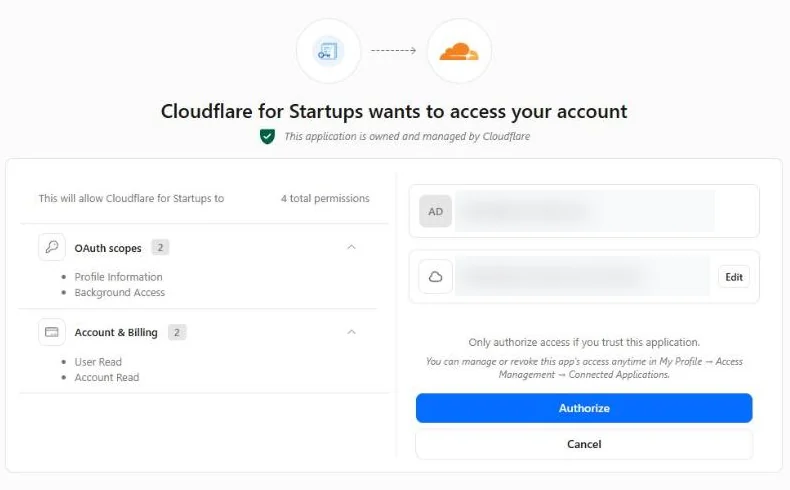
You can remove this access at any time under My Profile, Access Management, Connected Applications. After you authorize, the form comes back with your account marked Connected, the note “Credits will be applied to the selected account”, and the account’s email already filled in.
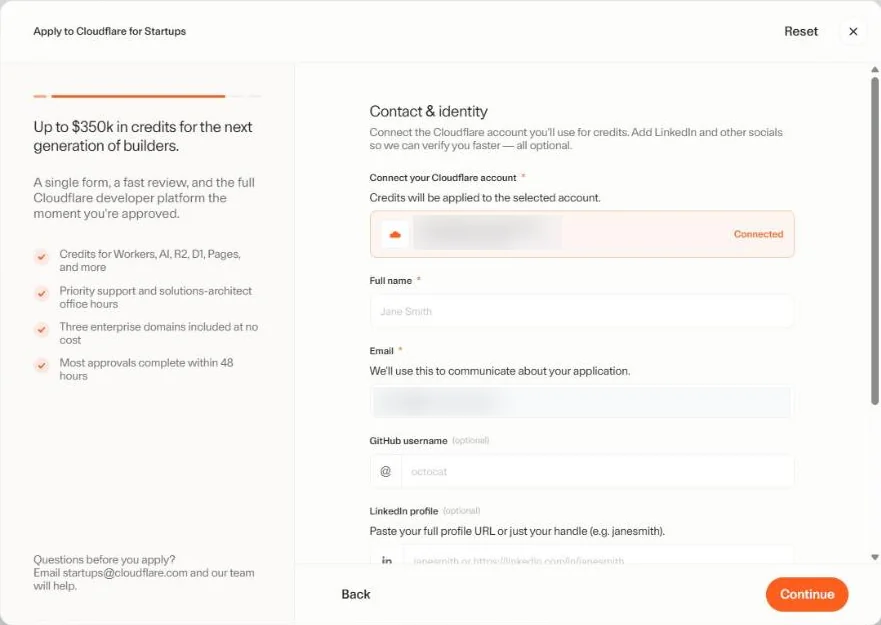
Step 5: Add your name and public profiles
- Full name of the person applying.
- Email: Cloudflare uses it to communicate about your application, so use the business email you will check.
- GitHub username, LinkedIn profile, X handle and Company LinkedIn page are optional. Cloudflare says they help it verify you faster, so add the ones you have.
- Click Continue.
Step 6: Choose your funding stage
The Funding and stage step decides your tier. Open Funding stage and pick one of Bootstrapped / Self-funded, Pre-Seed, Seed, Series A or Series B+.
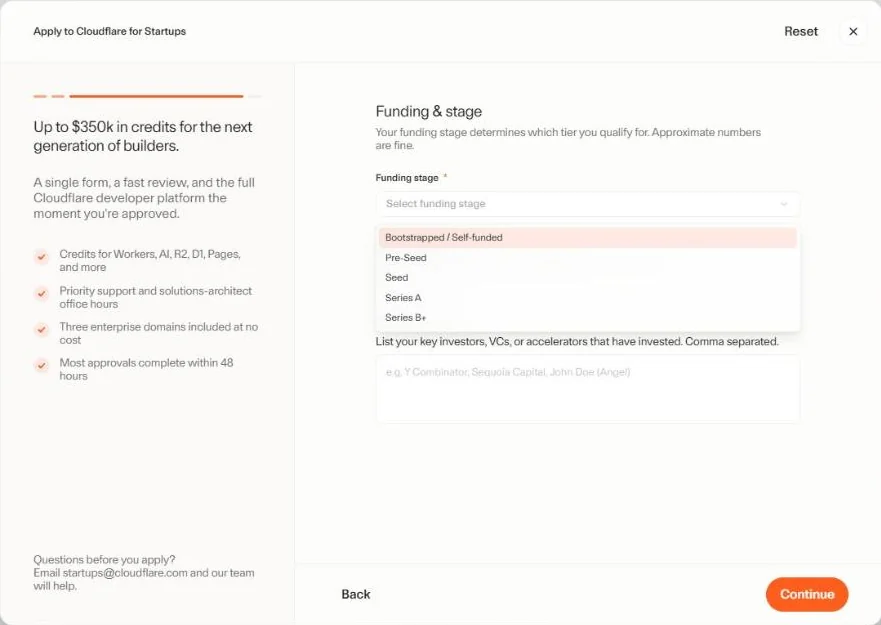
- Bootstrapped / Self-funded hides the money question, because Tier 3 needs no funding.
- Any other stage adds Total funding raised: Under $1M, $1M to $5M, $5M to $10M or $10M+. The form warns: “We verify funding information publicly. Ensure this is accurate.”
- Key investors is optional: list your investors, VCs or accelerators, separated by commas.
Step 7: Accelerator, referral and submit
The last step, Accelerator and referrals, is where funded startups unlock the bigger tiers. In VC / Accelerator partner, search for your investor or accelerator and select it. If yours is not on the list, choose Other (not listed) and type its name. A Batch / cohort field then appears for programs such as W24 or Summer 2024. Bootstrapped startups can leave it empty.
The Referred by field asks who referred you to the program. You may type ReconScribe.com in the Referred by box.
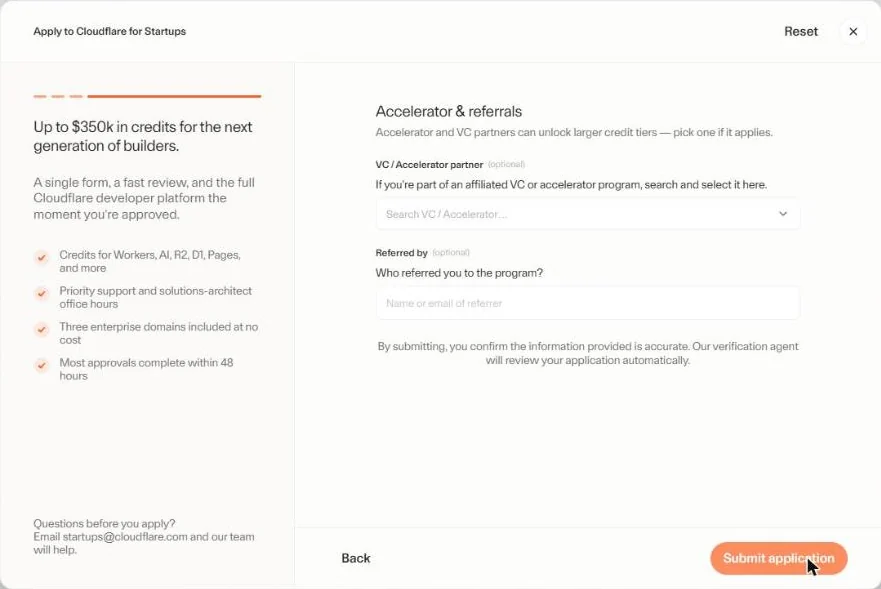
Above the button the form says: “By submitting, you confirm the information provided is accurate. Our verification agent will review your application automatically.” Check your entries with Back if you need to, then click Submit application.
Step 8: Confirmation and the wait
The form confirms straight away: “Your application has been received. Thank you for applying to Cloudflare for Startups. You will be updated soon.”
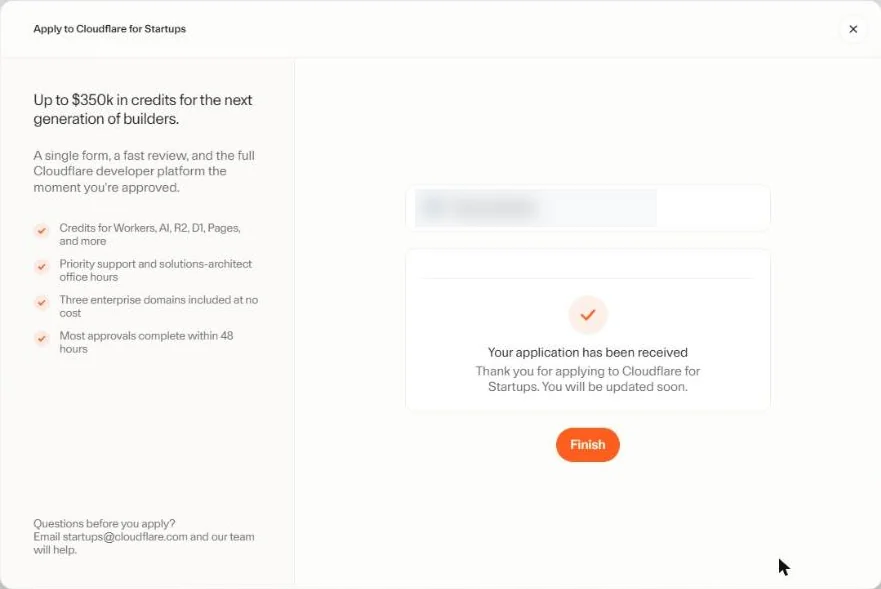
Cloudflare says its review typically takes up to 48 hours, and that approval comes by email to the address on your application. If you have not heard back in a week, check your spam folder, then write to startups@cloudflare.com. If you are rejected, Cloudflare gives a reason, and it will re-evaluate if you can share supporting information.
After approval: using your Cloudflare credits
- Credits land on the connected account. The dashboard shows what you have used and what is left, and each monthly invoice breaks down usage, credits and free features.
- Upgrade your domains. You get three Enterprise domain upgrades. Choosing a paid plan such as Pro or Business may still show a payment prompt; Cloudflare says that is expected and eligible charges are covered while your benefits are active.
- Some features must be requested. Email startups@cloudflare.com for Advanced Certificate Manager, SSL for SaaS, Advanced Rate Limiting and extra Load Balancing origins. Open a support ticket for Bot Management, API Shield, Apex Proxying and extra Zero Trust seats.
- Tier upgrades are case by case. Members who joined under the old $5,000 or $250,000 limits can ask for a review at startups@cloudflare.com with their account ID and how they use Cloudflare. An upgrade does not reset the one-year expiry.
If your product calls AI models, Workers AI runs open models on Cloudflare’s network. If you build on the Claude API instead, our Claude Haiku 5.5 guide covers Anthropic’s cheapest current model, the ReconScribe AI leaderboard compares the major models side by side, and our guide to the best AI models in India compares access and costs for Indian teams.
How to avoid surprise charges
Two lines in the terms matter most: “You will be automatically billed for any overages”, and “Upon expiration of credits, Cloudflare will bill your credit card on file unless you enter into a contract for prepaid services.” An overage is usage beyond what your credits or caps cover. A few habits keep the card quiet:
- Leave what you do not need on Free. Bills start when you choose a paid plan, such as Workers Paid at $5 a month, or a paid domain plan after the program.
- Watch the caps. R2 is covered up to $10,000 and Workers AI up to $2,500 on Tier 3. Anything above a cap is billed.
- Check Billing once a month. The dashboard shows your credit balance and usage.
- Set a reminder for 11 months after your confirmation email. Cloudflare sends three reminders before graduation, but your own reminder gives you time to decide.
- At graduation, switch off or downgrade. Move to a self-serve plan only for what you keep. Enterprise domains you do not move to a paid plan drop back to Free automatically.
- Cap the card. If you use an Indian card, you can set a low limit for international online payments in your banking app, so no unexpected charge can exceed it.
When your Cloudflare for Startups credits end, plan the bill like any other cost. Our free cash flow forecast template shows six weeks of cash ahead, so a jump in Cloudflare charges never comes as a surprise.
Cloudflare for Startups terms to read before you apply
| Term | What it means for you |
|---|---|
| Acceptance | Cloudflare decides at its sole discretion, and it can change or end the program at any time without notice. |
| Credits | Non-transferable, non-refundable and not redeemable for cash. They cannot be sold or bartered. |
| Taxes | You are responsible for any taxes on the value of the credits. Ask your accountant how to treat them. |
| Publicity | You give Cloudflare a non-exclusive, worldwide, royalty free right to show your company’s name and logo in its marketing. |
| Billing | Overages are billed automatically, and when the credits expire Cloudflare bills the card on file unless you sign a prepaid contract. |
| Service level | The Startup Plan does not include a service level agreement, even though the program page lists a 100% SLA among its network features. |
| Who cannot use it | Existing Cloudflare enterprise customers. |
Read the full Cloudflare terms of service as well, because your use of Cloudflare’s products is also covered by them.
Cloudflare for Startups vs Claude for Startups
Many founders apply to both. They solve different problems: Cloudflare pays for the infrastructure your product runs on, while Anthropic’s program covers Claude. As of 9 October 2026, Anthropic has temporarily paused the free Claude Team year and the $1,000 API credit for new applicants, while its partner offers worth up to $45,000 continue. Our Claude for Startups guide tracks the details.
| Cloudflare for Startups | Claude for Startups | |
|---|---|---|
| Main benefit | Up to $350,000 in Cloudflare credits for one year | Partner offers worth up to $45,000; Team year and API credit temporarily paused |
| Funding needed | None for Tier 3 | No VC backing needed |
| How you apply | One four-step form, then connect a Cloudflare account | An application in the Claude Console |
Related guides for founders
- Claude for Startups: free Team, API credits and how to claim
- Claude Code tutorial for finance teams
- Claude Code SEO: how we run SEO for a live WordPress site
- AI in finance and accounting: a complete 2026 guide
- Zoho Books vs TallyPrime: picking accounting software for your startup
Please note: we update this Cloudflare for Startups guide from time to time, but program tiers, credits and terms change, and there can be a gap between a change and our update. Check Cloudflare’s official program page and your own dashboard before you act. Credit amounts are Cloudflare’s advertised values in US dollars, not cash.
Cloudflare for Startups FAQs
Is Cloudflare for Startups free?
Applying is free, and approved startups get Cloudflare credits that pay for usage-based products for up to a year. You still need a Cloudflare account with a payment method on file. Usage beyond your credits, or anything still running after they expire, is billed to that payment method.
How much credit does Cloudflare give startups?
Tier 3 gives $10,000 to bootstrapped or self-funded startups that have raised under $1M. Tier 2 gives $100,000 and Tier 1 gives $350,000, both for startups funded by one of Cloudflare's affiliated VC or accelerator partners (under $5M raised for Tier 2, $5M or more for Tier 1).
Do I need VC funding to join Cloudflare for Startups?
No. Tier 3 is for bootstrapped and self-funded startups, with no minimum funding. Funding from an affiliated partner only matters for the larger Tier 2 and Tier 1 credits.
Can Indian startups apply for Cloudflare for Startups?
Yes. The program page lists no country restriction, and Indian startups use the same form. The company must be founded within the last 10 years, have a live website for its product and use a business email on its own domain.
Do I need a credit card for Cloudflare for Startups?
Yes. The application asks you to connect a Cloudflare account that has a payment method attached, and the program terms require a valid payment method on file. Credits are applied to that account once you are approved.
How long does Cloudflare for Startups approval take?
Cloudflare says its review typically takes up to 48 hours. The decision comes by email to the address on your application. If you have not heard back in a week, check your spam folder and then write to startups@cloudflare.com.
What happens if my Cloudflare for Startups application is rejected?
Cloudflare says it always gives a reason. If you believe you qualify and can share supporting information, it will re-evaluate the application.
Can I apply for Cloudflare for Startups more than once?
The program is a one-time opportunity per startup, and credits cannot move between accounts. If you run several separate startups, each one can apply with its own Cloudflare account and email address.
How long do Cloudflare startup credits last?
One year, or until you use them up, whichever comes first. Cloudflare does not approve extensions, so note the date of your confirmation email.
What happens when the Cloudflare startup program ends?
Cloudflare sends three reminders before your graduation date. You can move to a self-serve plan, let your domains drop back to the Free plan, or talk to Cloudflare about staying on Enterprise. After the credits expire, Cloudflare bills the card on file for anything you keep using, unless you sign a prepaid contract.