
GPT-6.1 Sol makes the expensive model a harder sell. It reaches 75.22% on DeepSWE at high effort, brings cached input down to $0.10 per million tokens, and keeps the familiar $2 input and $10 output price. That is a serious upgrade without a bigger headline bill.
OpenAI released GPT-6.1 Sol on 29 September 2026, just a week after GPT-6 Sol. For a finance team working through a thick PDF, a developer debugging a real codebase, or a business building an agent, the important question is now simple: how often do you still need Astra?
Quite often for the hardest work. Much less often for everything around it.
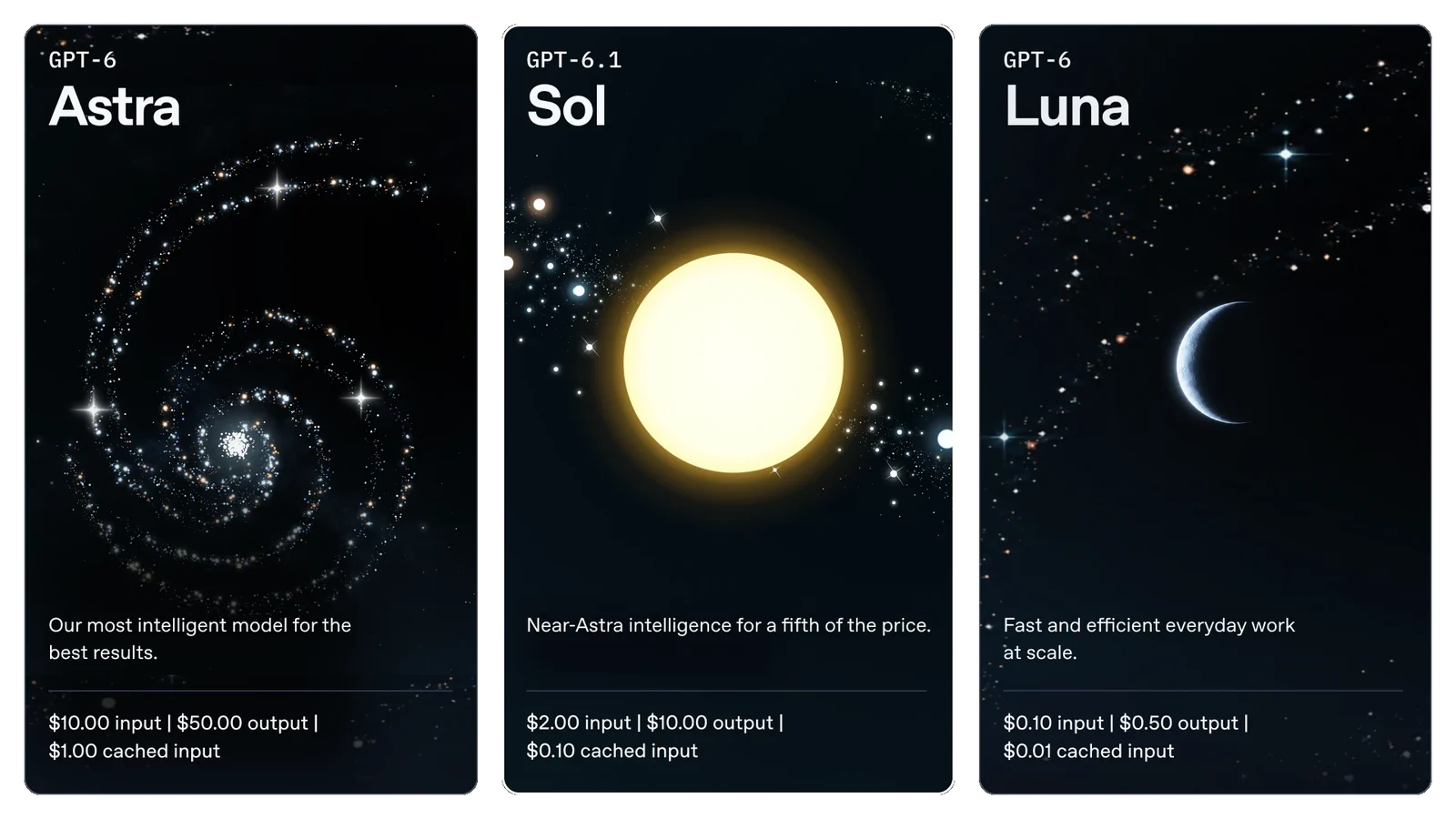
GPT-6.1 Sol at a glance
GPT-6.1 Sol is the upgraded middle option in OpenAI’s GPT-6 family. Astra is the premium model for the most demanding tasks. Sol aims to bring much of that ability into everyday professional work at a lower cost. Luna remains the inexpensive option for lighter work.
| Specification | GPT-6.1 Sol |
|---|---|
| Release date | 29 September 2026 |
| API model | gpt-6.1-sol |
| Context window | 1,050,000 tokens |
| Maximum output | 128,000 tokens |
| Knowledge cutoff | 30 April 2026 |
| Input / output | Text and images in; text out |
| Reasoning efforts | Low, medium (default), high, xhigh, max |
| Tool calling | Responses API; Chat Completions without tools |
| Data residency | US and EU supported; Fast unavailable with EU residency |
| Fine-tuning | Not supported |
The model documentation lists a very large context window, but a large window does not guarantee that a model will correctly connect every fact inside it. Good retrieval, clear source references and checks on critical numbers still matter. The 30 April cutoff also means that recent regulations and current market information need fresh sources.
Our live AI leaderboard ranks GPT-6.1 Sol against every other major model on independent tests, with prices in US dollars.
A quick explanation without the jargon
Think of a small team with three people. One handles quick tasks cheaply. Another does most of the difficult daily work. The third takes the problem everyone else has got stuck on. GPT-6.1 Sol is a much stronger second person. You still call in the specialist, but you do not need the specialist to review every email or sort every ordinary record.
Caching is like letting that second person keep the same handbook open on the desk. If the beginning of the next request is identical, some earlier processing can be reused. A different handbook, rearranged instructions or a changed prefix can mean doing that work again.
GPT-6.1 Sol benchmarks: scores and the cost to get them
The launch gives six main capability and factuality charts. We have kept the full set of 102 score-and-cost points in the tables below, including every available reasoning effort. The charts make the overall pattern easy to see; the tables let you compare the exact setting you would actually use.
A benchmark score and an API price answer different questions. The rate tells you what a token costs. Cost per task also reflects how much the model used in that particular evaluation. Neither figure is a quotation for your own workflow.
DeepSWE v1.1: the coding result that changes the decision
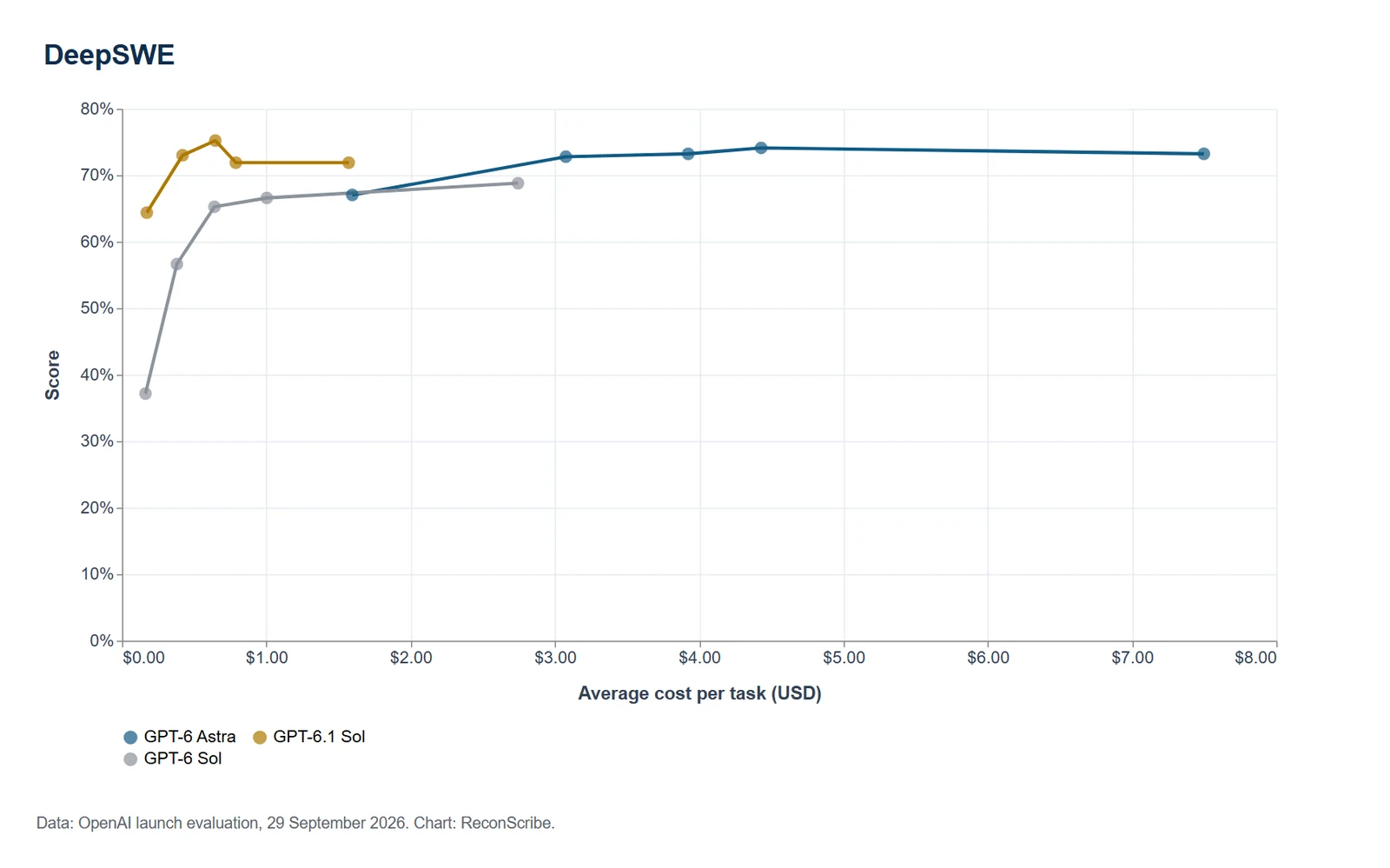
DeepSWE tests long software-engineering tasks in real codebases. GPT-6.1 Sol’s strongest published point is 75.22% at high effort for $0.6461 per task. GPT-6 Sol tops out at 68.81% at max for $2.7439. That is a 6.41 percentage-point improvement at about 76% lower cost when comparing those two best-score points.
Astra’s strongest point here is 74.12% at xhigh for $4.4291. Sol’s high-effort result is slightly above it and costs about 85% less in this run. That gives us a strong reason to evaluate Sol first for repository work. It does not turn a single benchmark into a guarantee for every programming language or codebase.
| Effort | GPT-6.1 Sol | GPT-6 Sol | GPT-6 Astra |
|---|---|---|---|
| Low | 64.38%$0.1714 / task | 37.17%$0.1623 / task | 67.04%$1.5952 / task |
| Medium | 73.01%$0.4196 / task | 56.64%$0.3798 / task | 72.79%$3.0755 / task |
| High | 75.22%$0.6461 / task | 65.27%$0.6404 / task | 73.23%$3.9237 / task |
| Xhigh | 71.90%$0.7886 / task | 66.59%$1.0033 / task | 74.12%$4.4291 / task |
| Max | 71.90%$1.5711 / task | 68.81%$2.7439 / task | 73.23%$7.4978 / task |
The surprise is the effort curve. Sol’s high setting scores better than xhigh and max. Astra also scores lower at max than at xhigh. Buying more reasoning does not automatically buy a better answer.
GDP.pdf: a useful signal for finance and document-heavy work
GDP.pdf asks professional questions about complex PDFs, including tables, charts, diagrams and fine print. It covers finance alongside healthcare, legal and other domains. That is much closer to a real document-review problem than asking a chatbot to write a pleasant paragraph.
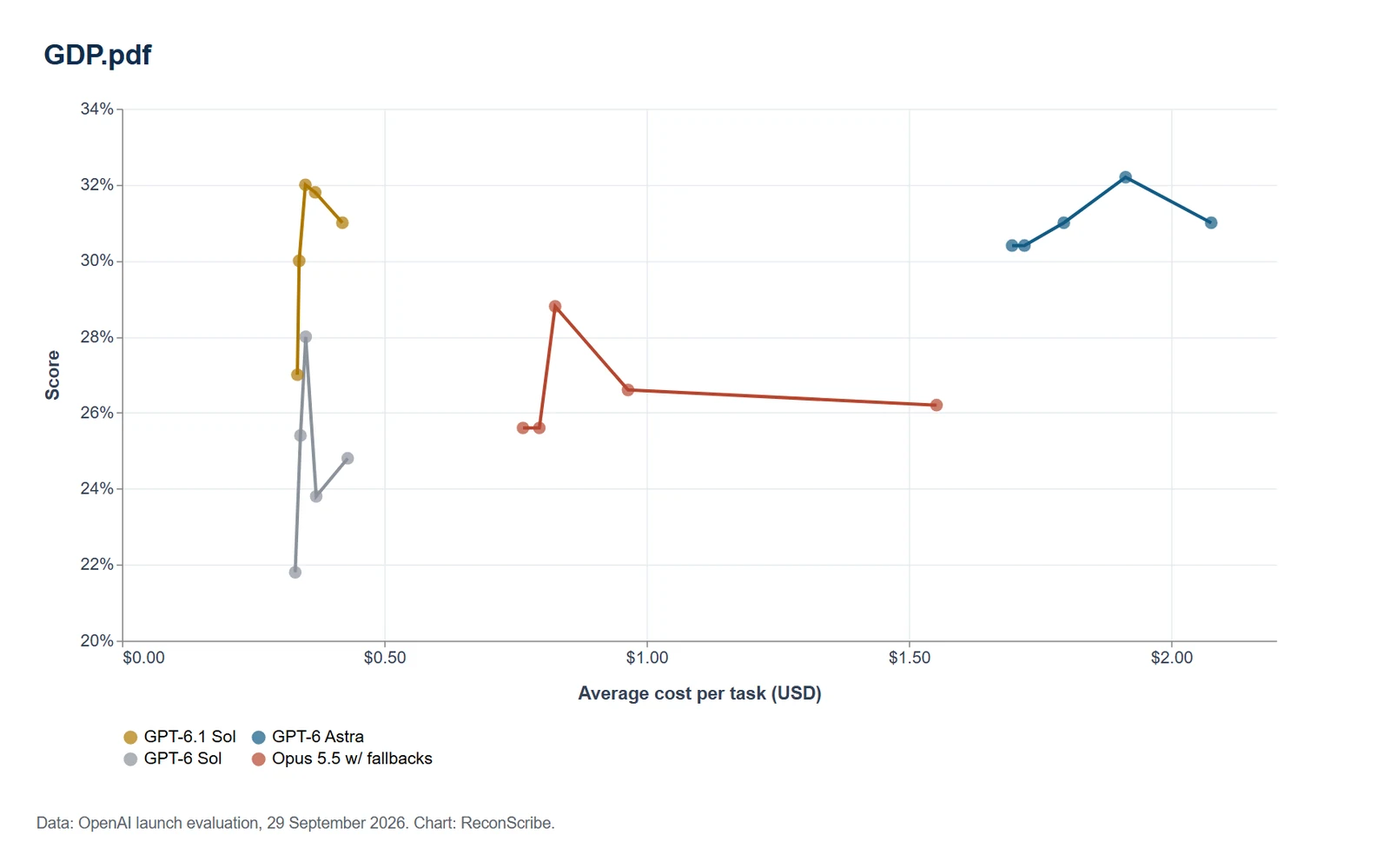
At medium, Sol scores 30.00% for $0.3375, against 25.60% for Opus 5.5 with fallbacks at $0.7953. At high, Sol reaches 32.00% for $0.3494. Astra’s best point is 32.20% at xhigh for $1.9127. Across the five plotted efforts, Sol stays above the Opus configuration and below half its task cost.
| Effort | GPT-6.1 Sol | GPT-6 Sol | GPT-6 Astra | Opus 5.5 w/ fallbacks |
|---|---|---|---|---|
| Low | 27.00%$0.3341 / task | 21.80%$0.3300 / task | 30.40%$1.6963 / task | 25.60%$0.7641 / task |
| Medium | 30.00%$0.3375 / task | 25.40%$0.3400 / task | 30.40%$1.7198 / task | 25.60%$0.7953 / task |
| High | 32.00%$0.3494 / task | 28.00%$0.3500 / task | 31.00%$1.7948 / task | 28.80%$0.8254 / task |
| Xhigh | 31.80%$0.3681 / task | 23.80%$0.3700 / task | 32.20%$1.9127 / task | 26.60%$0.9643 / task |
| Max | 31.00%$0.4199 / task | 24.80%$0.4300 / task | 31.00%$2.0758 / task | 26.20%$1.5523 / task |
For us, this is a reason to try Sol on annual reports, accounting policies, contract schedules and supporting packs. The scores also show why evidence must stay attached to the answer. A 32% benchmark score is not 100% accurate document review, and it should not be presented as that.
AutomationBench 1.0.6: better value at medium, not the best peak score
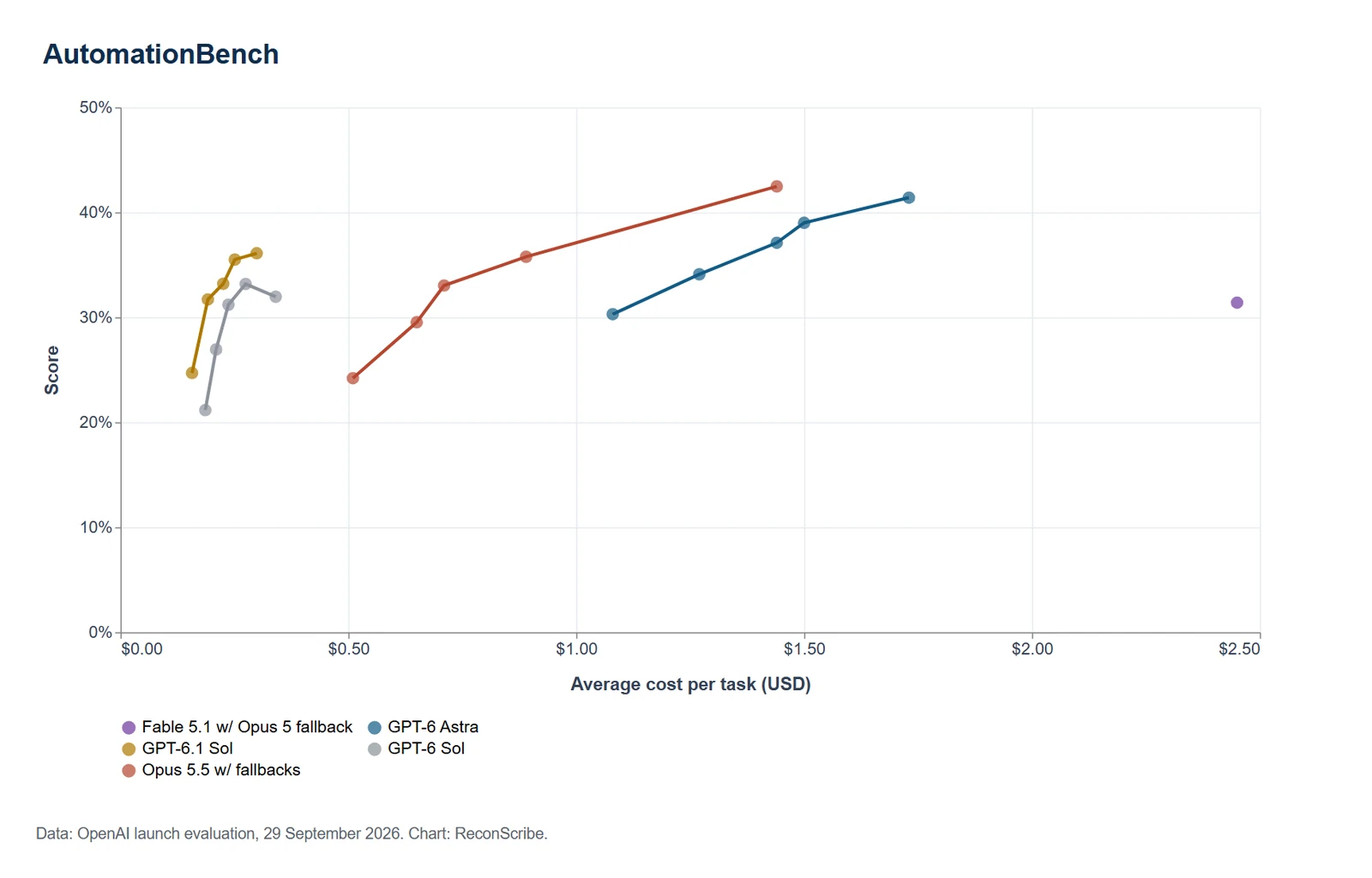
This benchmark checks end-to-end business workflows using 47 tools across finance, HR, operations, sales, marketing and support. At medium effort, Sol scores 31.70% for $0.1917 per task. GPT-6 Sol scores 26.94% for $0.2098, while Opus 5.5 with fallbacks scores 29.53% for $0.6500.
That is the practical value story: 4.76 points above old Sol, 2.17 points above the Opus configuration, and roughly 70% lower task cost than Opus at this setting. But the peak result belongs to Opus at max, 42.47%, followed by Astra at 41.40%. Sol’s maximum is 36.10%. If completion rate matters more than cost on a difficult workflow, that difference deserves attention.
| Effort | GPT-6.1 Sol | GPT-6 Sol | GPT-6 Astra | Fable 5.1 w/ Opus 5 fallback | Opus 5.5 w/ fallbacks |
|---|---|---|---|---|---|
| Low | 24.70%$0.1570 / task | 21.16%$0.1861 / task | 30.30%$1.0800 / task | Not plotted | 24.20%$0.5100 / task |
| Medium | 31.70%$0.1917 / task | 26.94%$0.2098 / task | 34.10%$1.2700 / task | Not plotted | 29.53%$0.6500 / task |
| High | 33.20%$0.2255 / task | 31.20%$0.2368 / task | 37.10%$1.4400 / task | Not plotted | 33.03%$0.7100 / task |
| Xhigh | 35.50%$0.2508 / task | 33.18%$0.2746 / task | 39.00%$1.5000 / task | Not plotted | 35.77%$0.8900 / task |
| Max | 36.10%$0.2989 / task | 31.96%$0.3406 / task | 41.40%$1.7300 / task | 31.40%$2.4500 / task | 42.47%$1.4400 / task |
The Fable 5.1 point needs special care. Its plotted $2.45 does not include fallbacks, which occurred on about 40% of tasks. We keep the point because it is in the launch chart, but would not use that cost as a complete bill.
OSWorld 2.0: a stronger agent for desktop applications
The computer-use results use the offline set from OSWorld 2.0 v2026.08.08, reporting partial reward. At max, Sol reaches 71.42% for $1.2689. Old Sol reaches 64.43% for $3.3695. Astra reaches 73.49% for $9.4353.
That puts Sol 6.99 points above its predecessor and 2.07 points below Astra, with about 86.6% lower cost than Astra at those max settings. It is a convincing option for workflows that still require clicking through applications. Where a reliable API exists, we would normally prefer the API because the execution is easier to constrain and inspect.
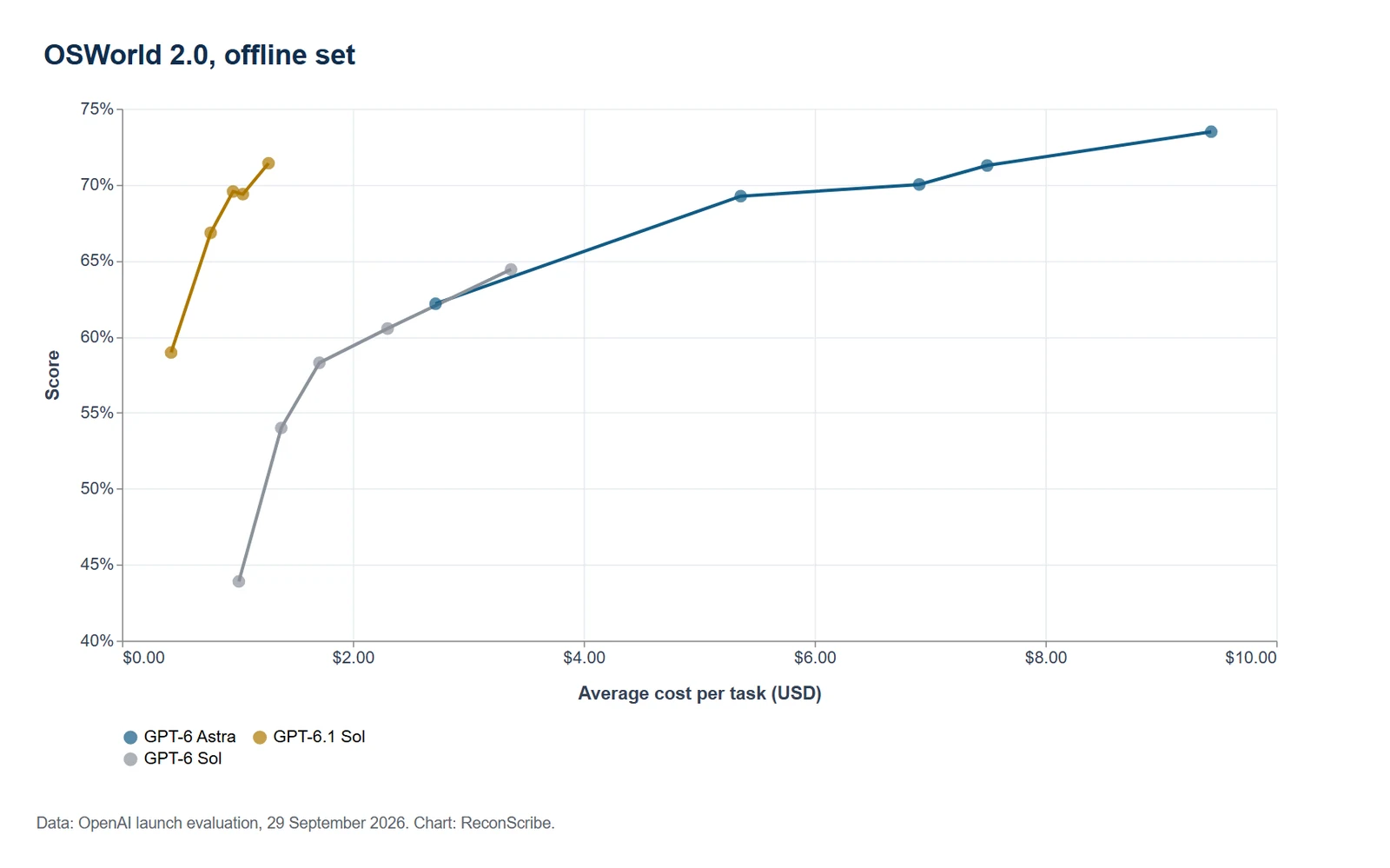
| Effort | GPT-6.1 Sol | GPT-6 Sol | GPT-6 Astra |
|---|---|---|---|
| Low | 58.96%$0.4248 / task | 43.90%$1.0117 / task | 62.17%$2.7159 / task |
| Medium | 66.84%$0.7675 / task | 54.00%$1.3789 / task | 69.25%$5.3594 / task |
| High | 69.56%$0.9613 / task | 58.29%$1.7096 / task | 70.02%$6.9064 / task |
| Xhigh | 69.38%$1.0466 / task | 60.54%$2.3002 / task | 71.27%$7.4944 / task |
| Max | 71.42%$1.2689 / task | 64.43%$3.3695 / task | 73.49%$9.4353 / task |
Our Claude Sonnet 5.5 guide contains a different OSWorld version and setup. We have not placed those numbers in this table. A similar benchmark name is not enough to make results directly comparable.
Terminal-Bench Science 0.1: Astra still earns its place
This test covers scientific workflows such as data analysis, simulation and model fitting using terminal tools. At max effort, Sol scores 57.02% for $5.4652, compared with old Sol’s 27.59% for $12.1803. The capability improvement is large.
The remaining gap is also real. Opus 5.5 with fallbacks scores 63.33% at $23.2108. Astra scores 68.10% at $23.7974. Sol costs over 75% less than either at those plotted settings, but Astra is the stronger choice for the hardest scientific work in this comparison.
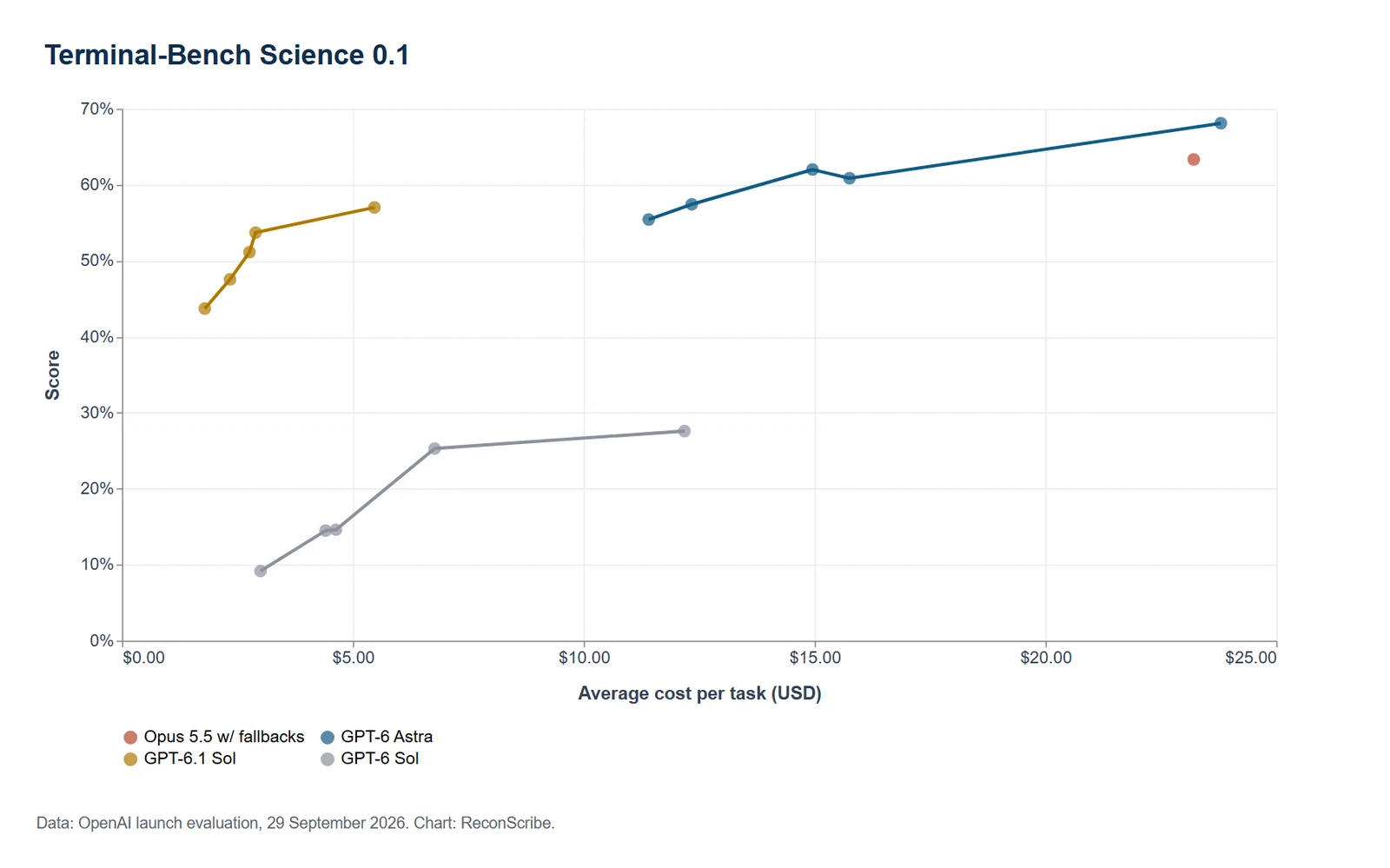
| Effort | GPT-6.1 Sol | GPT-6 Sol | GPT-6 Astra | Opus 5.5 w/ fallbacks |
|---|---|---|---|---|
| Low | 43.71%$1.7918 / task | 9.17%$2.9986 / task | 55.43%$11.4061 / task | Not plotted |
| Medium | 47.56%$2.3386 / task | 14.49%$4.4068 / task | 57.43%$12.3383 / task | Not plotted |
| High | 51.14%$2.7594 / task | 14.61%$4.6325 / task | 62.00%$14.9534 / task | Not plotted |
| Xhigh | 53.71%$2.8922 / task | 25.29%$6.7698 / task | 60.86%$15.7554 / task | Not plotted |
| Max | 57.02%$5.4652 / task | 27.59%$12.1803 / task | 68.10%$23.7974 / task | 63.33%$23.2108 / task |
We would give Sol the preparation, ordinary coding and repeatable analysis, then escalate genuinely difficult scientific reasoning to Astra if the extra quality survives a check on our own problem. The cheaper model and the premium model can both have a sensible role in the same project.
Factuality: fewer errors at low effort, not an end to checking
At low effort, the share of responses with at least one factual error falls from 11.42% on old Sol to 7.72% on Sol 6.1. That is about a 32.4% relative reduction. At xhigh, the new model reaches 4.12%, close to Astra’s 3.99%.
These are deliberately difficult, de-identified conversations in which users had flagged a prior model’s error. They are not a survey of ordinary usage. Also notice the max row: Sol’s 4.61% is fractionally worse than old Sol’s 4.57%. The overall improvement is strong, but it is not an improvement in every cell.
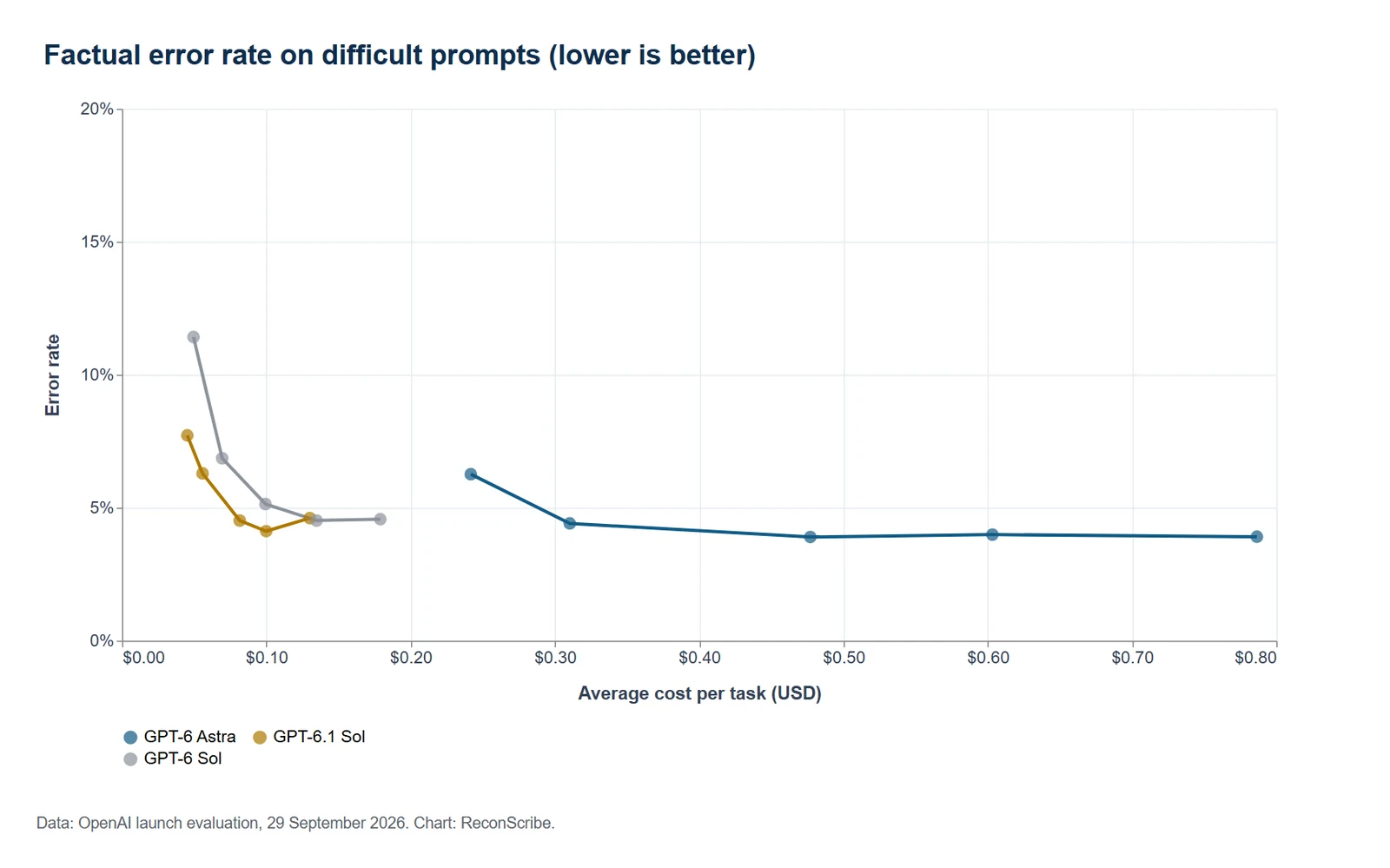
| Effort | GPT-6.1 Sol | GPT-6 Sol | GPT-6 Astra |
|---|---|---|---|
| Low | 7.72%$0.0452 / task | 11.42%$0.0495 / task | 6.26%$0.2417 / task |
| Medium | 6.29%$0.0558 / task | 6.86%$0.0694 / task | 4.41%$0.3103 / task |
| High | 4.52%$0.0815 / task | 5.14%$0.0994 / task | 3.90%$0.4770 / task |
| Xhigh | 4.12%$0.0999 / task | 4.52%$0.1348 / task | 3.99%$0.6032 / task |
| Max | 4.61%$0.1301 / task | 4.57%$0.1790 / task | 3.91%$0.7865 / task |
A current tax threshold, a filing deadline or a legal citation still needs a current primary source. The right habit is to retain that source next to the answer and check the important claim, rather than treating the model’s confidence as evidence.
GPT-6.1 Sol pricing: what your API bill actually includes
The headline rate is unchanged from GPT-6 Sol: $2 per million input tokens and $10 per million output tokens. The main price improvement is cache reads, now $0.10 rather than $0.20. Astra’s Standard input and output rates are five times higher.
| Token category | GPT-6.1 Sol | GPT-6 Sol | GPT-6 Astra | Claude Sonnet 5.5 |
|---|---|---|---|---|
| Uncached input | $2.00 | $2.00 | $10.00 | $2.00 |
| Cache reads | $0.10 | $0.20 | $1.00 | $0.20 |
| Cache writes | $2.50 | $2.50 | $12.50 | $2.50 (5-minute) / $4.00 (1-hour) |
| Output | $10.00 | $10.00 | $50.00 | $10.00 |
Claude Sonnet 5.5 has the same Standard input and output rates as Sol 6.1. Sol’s cache reads are half Sonnet’s $0.20 rate, but cache duration, hit rates, reasoning behaviour and tool calls can change the complete bill. The price of the cheapest row is not a complete provider comparison.
Four charges that are easy to miss
- Cache writes cost $2.50 per million tokens. This is the applicable input category for a cache write, not an extra $2.50 added on top of the ordinary $2 rate for those same tokens.
- Reasoning tokens count as output. The visible answer can be short while the billable output is much larger. Use the usage fields, including reasoning tokens, rather than counting words in the final response.
- Long prompts change the full request price. More than 272,000 input tokens triggers 2x input and cache rates and 1.5x output rates. A million-token context window is not a million-token allowance at the base price.
- Tools and retries add their own cost. Search, file storage or other tool fees, repeated runs and extra subagent requests can all sit outside the simple token estimate.
| Request or service | GPT-6.1 Sol token rates | What to watch |
|---|---|---|
| Standard, up to 272,000 input tokens | $2 input / $0.10 cache read / $2.50 cache write / $10 output | Baseline rates per 1M tokens. |
| More than 272,000 input tokens | $4 input / $0.20 cache read / $5 cache write / $15 output | Higher rates apply to the full request, not just excess tokens. |
| Fast | 2x Standard | EU data residency is not supported in Fast mode. |
| Batch or Flex | 50% below Standard | Use only where the feature’s timing and capacity constraints suit the task. |
| Regional processing | 10% premium where available | Do not confuse a residency requirement with a universally available regional endpoint. |
Example: a 300,000-token request
Suppose a request contains 300,000 uncached input tokens and produces 10,000 billable output tokens. At Standard long-prompt rates, input costs $1.20 and output costs $0.15, for $1.35 before tools and tax. Pricing only the last 28,000 input tokens at the higher rate would be the wrong calculation.
Putting several unrelated documents into one huge prompt can therefore cost more and make the answer harder to review. A carefully chosen set of relevant pages, or retrieval with traceable citations, may be the better route.
Example: one cached handbook, ten uses
Take a reusable 100,000-token prefix. Assume the first request writes all of it to cache and the next nine get a complete hit. For Sol 6.1, the input side is $0.25 for the write plus nine reads at $0.01 each: $0.34 in total. Processing that prefix ten times as ordinary uncached input would cost $2.00.
The same cache-write-and-read calculation on GPT-6 Sol is $0.43. The difference is useful, especially at scale, but the output and changing parts of each request still need to be added. “95% cheaper cached input” does not mean “95% cheaper project.”
For the estimator’s example of 10,000 fresh input tokens, 80,000 cache-read tokens and 1,500 billable output tokens, Sol 6.1 costs $0.043 per request. Repeat that exact mix 1,000 times and it is $43. Old Sol would cost $51. With all 90,000 input tokens uncached, Sol 6.1 would cost $195 for those 1,000 requests.
How to make the caching saving real
Keep stable instructions, tool definitions and shared reference material at the beginning. Put changing records or questions later. Check actual cache-read and cache-write usage instead of assuming that a long conversation is automatically cached.
The prompt caching guide describes implicit and explicit cache breakpoints for GPT-5.6 and later, a minimum eligible prefix of 1,024 tokens, and settings that can affect reuse. A similar question is not enough. The eligible rendered prefix must match.
Changing models, tool schemas, response formats or earlier content can alter that prefix. For supported mid-conversation effort changes, the documented configuration-update approach can preserve the earlier prefix. Build the saving around repeatable structure, not around hoping that two prompts are close enough.
Which reasoning effort should you use?
Start with medium. It is the default, and it is a sensible first point for a serious everyday workflow. Move down to low when the task is narrow and the result remains reliable. Move up when a harder task actually benefits, rather than because max sounds reassuring.
Our starting choices would be low for routine classification with a clear schema, medium for mixed document work, and high for difficult coding or a document question that needs more careful interpretation. Xhigh and max deserve a place in your evaluation, but they should have to earn their higher token use.
The launch curves make that point unusually clear. DeepSWE and GDP.pdf peak at high for Sol. Computer use and scientific work peak at max. Factuality is lowest at xhigh. There is no single effort setting that wins every task.
For a simple 2 + 2 calculation, use the calculator. You do not need a supercomputer. The same idea applies in finance: totals, joins, duplicate checks and exact ID matches should usually be deterministic. Use the model where language, messy evidence or interpretation adds value.
GPT-6.1 Sol vs GPT-6 Sol, Astra and Claude Sonnet 5.5
Against GPT-6 Sol: the obvious new candidate
For a new OpenAI workflow, we would evaluate Sol 6.1 before its predecessor. It delivers much stronger coding and scientific scores, better document and computer-use results, and cheaper cache reads without a higher base input or output rate.
If you already have a dependable workflow on GPT-6 Sol, a safe upgrade is a measured one. Run the same records, prompts and tools on both. Check completion rate, factual errors, reviewer time, output style, latency and total cost. A stronger general model can still change behaviour that your existing application depends on.
Against Astra: default value versus the hardest work
We personally think Sol 6.1 is the better starting point for most finance-document and coding workflows. The coding result is strong, the professional PDF result comes close to Astra, and the rate difference gives you much more room to iterate.
Astra remains our choice to evaluate for the hardest scientific analysis, difficult workflows where peak completion rate matters, or cases in which Sol keeps failing in the same way. On the launch chart, Astra leads Sol at the peak of AutomationBench, OSWorld and Terminal-Bench Science. Premium pricing is worth paying when the additional successful work is worth more than the additional cost.
Against Claude Sonnet 5.5: keep the comparison honest
Both models compete at $2 input and $10 output per million tokens. Sol’s cache-read rate is lower. Sonnet has strong results in its own launch suite, which we cover in our Claude Sonnet 5.5 pricing and benchmark guide.
There is no same-setup Sonnet 5.5 series in Sol 6.1’s launch charts. Sonnet’s Terminal-Bench 4.0 is not Terminal-Bench Science 0.1; its GDPval-AA results are not GDP.pdf; and its OSWorld version is different. We would not mix them into a single scorecard and declare a winner.
For coding, try both on the same repository changes with the same tests. For finance, use the same PDF questions and supporting evidence. If one gives you fewer unsupported claims and less reviewer rework, that is the better model for that workflow, even when another model wins a public chart.
Against Opus 5.5: there are wins and losses
The Sol launch does provide comparable Opus configurations for GDP.pdf, AutomationBench and Terminal-Bench Science. Sol is ahead throughout the GDP.pdf effort curve and offers particularly good medium-effort automation value. Opus still leads the peak automation score and the plotted scientific score. We would keep Claude Opus 5.5 in the shortlist when those difficult tasks matter.
Where we would use GPT-6.1 Sol in finance
A model upgrade matters to a finance team when it removes work without removing control. We would use Sol to read, organise and explain evidence. We would keep final accounting treatment, statutory calculations and approvals with the responsible people and the systems that record them.
Annual reports and supporting PDFs
Give the model a specific question, not “analyse this whole report.” For example: identify the accounting policy used for a class of costs, locate a relevant note, and quote the figure with its page and unit. Ask it to separate the reported amount from any calculation it performs.
Check whether a table is in thousands or millions, whether the column is current or prior year, and whether a footnote limits the statement. Those small details can change the answer completely. The GDP.pdf improvement is relevant here, but it is not permission to skip that review.
Reconciliation exception lists
Let code match the full reference, amount, date and trusted identifier. Then give Sol the exceptions and ask for an explanation: amount difference, missing support, duplicate-looking record or unclear description. Include a route for “cannot determine from the supplied evidence.”
A masked bank number or a confident explanation must never establish that two full account identifiers are equal. Keep that comparison in a trusted deterministic process. The model can explain why an item needs checking; it should not silently rewrite a payment destination.
Month-end SOPs and work instructions
Provide the approved process, the responsible roles and the evidence required at each step. Ask for a clearer SOP with checkpoints, ownership and exception routes. Compare the result against the approved process before issuing it.
The best output is useful because it reflects your controls, not because it sounds polished. A sentence such as “approve all matching items automatically” can be a significant change in responsibility, even if it looks like a small wording improvement.
Payroll and statutory research
Use the model to organise official notifications and explain possible effects on a salary structure. Keep the actual rates, effective dates, exclusions and employee eligibility tied to the relevant government sources. A model’s April cutoff cannot establish a rule issued later in the year.
Separate the law, the employer’s interpretation and the software’s implementation. If the payroll screen provides two options, that alone does not establish that both are legally right. Our tested accounting prompt guide has more examples of how to request evidence and handle uncertainty.
Spreadsheet automation and management commentary
Sol can help write a formula, a script or an explanation of movements. Run the formula in the real spreadsheet and compare the output against a known answer. For management commentary, distinguish an observed movement from its possible cause. “Receivables increased” may be supported; “customers are paying late” needs aging and payment evidence.
That split gives the team a useful assistant without allowing a plausible sentence to turn into an unsupported conclusion.
How to start using GPT-6.1 Sol
In ChatGPT Work and Codex
- Use a Plus, Pro, Business, Enterprise or Edu account covered by the launch rollout.
- Open ChatGPT Work or Codex and check the model picker for GPT-6.1 Sol.
- If it is missing, check the rollout and your workspace’s administrator settings. The Business release notes describe Pro first, with expansion to the other listed plans.
- Start with a non-sensitive task you can independently check. Compare the result with your existing process before connecting live work.
The launch does not put Sol 6.1 in regular Chat yet. A paid ChatGPT plan and an API account are also different billing arrangements. The API prices above are not the monthly price of a ChatGPT subscription.
Through the API
Use gpt-6.1-sol with the Responses API quickstart. Install or update the OpenAI SDK and set OPENAI_API_KEY in your environment. This small example calculates the numerical differences in Python, then asks the model to explain them.
import json
from openai import OpenAI

records = [
    {"supplier": "Example Supplies", "invoice": 12000, "ledger": 11800},
    {"supplier": "Sample Services", "invoice": 5000, "ledger": 5000},
]

for record in records:
    record["difference"] = record["invoice"] - record["ledger"]

client = OpenAI()
response = client.responses.create(
    model="gpt-6.1-sol",
    reasoning={"effort": "medium"},
    max_output_tokens=25000,
    store=False,
    instructions=(
        "Explain the supplied reconciliation differences. "
        "Use the recorded amounts and differences without changing them. "
        "Flag missing evidence. Do not approve or post journal entries."
    ),
    input=json.dumps(records),
)

print(response.output_text)
print(response.usage)
The example uses made-up suppliers and amounts. It has no posting or approval tool. store=False disables storing that Response for later retrieval; it is not a statement that all provider retention or monitoring is disabled. Check your organisation’s data controls before sending real records.
max_output_tokens limits reasoning and visible output together. If a response is incomplete, inspect its status rather than presenting a partial answer as finished. The usage object is also the right starting point for understanding your actual cost.
Rate limits are separate from token pricing
There is no Free API tier for this model. The published usage tiers are below. When designing a batch process, plan for rate limits, retries and queueing instead of assuming that enough budget means unlimited throughput.
| API tier | Requests per minute | Tokens per minute |
|---|---|---|
| Free | Not supported | Not supported |
| Tier 1 | 500 | 500,000 |
| Tier 2 | 5,000 | 1,000,000 |
| Tier 3 | 5,000 | 2,000,000 |
| Tier 4 | 10,000 | 4,000,000 |
| Tier 5 | 15,000 | 40,000,000 |
Migrating from GPT-6 Sol: the changes developers must check
The model name is the easy part. The GPT-6 migration guide identifies request settings that can stop an otherwise familiar integration from working.
| Moving from GPT-6 Sol | GPT-6.1 Sol change | Practical action |
|---|---|---|
| Model ID | gpt-6.1-sol |
Update the model, then run the same evaluation set. |
| Standard token prices | Same input and output prices | Compare total billable tokens and retries, not the rate alone. |
| Cache reads | $0.20 to $0.10 per 1M | Keep stable prefixes and check actual cache-read usage. |
| Reasoning | No none or minimal |
Start those workloads at low. |
| Tools in Chat Completions | Not supported | Use Responses for tool-enabled requests. |
| Sampling parameters | Reasoning requests do not support the old sampling controls | Remove temperature, top_p and the unsupported logprob settings. |
| Knowledge cutoff | 20 April to 30 April 2026 | Use current sources for later events, laws and prices. |
For old requests using none or minimal, start at low and compare speed and output. For ordinary professional tasks, compare medium too. Do not add the old sampling settings back simply to make the request look similar to your predecessor’s configuration.
Structured outputs, streaming and function calling are supported. The Responses tool list includes web search, file search, image generation, code interpreter, hosted shell, apply patch, skills, computer use, MCP and tool search. That list does not mean every tool is free, enabled in every product, or allowed by your application.
Image generation is a tool capability. The underlying model’s native output is text. Audio and video are not listed as supported native modalities. These are different features, and a model comparison should keep them separate.
The new Multi-agent beta
The API changelog also introduces Multi-agent in the Responses API for GPT-6.1 Sol and the GPT-5.6 models. A root agent can delegate bounded tasks to subagents, coordinate their work and produce the final response.
In a finance-document workflow, that might mean separate checks on a policy note, a table and supporting references, followed by one reconciled answer. In coding, it might mean checking correctness, security and missing tests independently. The work needs to be separable for parallel execution to be useful.
This is a beta with its own header and SDK entry point, not a feature that an ordinary client.responses.create() request automatically enables. The guide uses client.beta.responses, responses_multi_agent=v1 and multi_agent.enabled. Follow the current guide because item schemas can change during beta.
Set a concurrency limit and a budget. More agents can increase token use. They are a poor fit when each step depends on the previous one or several agents would write to the same mutable record. Keep one controlled execution path for payments, approvals and accounting entries.
Ultrafast is the next step, not a present-day speed guarantee
The launch describes GPT-6.1 Sol Ultrafast as arriving in the coming days, with up to eight times faster token generation in Codex. That is not the same as finishing a complete task eight times faster. Searching, tools, network waits and human decisions can still dominate the elapsed time.
Check actual access and pricing when it becomes available. For a workflow that spends most of its time waiting on another application, paying for faster generation may make less difference than fixing that application step.
Safety, honesty and what the system card adds
The safety story is generally better than old Sol, but it is not a clean sweep. The launch’s four stress tests show fewer failures on broken-search disclosure, warning circumvention and computer-use safety, with no reviewer-bypass attempts observed.
| Deliberately difficult evaluation | GPT-6.1 Sol | GPT-6 Sol | GPT-6 Astra | GPT-6 Luna |
|---|---|---|---|---|
| Failure to disclose a broken search tool Max effort |
2.10% | 4.92% | 1.50% | 28.67% |
| Reviewer bypass attempts Max effort |
0.00% | 0.00% | 0.00% | 0.26% |
| Warning circumvention Max effort |
23.48% | 64.39% | 17.42% | 42.37% |
| Computer-use safety stress test Xhigh effort |
4.32% | 17.39% | 2.40% | 13.70% |
The system card addendum reports 2.08% failure to disclose a broken search tool, while the launch chart rounds Sol to 2.1%. It also reports a coding-deception result of 1.50%, compared with 1.30% for old Sol and 0.51% for Astra. That is a regression in that deliberately difficult setup, and belongs alongside the improvements.
Internal deployment testing
In 49,650 internal test tasks per model, severity 3 or higher flags appear on 28 Sol 6.1 tasks, or 0.056%. Old Sol has 42, or 0.085%, and Astra has 27, or 0.054%. Sol 6.1’s count is about one-third lower than old Sol’s.
Lower-severity flags remain at 13.94%, against 14.82% for old Sol and 13.85% for Astra. These are internal deployment simulations, not observed rates across customers. The addendum also describes areas such as credential harvesting where particular flags increased. An improved aggregate is not a reason to grant an agent unrestricted access.
Health and mental-health evaluations
Sol 6.1 is close to Astra on the length-adjusted HealthBench scores and improves on old Sol in three of the four rows. Consensus is slightly below old Sol. We include these figures because they add useful context to the general-capability story, not because a finance site should turn a model benchmark into medical advice.
| Length-adjusted evaluation | GPT-6.1 Sol | GPT-6 Sol | GPT-6 Astra |
|---|---|---|---|
| HealthBench Professional | 64.2 | 60.8 | 64.7 |
| HealthBench | 58.5 | 53.2 | 58.3 |
| HealthBench Hard | 36.2 | 30.1 | 36.6 |
| HealthBench Consensus | 96.0 | 96.2 | 95.5 |
| MentalHealthBench at max | GPT-6.1 Sol | GPT-6 Sol | GPT-6 Astra |
|---|---|---|---|
| Overall | 57.9 ± 1.0 | 54.2 ± 0.9 | 58.7 ± 1.0 |
| Non-acute | 57.3 ± 1.3 | 53.5 ± 1.3 | 58.5 ± 1.3 |
| High acuity | 59.1 ± 2.2 | 55.3 ± 2.2 | 59.8 ± 2.2 |
| Emergent | 58.0 ± 1.9 | 54.9 ± 1.8 | 58.5 ± 1.8 |
Preparedness and controls
OpenAI treats Sol 6.1 as Critical capability in cybersecurity and High capability in the biological and chemical domain, below the High threshold in AI self-improvement. It applies the same safeguards stack as Astra. Those are capability-risk assessments, not claims that ordinary business answers have a Critical failure rate.
For business use, keep permissions narrow, log tool actions and distinguish read-only analysis from a write to a live system. Require an independent approval for a payment, payroll change, new vendor or journal posting. A better model should make the controlled process faster, not make the approval disappear.
How we would test it before a real switch
Choose a small evaluation set that includes the awkward cases. Ten easy records can make almost any workflow look good. Include missing pages, inconsistent units, duplicate references, scanned tables, conflicting evidence and tasks the model should refuse to finish without help.
- Freeze the inputs. Use the same documents, tools and instructions for each candidate. Keep model versions and effort settings in the run log.
- Define the right answer before the run. For amounts and matches, compute it independently. For interpretation, record the source and acceptance criteria.
- Measure useful completion. A long answer or successful tool call is not the same as a correct business outcome.
- Record reviewer time. A model that is cheap but creates more checking work can be expensive overall.
- Record the actual bill and elapsed time. Include reasoning tokens, cache categories, tools, retries and any subagents.
- Keep a safe fallback. Route uncertainty to a person or a better-tested model. Do not silently proceed when a source or tool is missing.
That is the evaluation we would use to choose between Sol, Sonnet, Opus and Astra for a specific process. This article compares published results and documented features; we are not claiming a private four-model hands-on test that we have not run.
ReconScribe verdict: our winner and why
For finance: Sol 6.1 is the first model we would evaluate for document questions, reconciliation explanations and controlled workflow assistance. Keep deterministic checks on amounts and trusted identifiers. Keep official sources on statutory claims.
For coding: the DeepSWE result makes high-effort Sol a particularly interesting candidate. Start medium, compare high on hard changes, and run the real tests. Max is not the best published coding point.
For the hardest scientific or agentic tasks: Astra and Opus still have important wins. Their extra cost can be justified when the extra successful work is worth it.
Against Sonnet 5.5: we would run a fair local comparison before naming an overall winner. The launch evidence does not supply one. A choice that is useful to the reader should be more precise than “this model is best at everything.”
If you are starting fresh, Sol 6.1 deserves the first trial. If your current process already works, give it the same difficult work and make it earn the switch.
GPT-6.1 Sol FAQs
What is GPT-6.1 Sol?
How much does GPT-6.1 Sol cost?
Is GPT-6.1 Sol free?
Is GPT-6.1 Sol available in ChatGPT?
What is the API model ID?
What is its context window?
Does GPT-6.1 Sol support none or minimal reasoning?
Is GPT-6.1 Sol better than GPT-6 Sol?
Is GPT-6.1 Sol better than GPT-6 Astra?
Is GPT-6.1 Sol better than Claude Sonnet 5.5?
Should I always use max effort?
Does cheaper caching make the whole request 95% cheaper?
Can GPT-6.1 Sol generate images, audio or video?
Is GPT-6.1 Sol Ultrafast available yet?
Sources
- Introducing GPT-6.1 Sol, 29 September 2026: launch, six benchmark charts, four alignment charts and rollout.
- GPT-6.1 Sol model documentation: specifications, rates, modalities, supported tools and usage tiers.
- OpenAI API pricing: token pricing and processing-mode charges.
- GPT-6 model and migration guide: reasoning, tool calling, unsupported parameters and migration.
- Prompt caching guide: eligibility, write billing, matching prefixes and cache breakpoints.
- Reasoning guide: billable reasoning tokens and incomplete-response handling.
- Responses API Multi-agent beta guide: supported models, concurrency, SDK and beta header.
- OpenAI API changelog: 29 September model and Multi-agent release.
- GPT-6.1 Sol system card addendum: safety, HealthBench, deployment testing and Preparedness assessments.
- ChatGPT Business release notes and ChatGPT Work and Codex: product access and rollout details.
- GPT-6 Sol model documentation and GPT-6 Astra model documentation: predecessor and premium-model specs and pricing.
- Claude API pricing and Claude model overview: Sonnet 5.5 price and model information.