
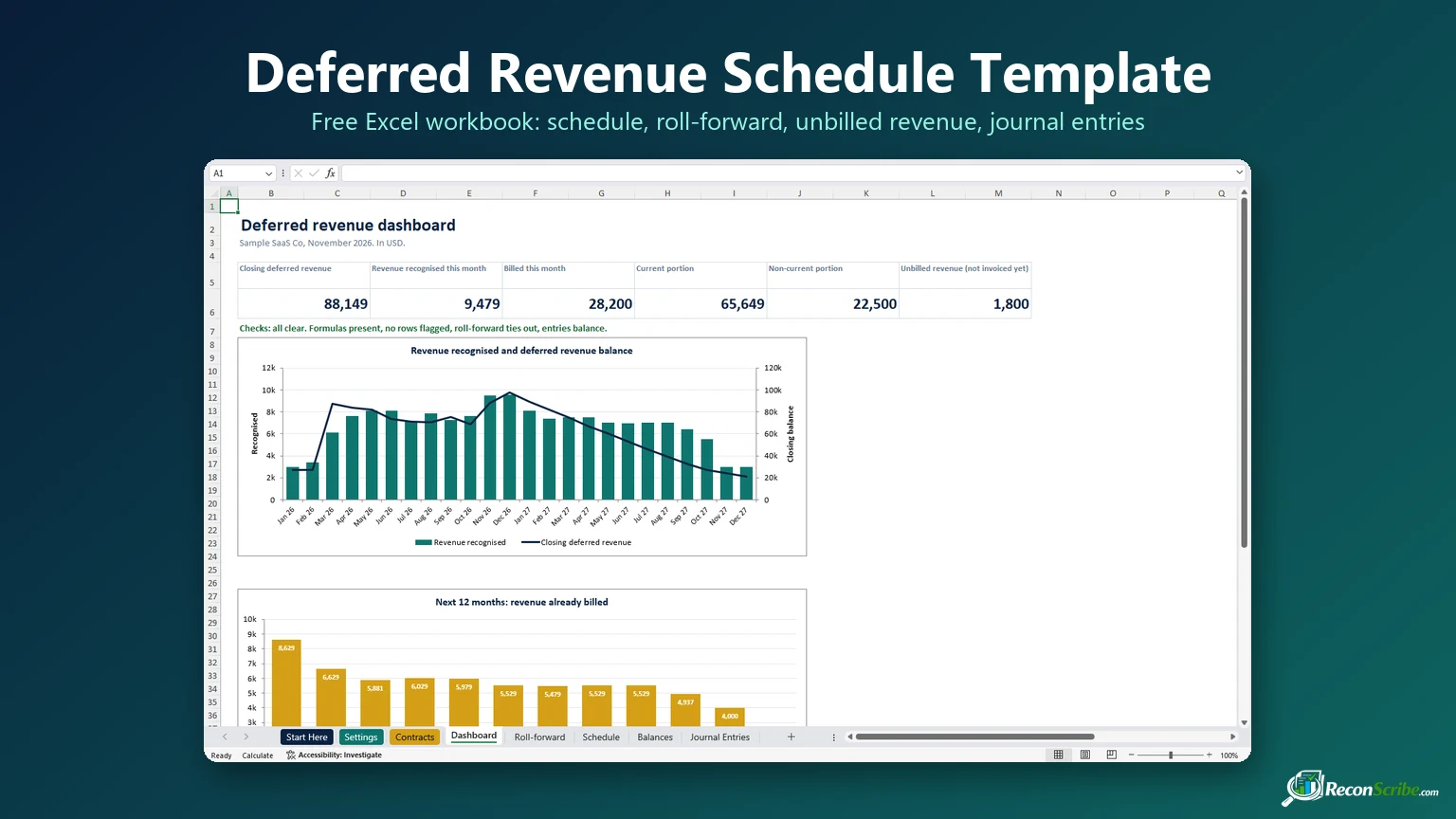
This free deferred revenue schedule template takes you from your invoice list to the month-end journal. It gives you 36 months of revenue recognition, a 24-month roll-forward that ties to the cent, and unbilled revenue on its own line, so it never hides inside the liability. Type each contract once and the rest fills in.
It is the liability-side twin of our prepaid expense schedule template: prepaid expenses are costs you paid before using them, deferred revenue is cash you billed before earning it.
- Sheets: Start Here, Settings, Contracts, Dashboard, Roll-forward, Schedule, Balances and Journal Entries.
- Columns you fill in (Contracts): contract ID, customer, revenue account, invoice or credit note number, invoice date, service start, service end, amount, method (Monthly or Daily) and remarks, plus an optional cancellation date and credit.
- Columns it fills in: term, days, the amounts before, inside and after the schedule, revenue for the reporting month, the deferred and unbilled balance at that month end, and a Row check.
- Cost: free. The download needs a free ReconScribe account: sign in or sign up, and the download starts.
- Works in: Excel 2016 or later and Excel for the web, in any currency. No macros. Not yet tested in Google Sheets.
Download the deferred revenue schedule template (free Excel)
The deferred revenue schedule template comes with sample contracts for a subscription business, so every sheet shows real numbers the moment you open it. Type over them, or delete them as whole rows, and add your own. The table holds 300 contracts, invoices or credit notes. It is a plain deferred revenue schedule Excel workbook with no macros, only formulas you can inspect.
It has eight sheets: Start Here, Settings, Contracts, Dashboard, Roll-forward, Schedule, Balances and Journal Entries, and it is built for Excel 2016 or later and Excel for the web.
Watch the deferred revenue schedule template walkthrough
The walkthrough adds a new contract on camera and follows it through the schedule, the roll-forward, unbilled revenue, a credit note, the journal entries and the checks, all in the real workbook.
- 0:00 Intro
- 0:42 The idea in one minute
- 1:14 Set up the template
- 1:37 Add a contract
- 2:31 The revenue schedule
- 2:55 Roll-forward and the current split
- 3:35 Arrears, credit notes, cancellations
- 4:20 Journal entries
- 4:40 Dashboard and checks
- 5:15 Recap
What is inside this deferred revenue schedule template
| Sheet | What it does | Do you edit it? |
|---|---|---|
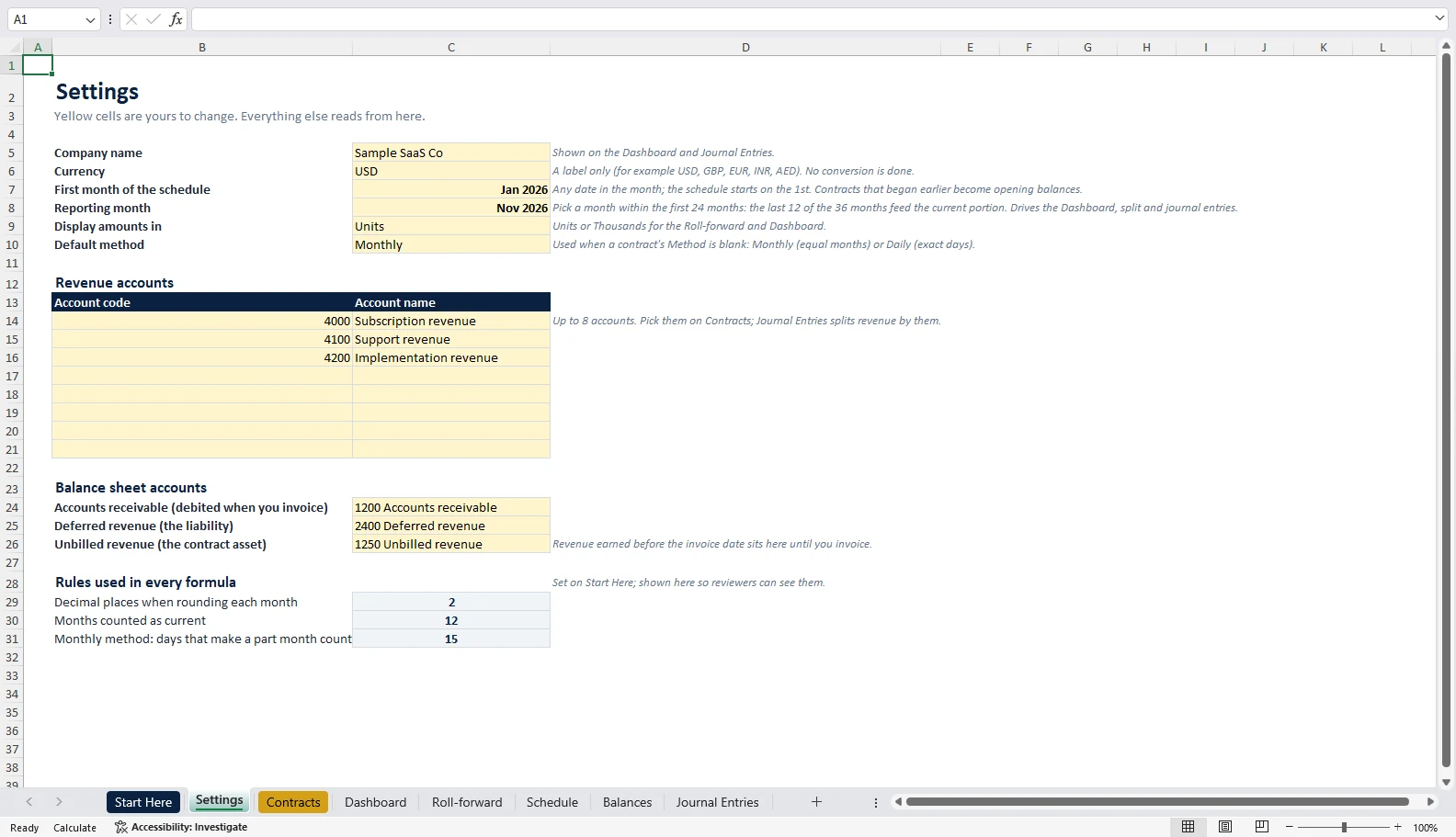
| Settings | Company name, currency label, first month of the schedule, reporting month, display units, default method, up to 8 revenue accounts, and the receivable, deferred revenue and unbilled revenue accounts. | Yes |
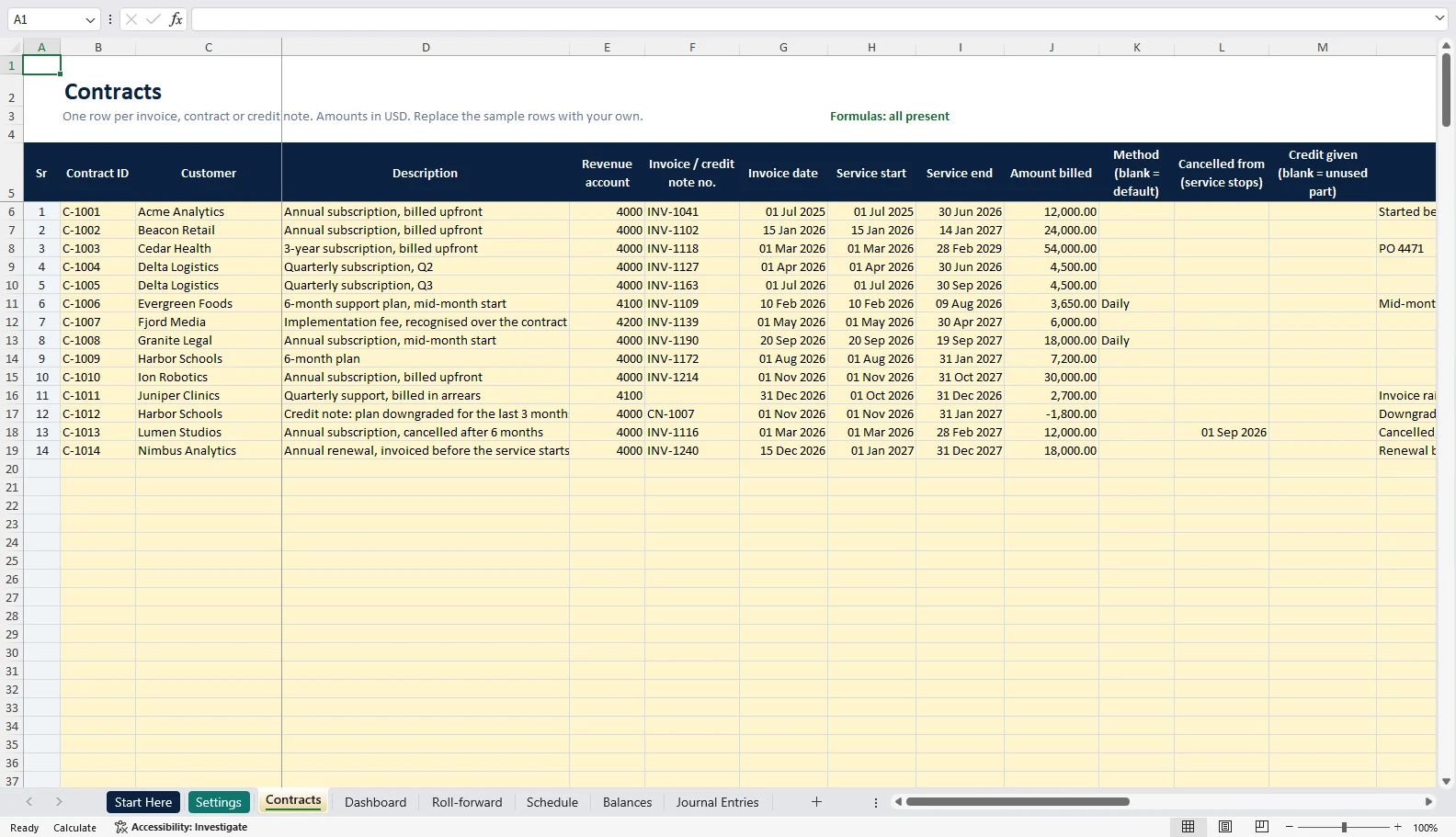
| Contracts | One row per invoice, contract or credit note: contract ID, customer, revenue account, invoice or credit note number, dates, amount, method, an optional cancellation date and credit, and remarks. Grey formula cells show the term, days, what falls before, inside and after the schedule, the revenue and balances for the reporting month, and a Row check. | Yellow cells only |
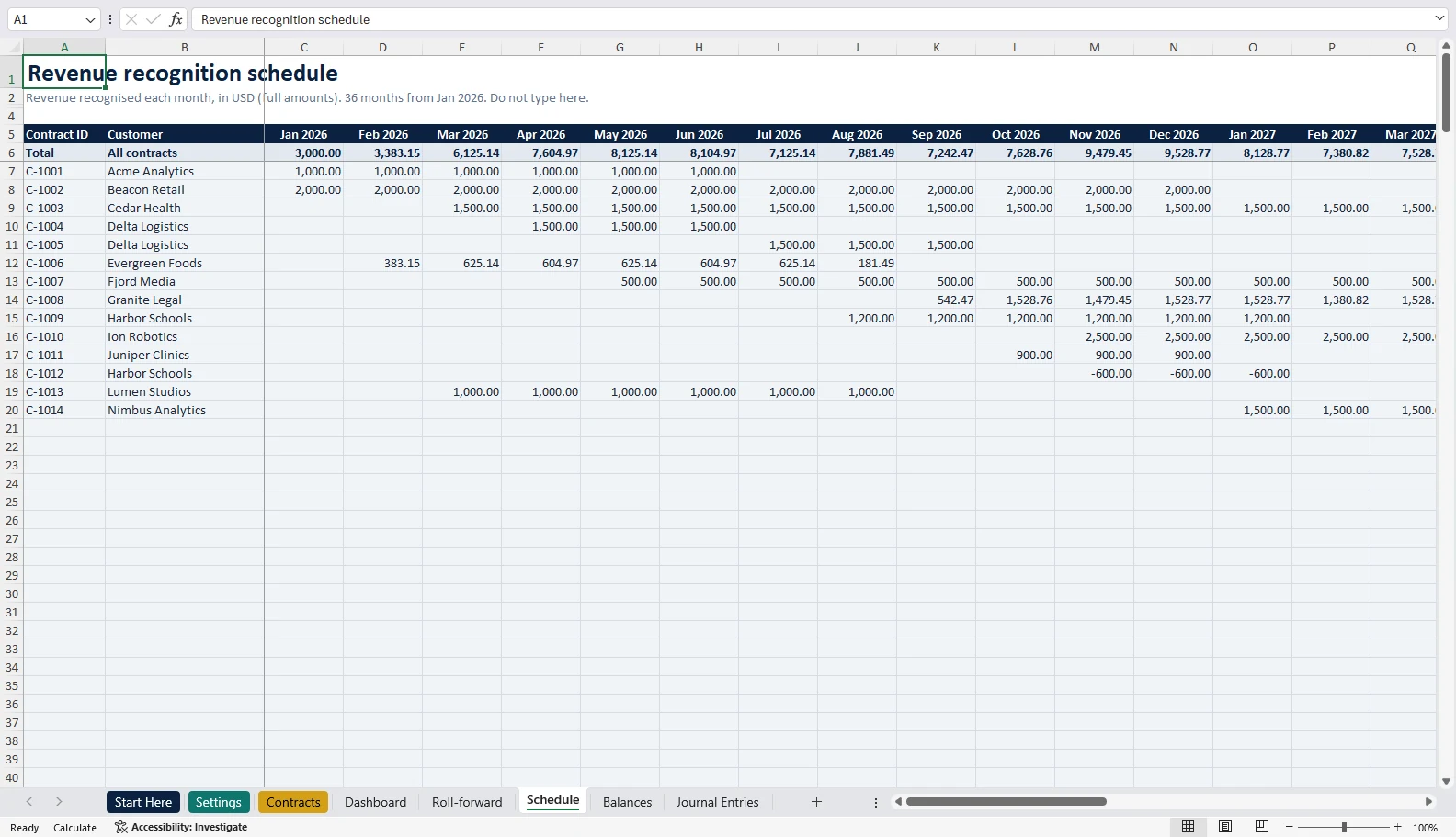
| Schedule | Revenue recognised for every contract in every one of 36 months, with a total row. This is the revenue recognition schedule. | No |
| Balances | Every contract’s balance at every month end, starting with the month before the schedule. Shaded cells are not invoiced yet. | No |
| Roll-forward | 24 months of opening balance, billings, revenue recognised, change in unbilled revenue, closing balance, the current and non-current split, and a tie-out. | No |
| Journal Entries | The two entries for the reporting month, split by revenue account, with a debits-less-credits check. | No |
| Dashboard | Six headline numbers, two charts and one status line that checks the whole workbook. | No |
| Start Here | Instructions and credits. You can hide this sheet before sharing; keep it in the workbook. | No |
What is a deferred revenue schedule?
Deferred revenue is money you have billed or collected before you deliver the service. Until you deliver it, you owe the customer the work or the money back, so it sits on the balance sheet as a liability with a credit balance.
IFRS 15 and ASC 606 call this balance a contract liability, but both allow other labels such as deferred revenue. Unearned revenue is the same balance under another name, so an unearned revenue schedule is the same tool.
The schedule releases that liability into revenue month by month as you deliver. For a subscription, support plan or licence that the customer uses evenly over time, that means spreading the amount over the service period. The same pattern fits annual maintenance contracts, retainers, prepaid training, memberships and software support, not only SaaS.
Deferred revenue schedule example: a $12,000 annual subscription
Take one contract: a $12,000 annual subscription, invoiced on 15 March 2026, with service from 15 March 2026 to 14 March 2027. That is 365 days. Here is what the deferred revenue schedule template does with it.
Monthly method
Seventeen days of service fall in March, which is at least 15, so March counts as the first full month. The template recognises $1,000 a month for 12 months, from March 2026 to February 2027.
Daily method
The template spreads $12,000 over the 365 days and recognises each month’s actual days. Because each month is the cumulative amount to date, rounded, less the cumulative amount to the month before, the 13 monthly figures add up to exactly $12,000.00.
| Month | Monthly | Daily |
|---|---|---|
| Mar 2026 | 1,000.00 | 558.90 |
| Apr 2026 | 1,000.00 | 986.31 |
| May 2026 | 1,000.00 | 1,019.17 |
| Jun 2026 | 1,000.00 | 986.30 |
| Jul 2026 | 1,000.00 | 1,019.18 |
| Aug 2026 | 1,000.00 | 1,019.18 |
| Sep 2026 | 1,000.00 | 986.30 |
| Oct 2026 | 1,000.00 | 1,019.18 |
| Nov 2026 | 1,000.00 | 986.30 |
| Dec 2026 | 1,000.00 | 1,019.18 |
| Jan 2027 | 1,000.00 | 1,019.18 |
| Feb 2027 | 1,000.00 | 920.55 |
| Mar 2027 | 460.27 | |
| Total | 12,000.00 | 12,000.00 |
What the balance sheet shows at 30 June 2026
Under Monthly, four months are recognised, so deferred revenue is $8,000. Under Daily it is $8,449.32. All of it is current, because the rest of the revenue is recognised within 12 months of 30 June.
The journal entries for this contract
| When | Debit | Credit | Amount |
|---|---|---|---|
| When the invoice falls due or is paid (non-cancellable contract) | Accounts receivable | Deferred revenue | 12,000.00 |
| Each month (Monthly) | Deferred revenue | Subscription revenue | 1,000.00 |
| When the customer pays | Cash | Accounts receivable | 12,000.00 |
How to use the deferred revenue schedule template in Excel, sheet by sheet
- Settings. Type your company name and currency label. Pick the first month of the schedule (any date in that month) and the month you are reporting on, which must be within the first 24 months. Choose Units or Thousands, and Monthly or Daily as the default method. List your revenue accounts with their codes, then the receivable, deferred revenue and unbilled revenue accounts your entries use.
- Contracts. Type over the sample rows, delete them as whole rows, or insert whole rows anywhere above Totals. Fill the yellow cells: contract ID, customer, revenue account, invoice or credit note number, invoice date, service start, service end and amount, plus remarks if you like. Leave Method blank to use the default. Never type in the grey cells. Row check should say OK; rows billed in arrears or cancelled show a blue note.
- Schedule. Read each contract across the months, and each month’s total in the top row.
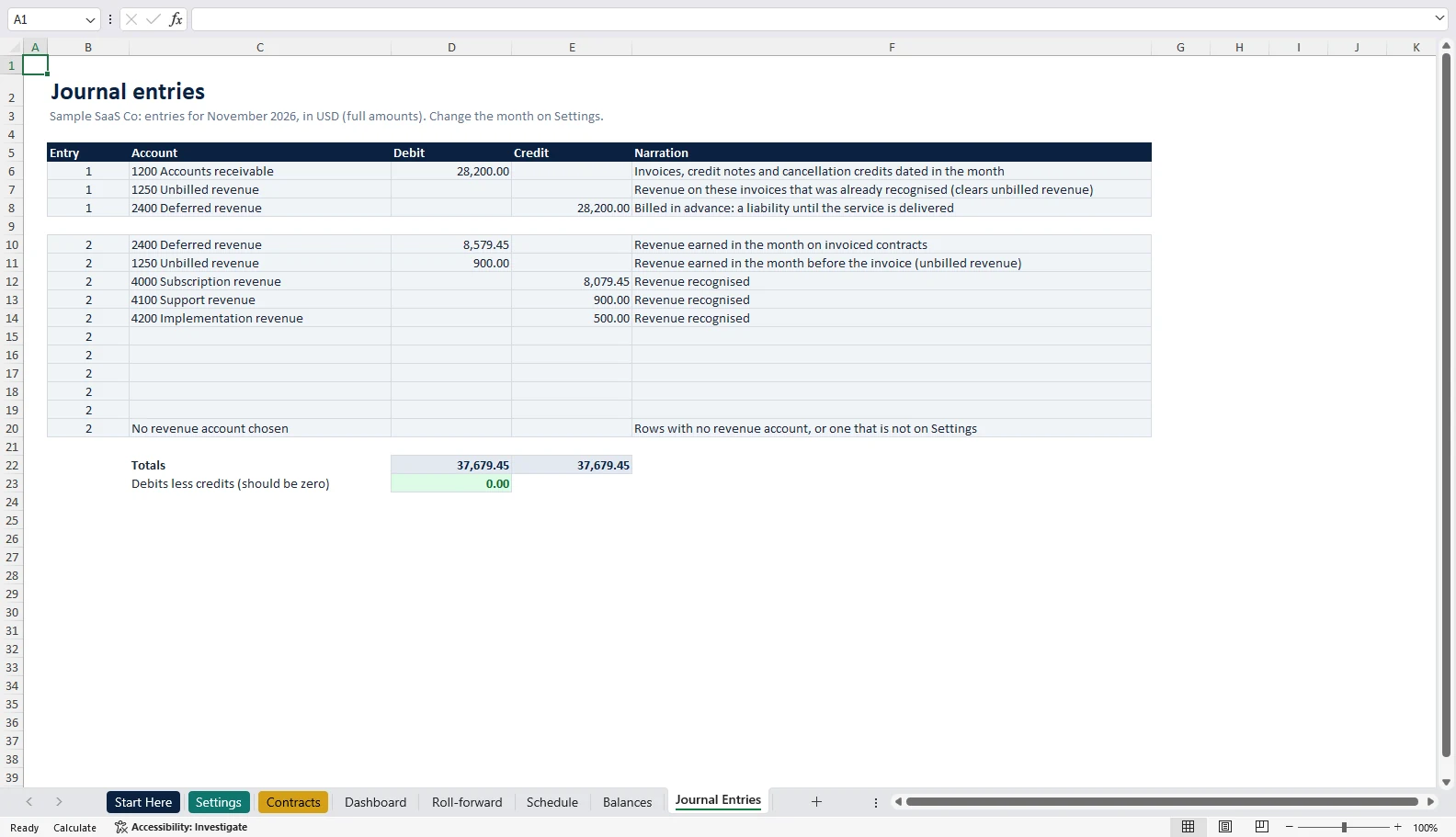
- Balances. Take the deferred revenue total for your reporting month and tie it to the deferred revenue account in your general ledger. Need one month line by line? On Contracts, the last three grey columns show each contract’s revenue for the reporting month and its deferred and unbilled balance at that month end; their totals match the Roll-forward and Journal Entries.
- Roll-forward. Read the closing balance and its current and non-current split, and confirm the difference line is zero.
- Journal Entries. Post the two entries for the month. Debits less credits must be zero. Change the reporting month on Settings to get any other month.
- Dashboard. “Checks: all clear” means formulas are present, no row is flagged, the roll-forward ties out, the entries balance, no account code is used twice and the Contracts sheet agrees with Balances.
Your revenue recognition schedule and deferred revenue waterfall
The Schedule sheet is the deferred revenue waterfall: one row per contract, one column per month, so you can see when each contract’s revenue lands and how much revenue is already locked in for the months ahead.
Your monthly close in four lines: add the month’s invoices and credit notes, move the reporting month, read the checks, then post the two entries and tie Balances to the ledger.
The deferred revenue roll-forward, line by line
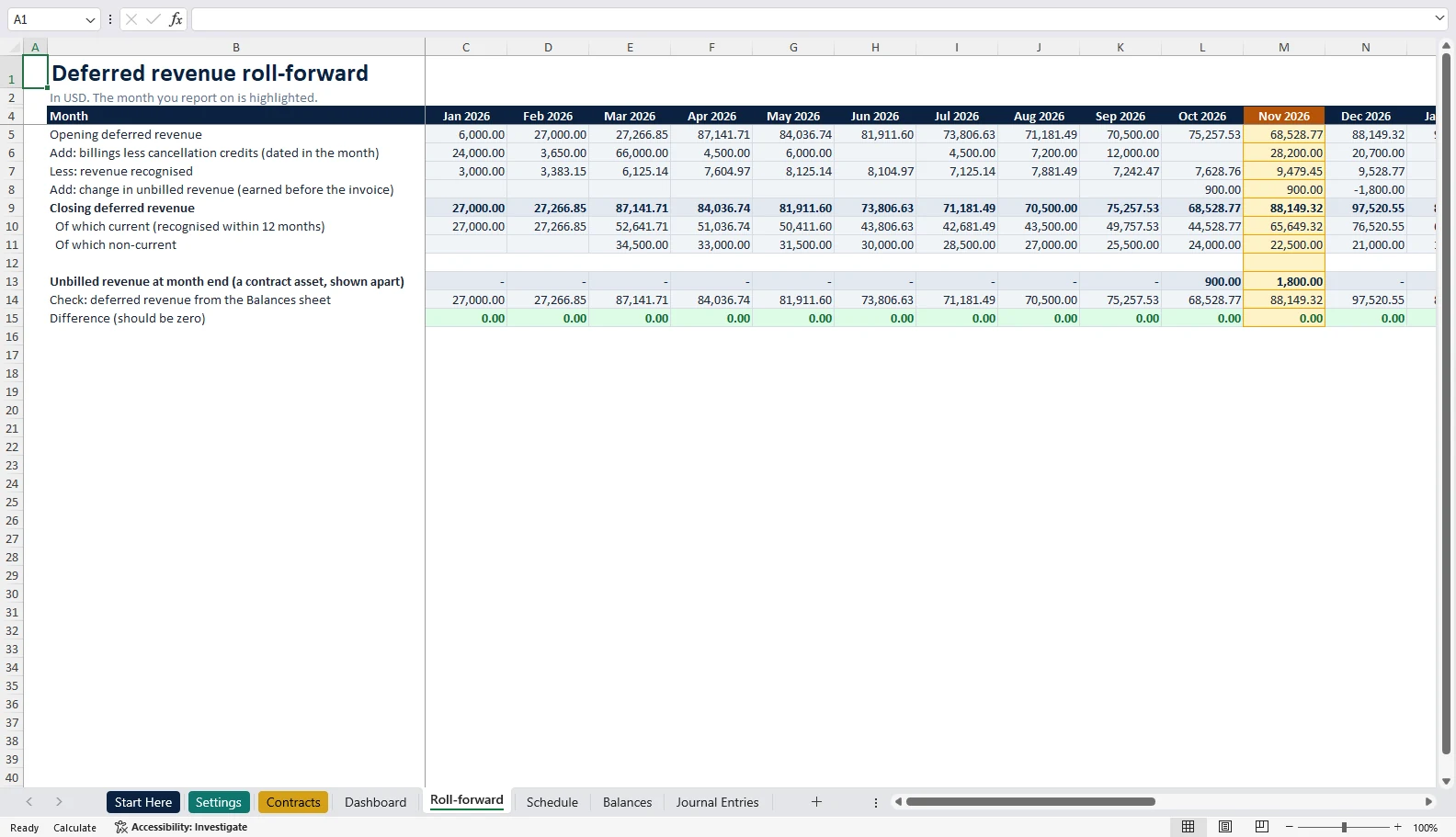
Closing deferred revenue = Opening deferred revenue + Billings - Revenue recognised + Change in unbilled revenueHere is November 2026 from the sample contracts in the workbook:
| Line | November 2026 |
|---|---|
| Opening deferred revenue | 68,528.77 |
| Add: billings (a 30,000.00 annual invoice less a 1,800.00 credit note) | 28,200.00 |
| Less: revenue recognised | 9,479.45 |
| Add: change in unbilled revenue | 900.00 |
| Closing deferred revenue | 88,149.32 |
| Check: deferred revenue from the Balances sheet | 88,149.32 |
| Difference (should be zero) | 0.00 |
Why is there an unbilled line? Part of November’s revenue came from a contract that will only be invoiced in December. That revenue did not come out of deferred revenue, so it is added back here and shown on its own line instead.
The bottom line rebuilds the closing balance contract by contract from the Balances sheet. If a formula is broken or a row is missing, the difference stops being zero and the Dashboard says so.
IFRS 15 and ASC 606 ask for the opening and closing balances of receivables, contract assets and contract liabilities in the notes, plus the revenue recognised from the opening liability. The roll-forward and the Balances sheet give you those raw numbers; the wording of the note is still yours.
Current vs non-current deferred revenue
The part of the closing balance you will recognise within 12 months of the reporting date is current, and the rest is non-current. In the sample, a three-year $54,000 contract billed on 1 March 2026 is recognised at $1,500 a month. At 30 November 2026 its balance is $40,500: $18,000 current and $22,500 non-current.
For the whole book in November that is 65,649.32 current and 22,500.00 non-current. The template recalculates the split every month for each invoiced row: the balance now, less the balance 12 months later.
Unbilled revenue: why it stays apart from deferred revenue
Some customers are billed after the service starts. In the sample, Juniper Clinics buys quarterly support of $2,700 for October to December 2026 and is invoiced on 31 December 2026.
- October: $900 of revenue is earned with no invoice yet, so unbilled revenue is $900 (debit unbilled revenue, credit support revenue).
- November: unbilled revenue grows to $1,800.
- 31 December: the invoice clears it. Debit accounts receivable 2,700, credit unbilled revenue 1,800, credit deferred revenue 900. December’s $900 then moves from deferred revenue into revenue.
- End result: receivable 2,700, deferred revenue 0, unbilled revenue 0.
Within a single contract, the standards present one net position, a contract asset or a contract liability (ASU 2014-09, paragraphs 606-10-45-1 to 45-4). Across different contracts, the general rules against offsetting assets and liabilities apply, so one customer’s unbilled revenue should not reduce another customer’s deferred revenue. That is why the template keeps unbilled revenue on its own line in the roll-forward, the Balances sheet and the journal entries.
Call it unbilled revenue: a contract asset when the right to payment still depends on more performance, or an unbilled receivable when only time stands between you and payment. If one contract has an advance-billed row and an arrears row, give them the same contract ID and net them for that contract on the balance sheet. Review ageing unbilled balances for credit losses.
This also answers a common question: can deferred revenue be negative? On a single row, a negative usually means revenue was earned before billing, which is unbilled revenue, or a credit note.
Journal entries for deferred revenue, for any month
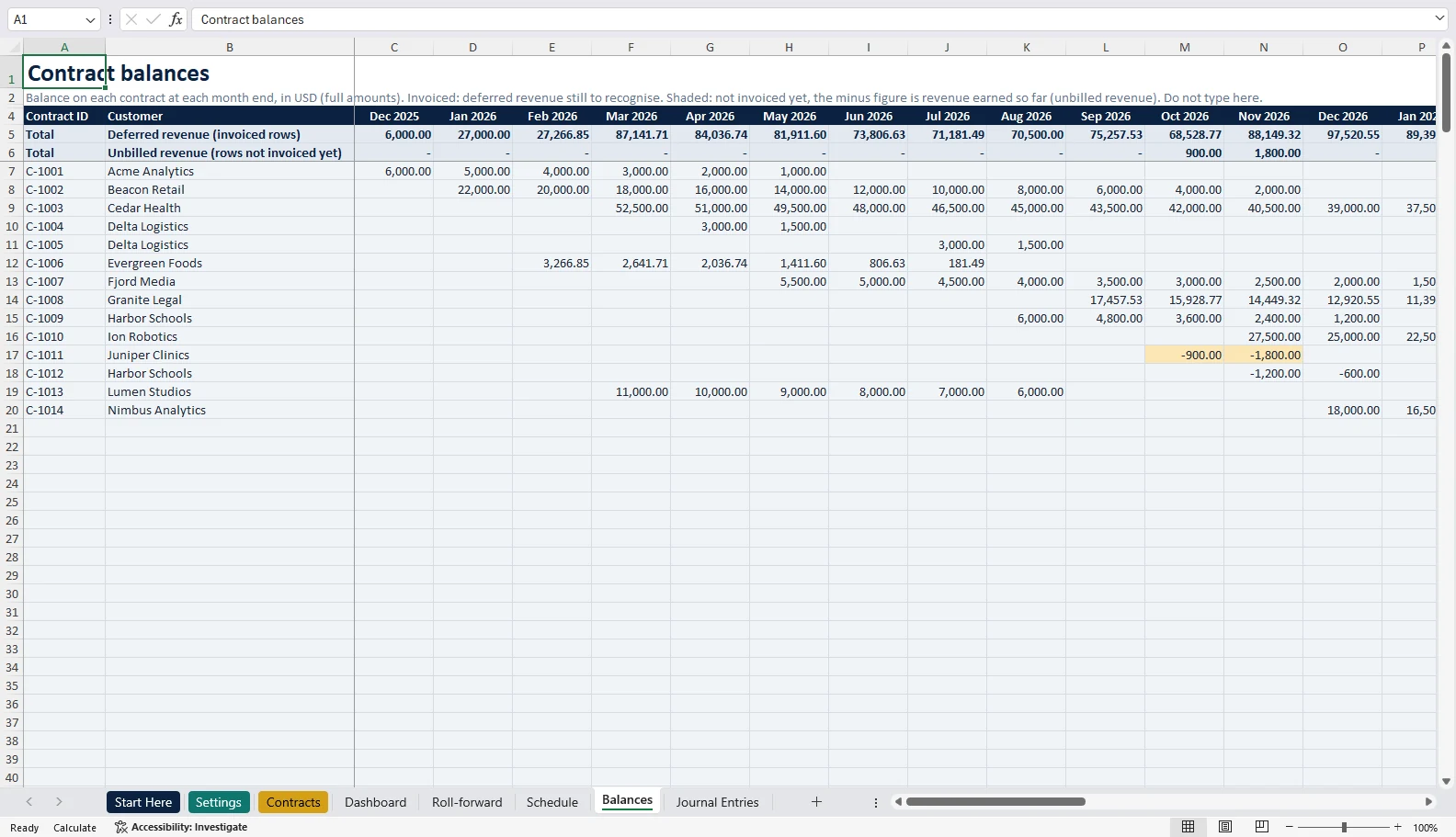
The Journal Entries sheet gives you two entries for the reporting month. Here is November 2026 from the sample:
| Entry | Account | Debit | Credit |
|---|---|---|---|
| 1 | 1200 Accounts receivable | 28,200.00 | |
| 1 | 1250 Unbilled revenue | 0.00 | |
| 1 | 2400 Deferred revenue | 28,200.00 | |
| 2 | 2400 Deferred revenue | 8,579.45 | |
| 2 | 1250 Unbilled revenue | 900.00 | |
| 2 | 4000 Subscription revenue | 8,079.45 | |
| 2 | 4100 Support revenue | 900.00 | |
| 2 | 4200 Implementation revenue | 500.00 | |
| Totals | 37,679.45 | 37,679.45 |
In December, entry 1 includes the arrears invoice from the unbilled section: debit receivable 2,700, credit unbilled revenue 1,800 and deferred revenue 900. A credit note on its own is the reverse of an invoice: debit deferred revenue, credit accounts receivable.
A line called “No revenue account chosen” catches any row without a revenue account, or with a code that is not on Settings, so revenue never goes missing from the entry.
One timing point: a contract liability arises when the customer pays or when payment falls due, whichever is earlier. If your contracts can be cancelled until they are paid, enter the payment or due date in the invoice date column.
Monthly vs Daily, and the 15-day rule
| Method | How it works | Pick it when |
|---|---|---|
| Monthly | Equal monthly parts. It starts in the start month if at least 15 days of service fall in it, otherwise in the next month. A contract from 20 March 2026 to 19 March 2027 runs from April 2026 to March 2027 at $1,000 a month. | You bill in whole months and want simple, even numbers. |
| Daily | Exact days. The same 20 March contract recognises $394.52 in March and the rest by actual days. | Mid-month starts, odd periods, short contracts and cancellations part-way through a month. |
Both are practical ways to measure progress evenly over time; neither is named in the standards. Use one method consistently for similar contracts, and check that the difference between them is not material for you.
Even spreading only fits services the customer benefits from evenly, such as a subscription or a support plan. If the work is uneven, like a project delivered in milestones, it needs a different measure.
Why cumulative rounding makes every contract add up
Split $10,000 over three months and you get 3,333.33, 3,333.34 and 3,333.33: exactly 10,000.00. The naive way rounds a daily rate first, for example $32.88 a day on $12,000, and 32.88 times 365 is 12,001.20, which is $1.20 too much.
The template rounds the cumulative amount to date and subtracts the previous month’s cumulative amount. That is why April shows 986.31 and June 986.30 in the Daily example above. Our guide to Excel formulas for finance covers the rounding functions behind it.
How the formulas work
Monthly share to date = MIN(term, months elapsed) / termDaily share to date = MIN(service days, days elapsed) / service daysCumulative to date = ROUND(amount x share to date, 2)Revenue this month = cumulative to date - cumulative to last monthIn the final month the cumulative amount is set to the exact amount billed, so even amounts with more decimals than the currency uses add up. Every formula is visible in the workbook; there are no macros.
Opening balances, cancellations, credit notes and other real cases
Contracts that started before the schedule
Acme Analytics was billed $12,000 on 1 July 2025 for July 2025 to June 2026, and the schedule starts in January 2026. The $6,000 recognised before the schedule is left out, so the opening deferred revenue at 31 December 2025 is $6,000, followed by $1,000 a month to June. Tie that opening balance to your ledger at the cut-off date; differences usually come from old rounding, a different day count or partial billings.
Cancellations part-way through a contract
In the sample, Lumen Studios was billed $12,000 for March 2026 to February 2027 and cancelled from 1 September 2026. On the original row you type the cancellation date and leave the credit blank: the template recognises $1,000 a month from March to August, credits the unused $6,000 in September and the balance drops to zero.
| What happened | What you enter on the original row | What the template does |
|---|---|---|
| Cancelled, unused part credited | Cancelled from; credit blank | Revenue stops; the unused part, by the row’s own method, is credited and clears the balance. |
| Cancelled, no refund | Cancelled from; credit 0 | The remaining deferred revenue is recognised in the cancellation month. |
| Cancelled, part refund (for example $4,000 of the $6,000) | Cancelled from; credit 4,000 | Revenue stops; the $2,000 you keep is recognised in September. |
| Whole invoice credited after some service | Cancelled from; credit 12,000 | The $6,000 already recognised is reversed in September. |
| Cancelled before the service starts | Cancelled from on or before the start | Full credit, no revenue. |
| Upgrade, downgrade or re-issued invoice | Cancelled from the change date; then add the new invoice as its own row | The old price runs to the change date and the new invoice takes over. |
| Contract that already has a credit note | The same Cancelled from date on the invoice row and on the credit note row | Both stop on that date and only the net unused part is credited. Row check reminds you if the credit note is left open. |
Credit notes without a cancellation
Harbor Schools has a $7,200 plan for August 2026 to January 2027, at $1,200 a month. A downgrade credit note CN-1007, referring to invoice INV-1172, is minus $1,800 for November to January, so the net is $600 a month and the net balance at 30 November is $1,200.
If a credit note relates to months already passed, the template adjusts revenue in the credit note’s month instead of reopening closed months. A credit note that covers only part of a month should use Daily, so it nets exactly against the original. Row check flags a credit larger than the row’s amount, a credit typed as text, a cancellation dated before the invoice and a credit with no cancellation date.
Invoices raised before the service starts
Nimbus Analytics is invoiced $18,000 on 15 December 2026 for a renewal running through 2027. The whole amount is deferred revenue at 31 December 2026, all of it current, and the template starts recognising $1,500 a month in January 2027.
Invoices in another currency
Enter the amount converted at the rate on the invoice date. Deferred revenue is not revalued at month-end exchange rates; an unpaid receivable in a foreign currency still is, in your ledger.
Multi-year upfront billing
For most subscriptions billed annually in advance there is no financing to account for. If a customer pays more than a year ahead of the service, check whether the contract contains a significant financing component; the template does not model interest.
A book schedule, not a tax schedule
In the US, advance payments are generally taxed when received. Under the deferral method of section 451(c), an accrual-method taxpayer includes in the year of receipt the part the books recognise that year, and the rest in the next tax year, even when the books spread it over longer; IRS Publication 538 covers the rules. A 36-month book deferral therefore creates a book-tax difference. You elect the deferral method by filing a return that uses it; switching to it from a method you already use is a change of accounting method and needs Form 3115.
In India, Ind AS 115 follows IFRS 15 on contract assets, contract liabilities and revenue over time, with a few India-specific additions (ICAI educational material on Ind AS 115).
Who this deferred revenue schedule template is for, and what it does not do
It suits SaaS finance teams, agencies on retainers, maintenance and support providers, training and membership businesses, and the bookkeepers and auditors who need a clean tie-out. If you also run payables, our accounts payable template sits alongside it, and the bank reconciliation template closes the loop on cash.
It recognises revenue evenly over time. It does not allocate a bundled price between products, handle usage-based fees or milestones, revalue foreign currency or model financing interest.
Related templates and guides
- Prepaid expense schedule template: the asset-side twin of this workbook.
- Accounts payable template: bills, payments, ageing and vendor statements.
- Bank reconciliation template: match the bank to the books every month.
- Excel financial dashboard template: ten dashboard designs for management reporting.
- MIS report format: the monthly report pack that deferred revenue feeds into.
- Cash flow decision tool: cash timing, which deferred revenue deliberately separates from revenue timing.
- AI prompts for auditors: prompts for reviewing a roll-forward and its support.
Please note: we update this page from time to time, but accounting standards, tax rules and their interpretation change, and there can be a gap between a change and our update. Check the standard or your adviser before you act. This template and guide help with working papers and estimates; they are not accounting, tax or legal advice, and ReconScribe is not responsible for decisions made on them.
Frequently asked questions
How do you create a deferred revenue schedule in Excel?
Enter one row per invoice with the invoice date, the service start and end, and the amount. Spread each amount over its service months, read the monthly totals, check that a roll-forward of the balance ties out, then post the month's journal entries. This deferred revenue schedule template does every step after the first one for you.
What is the journal entry for deferred revenue?
When you invoice in advance: debit accounts receivable and credit deferred revenue. Each month, as you deliver the service: debit deferred revenue and credit revenue. If the revenue was earned before the invoice, the invoice first clears the unbilled revenue balance and only the rest goes to deferred revenue.
Is deferred revenue a debit or a credit, an asset or a liability?
Deferred revenue is a liability with a credit balance. It is money billed or received for work you still owe the customer. It turns into revenue, a credit to the income statement, as you deliver the service, and the liability is debited down to zero by the end of the contract.
Is deferred revenue a current or a non-current liability?
The part you will recognise within 12 months of the reporting date is current, and the rest is non-current. A three-year contract billed upfront is partly non-current for most of its first two years. The template splits every month's closing balance this way, contract by contract.
What is the difference between deferred revenue and unbilled revenue?
Deferred revenue is billed but not yet earned, so it is a liability. Unbilled revenue is earned but not yet billed, so it is an asset: a contract asset, or an unbilled receivable when only time stands between you and payment. The template keeps the two on separate lines so neither hides the other.
Is deferred revenue the same as unearned revenue?
Yes. Deferred revenue, unearned revenue and contract liability describe the same balance. IFRS 15 and ASC 606 use the term contract liability but allow other labels, so an unearned revenue schedule and a deferred revenue schedule are the same thing.
What is a deferred revenue waterfall, and how is it different from a roll-forward?
A deferred revenue waterfall shows each contract across the months, so you can see when its revenue lands. A roll-forward works on totals: opening balance, plus billings, less revenue recognised, equals the closing balance. The template gives you both, plus a Balances sheet with every contract at every month end.
How do you record a credit note or reverse deferred revenue?
Add the credit note as its own row with a negative amount, the credit note date and the service period it covers. It reduces deferred revenue and the revenue still to come for that period. For months already passed, the template books the adjustment in the credit note's month instead of reopening closed months.
How do you record a cancellation or an upgrade part-way through a contract?
On the original row, type the date the service stops and the credit you give; leave the credit blank to credit the unused part, or type 0 if there is no refund. Revenue stops on that date and the credit clears the balance. If the contract also has a credit note running past that date, type the same date on the credit note row. For an upgrade or downgrade, add the new invoice as its own row from the same date.
Is monthly recurring revenue the same as revenue recognised?
Not always. Monthly recurring revenue is a sales metric based on the subscription price. Revenue recognised follows the service actually delivered, so it differs for mid-month starts, cancellations, credits and one-off fees. Under the Monthly method with whole-month contracts the two often match; the Schedule sheet shows the recognised figure.
Why does my deferred revenue not tie to the trial balance?
The usual causes are an opening balance that was never tied out, manual journals posted outside the schedule, unbilled amounts netted into the liability, and rounding. Start from the Balances sheet total for the month, compare it with the ledger, then check the roll-forward difference line, which should be zero.
Is this deferred revenue schedule template free, and which Excel versions does it work in?
Yes. It is free with a ReconScribe account. It is built for Excel 2016 or later and Excel for the web, holds 300 contracts and takes any currency, since the currency is a label. It has not been tested in Google Sheets yet. Enter amounts excluding sales tax, VAT or GST, because tax collected is not revenue.
Sources
- FASB, ASU 2014-09, Revenue from Contracts with Customers (Topic 606)
- FASB, Comparison of Topic 606 and IFRS 15
- IFRS Foundation, IFRS 15 Revenue from Contracts with Customers
- IFRS Foundation, IFRS 18 Presentation and Disclosure in Financial Statements
- IRS, Publication 538, Accounting Periods and Methods
- ICAI, Educational Material on Ind AS 115