
Under the new labour codes, the way you split a CTC decides what PF, ESIC, gratuity and bonus will cost. Wages are now Basic, DA and retaining allowance plus every fixed allowance the law does not exclude. And if the excluded payments, such as HRA, conveyance, overtime and commission, add up to more than half of total pay, the excess is counted as wages anyway.
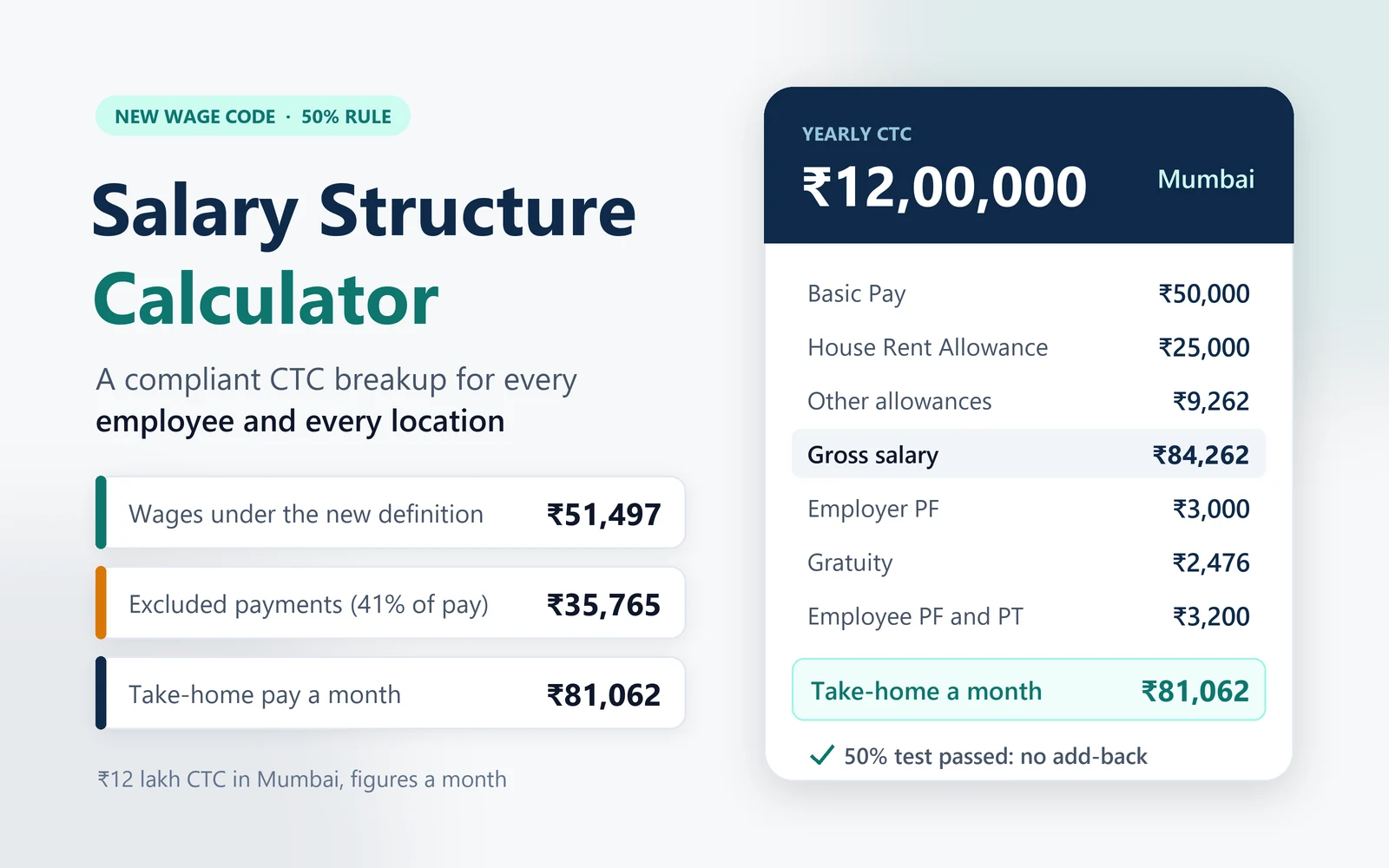
This salary structure calculator builds a salary structure as per the new labour code, with the full CTC breakup, for one employee or a whole team. Enter a yearly CTC and it fills a ready structure with Basic, HRA, the usual allowances and a balancing Special Allowance. It runs the 50% wage test, then applies PF, ESIC, professional tax, labour welfare fund, gratuity and statutory bonus using the rules of each employee’s location.
You can rename, add, delete, hide or reclassify any component, change every percentage from Basic and HRA to PF, gratuity and bonus, type over any amount for one employee, import a whole team from a CSV file, and download the result as a PDF or as an Excel workbook with live formulas.
What the law says now: the Code on Wages, 2019 and the Code on Social Security, 2020 came into force on 21 November 2025 (PIB release). Both use one definition of wages, in Section 2(y) and Section 2(88). Payments under clauses (a) to (i), such as HRA, conveyance, overtime and commission, stay out of wages only up to one half of total remuneration. Gratuity and retrenchment compensation sit outside that test.
The salary structure calculator follows the Ministry of Labour and Employment’s FAQs of December 2025 and 16 March 2026, and uses the rates in force on 27 September 2026: EPF on wages up to ₹25,000, ESIC and statutory bonus for wages up to ₹21,000, and the latest professional tax and labour welfare fund rates for every state.
How to use the salary structure calculator
The salary structure calculator works in five steps, one card each. Everything updates as you type, and your entries stay in this browser for your next visit.
- Employees and CTC. Add each person with a location and a yearly CTC, or import a CSV file into the salary structure calculator: download the sample, fill one row per person and import it. The file is read in your browser and never uploaded. Gender matters only for Maharashtra professional tax, where women earning up to ₹25,000 a month pay none. Leave the PT column blank to use the state rate, or type a monthly amount where the local body sets it, as in Tamil Nadu.
- Locations. Add every office or branch with its state and city. Professional tax and labour welfare fund follow the state. HRA defaults to 50% of Basic in Delhi, Mumbai, Kolkata, Chennai, Bengaluru, Hyderabad, Pune and Ahmedabad and 40% elsewhere; type your own rate for any location. For Kerala, pick the labour welfare scheme that covers the establishment, and mark a location not covered if it is outside the state’s Act.
- Salary components. Each row has a type (monthly earning, paid yearly, employer contribution or deduction), a rule (percent of CTC, percent of Basic, a fixed amount or the balancing figure), a value and a wage treatment. Switch rows on or off, rename them, delete them, or add one from the ready-made list. The employer’s choices sit on their rows too: the PF rate for each side, the gratuity percentage and the bonus rate. Untick Show to keep a component in the totals but out of the printed structure.
- Statutory settings. Switch EPF, ESIC, professional tax, labour welfare fund, gratuity and statutory bonus on or off for the whole sheet. Choose PF on capped or full wages and whether gratuity sits inside the CTC. Rates fixed by law, such as the ESIC percentages and the ₹25,000 PF ceiling, sit under Advanced so you can update them when the law changes; any change is flagged.
- Results and downloads. Check gross pay, take-home pay, the CTC and the total wages with their backup. Every amount follows the rules above; type over one to fix it for that person, and the balancing figure keeps the CTC exact. Then download a PDF for one person or for everyone, or the Excel workbook. Downloads are free with a ReconScribe account.
When the CTC is too small for every allowance, the salary structure calculator shrinks the allowances in list order and names the ones it reduced, so the structure always adds up to the CTC.
Salary structure as per the new labour code: what changed
A salary structure as per the new labour code reflects four changes, and the salary structure calculator applies all of them:
- One definition of wages. Basic, DA and retaining allowance, plus fixed allowances the law does not exclude, are the wages for PF, ESIC, gratuity and bonus alike.
- The 50% rule. Excluded payments such as HRA, conveyance and commission can be at most half of total remuneration. The excess is added back to wages.
- A higher PF ceiling. EPF is worked out on wages up to ₹25,000 a month from 17 September 2026, up from ₹15,000.
- New wages for ESIC and bonus. The ₹21,000 limits for ESIC and statutory bonus now apply to the new wages, so an add-back can end both for an employee who was covered before.
To see what the new rules change for your team, enter your current structure in the salary structure calculator and compare each employee’s wages, PF and take-home pay, then adjust Basic or the allowances to settle the new salary structure for 2026.
Compliance checks and the total wages backup
Under each structure the salary structure calculator shows the total wages under the new definition with a line by line backup: every component counted as wages, the amount added back under the 50% rule, and the total that PF, ESIC, gratuity and bonus are worked out on. The backup uses exact amounts, so an auditor can follow it to the paisa.
The salary structure calculator also flags anything the law expects that your settings leave out, without changing a figure. It tells you when the wage condition is not met and an amount is added back, when ESIC applies because wages are within ₹21,000 but ESIC is switched off, when EPF applies within the ₹25,000 ceiling but is switched off, when a state levies labour welfare fund or professional tax that is not included, when statutory bonus is due but left out, when gratuity is not provided for, and when a rate set by law has been changed. You decide what to do with each flag; the salary sheet shows how many each person has.
The new salary structure: defaults and why each component is there
The starting structure in the salary structure calculator is built for the new wage definition. Every value can be changed, and the last column explains each default.
| Component | Default | Counts as | Why |
|---|---|---|---|
| Basic Pay | 50% of CTC | Wages | Keeps wages near half of total pay, so the 50% test rarely adds anything back. |
| Dearness Allowance | ₹0 | Wages | Most private employers pay none. Enter it if you do. |
| House Rent Allowance | 50% of Basic in the eight metro cities, 40% elsewhere | Excluded, clause (f) | Matches the HRA exemption limit for employees on the old tax regime. |
| Conveyance Allowance | ₹1,600 a month | Excluded, clause (d) | A common fixed travel allowance. |
| Leave Travel Allowance | 8.33% of Basic | Excluded, clause (d) | One month’s Basic a year, the usual LTA. |
| Mobile Allowance | ₹1,000 a month | Excluded, clause (e) | Paid for work use. If you pay the bill directly, switch it to remuneration in kind, as the March 2026 FAQs treat mobile recharge. |
| Children Education Allowance | ₹200 a month | Wages | No exclusion covers it, so it counts as wages. |
| Equipment Allowance | ₹1,000 a month | Excluded, clause (e) | For the laptop, internet or tools the job needs. |
| Special Allowance | Balancing figure | Wages | Takes whatever is left, so the structure adds up to the CTC. |
| Performance Bonus | 10% of CTC, paid yearly | Outside the test | The Ministry’s FAQs say performance incentives are not wages. |
The salary structure calculator works out the statutory rows for you, on the wages that come out of the 50% test:
| Component | Rate used | Counts as |
|---|---|---|
| Statutory Bonus | 8.33% of ₹7,000 or the minimum wage, whichever is higher, when wages are up to ₹21,000 | Excluded, clause (a) |
| Employer PF (EPF and EPS) | 12% of wages up to ₹25,000 | Excluded, clause (c) |
| EDLI and PF admin charges | 0.50% and 0.50% | Outside the test |
| Employer ESIC | 3.25% when wages are up to ₹21,000 | Outside the test |
| Gratuity | 15/26 of a month’s wages a year, 4.81% a month | Outside the test |
| Employer and employee LWF | The state’s rate, in the state’s months | Outside the test |
| Employee PF | 12% of wages up to ₹25,000 | Deduction |
| Employee ESIC | 0.75% when wages are up to ₹21,000 | Deduction |
| Professional Tax | The state’s slab | Deduction |
The Add component list has ready-made extras with the right treatment: Employer NPS (clause (c)), Overtime (h), Commission (i), Meal Card (remuneration in kind), Shift Allowance and Retaining Allowance (wages), Uniform Allowance (e), Award or Settlement Pay (g), and Reimbursements against bills and Group Health Insurance (outside the test).
The 50% wage rule in the salary structure calculator
Section 2(y) of the Code on Wages, 2019 lists the payments that are not wages, clauses (a) to (k). Its first proviso adds a limit: if the payments under clauses (a) to (i) are more than one half of all remuneration, the amount above that half is deemed to be wages. The Ministry’s March 2026 FAQs say employer PF and pension contributions and statutory bonus count in that total, while gratuity, ESIC and other retirement benefits do not. Remuneration in kind counts as wages up to 15% of total wages.
Employer PF makes this circular: PF depends on wages, and wages depend on a test that includes PF. The salary structure calculator solves it step by step until the figures settle, and checks that ESIC and bonus coverage agree with the wages it lands on.
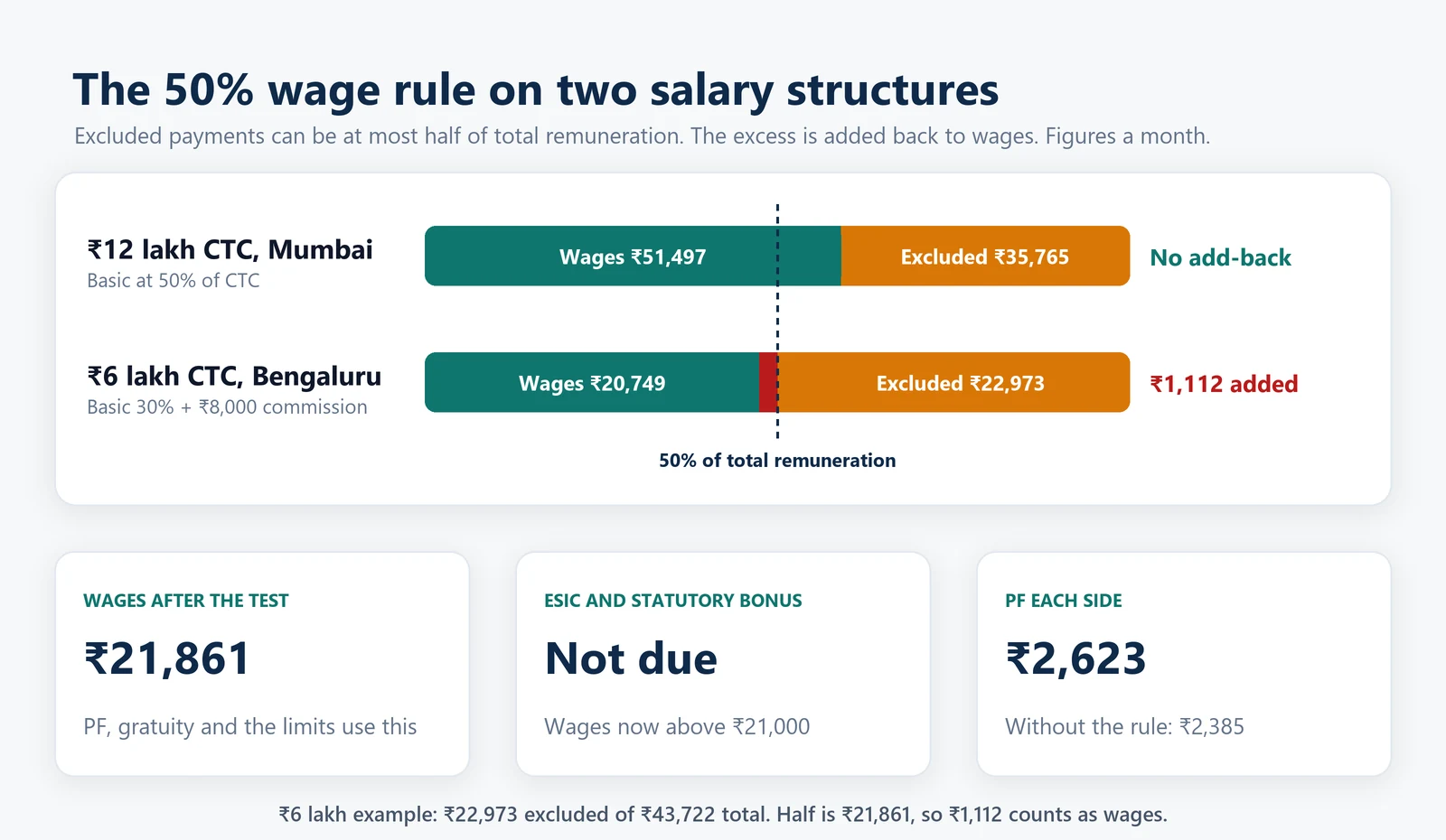
Example 1: ₹12 lakh CTC in Mumbai, no add-back
With the default structure, Basic is ₹50,000 a month. The wage components (Basic, Children Education Allowance and Special Allowance) come to ₹51,497. The excluded payments are ₹35,765: HRA of ₹25,000, conveyance and LTA of ₹5,765, mobile and equipment allowances of ₹2,000 and employer PF of ₹3,000. Total remuneration for the test is ₹87,262, so the limit is ₹43,631. The exclusions are 41% of the total, inside the limit, so nothing is added back and wages stay at ₹51,497.
| Component | Monthly | Yearly |
|---|---|---|
| Basic Pay | ₹50,000 | ₹6,00,000 |
| House Rent Allowance | ₹25,000 | ₹3,00,000 |
| Conveyance Allowance | ₹1,600 | ₹19,200 |
| Leave Travel Allowance | ₹4,165 | ₹49,980 |
| Mobile Allowance | ₹1,000 | ₹12,000 |
| Children Education Allowance | ₹200 | ₹2,400 |
| Equipment Allowance | ₹1,000 | ₹12,000 |
| Special Allowance | ₹1,297 | ₹15,558 |
| Gross salary | ₹84,262 | ₹10,11,138 |
| Performance Bonus (paid yearly) | ₹1,20,000 | |
| Employer PF (EPF + EPS) | ₹3,000 | ₹36,000 |
| EDLI and PF admin charges | ₹250 | ₹3,000 |
| Gratuity | ₹2,476 | ₹29,712 |
| Employer LWF | ₹150 | |
| Cost to company (CTC) | ₹1,00,000 | ₹12,00,000 |
| Employee PF | ₹3,000 | ₹36,000 |
| Professional Tax | ₹200 | ₹2,500 |
| Employee LWF | ₹50 | |
| Take-home pay (before income tax) | ₹81,062 | ₹9,72,588 |
PF is capped at the ₹25,000 ceiling, so it is ₹3,000 from each side. Gratuity is ₹2,476 a month, ESIC and statutory bonus do not apply, labour welfare fund is ₹25 from the employee and ₹75 from the employer in June and December, and take-home pay is ₹81,062 a month before income tax.
Example 2: ₹6 lakh CTC in Bengaluru with commission, an add-back of ₹1,112
Now take a sales executive with Basic at 30% of CTC (₹15,000 a month) and a fixed commission of ₹8,000 a month, with the other defaults unchanged. The wage components come to ₹20,749, but the excluded payments reach ₹22,973, because commission (clause (i)) and HRA (clause (f)) are both excluded. Total remuneration is ₹43,722 and half of it is ₹21,861, so ₹1,112 is added back and wages become ₹21,861.
That add-back does more than raise PF. Without the rule, wages would be ₹19,874: ESIC would apply (₹150 from the employee and ₹646 from the employer) and so would a statutory bonus of ₹583 a month. With the rule, wages cross ₹21,000, so neither applies, and PF rises to ₹2,623 a month on each side instead of ₹2,385.
Compare this with the Ministry’s own illustration in its December 2025 FAQs: total remuneration of ₹76,000 with Basic and DA of ₹20,000 and allowances of ₹40,000 gives a limit of ₹38,000, an add-back of ₹2,000 and wages of ₹22,000. That example counts gratuity in the total, while the March 2026 FAQs leave it out. The advanced settings let you follow either reading.
PF, ESIC, gratuity and bonus on the new wages
Every statutory figure in the salary structure calculator uses the wages after the 50% test, not Basic alone.
- EPF: 12% from the employee and 12% from the employer, on wages up to ₹25,000 a month from 17 September 2026 (S.O. 5109(E)). Of the employer’s share, 8.33% of wages up to the ceiling goes to the pension fund (EPS) and the rest to EPF. The employer also pays 0.50% for EDLI and 0.50% as admin charges. Choose full wages instead of the ceiling if your company pays PF on actual wages. Our EPF calculator shows the split in detail.
- ESIC: since 21 November 2025, ESIC uses the Code’s wage definition (ESIC circular of 11 December 2025). Employees with wages up to ₹21,000 a month are covered: 0.75% from the employee and 3.25% from the employer, rounded up to the next rupee. Employees whose average daily wage is ₹176 or less pay no employee share.
- Gratuity: 15 days’ wages for every year of service, counting 26 working days in a month, which works out to 4.81% of monthly wages. It is payable after five years of service, or one year for fixed-term employees, up to ₹20 lakh. Use the gratuity calculator to work out a payout.
- Statutory bonus: due to employees with wages up to ₹21,000 a month, at 8.33% to 20% of ₹7,000 or the minimum wage, whichever is higher, under S.O. 4710(E) and S.O. 4711(E) of 25 August 2026. The salary structure calculator adds the monthly accrual to the CTC. The statutory bonus calculator covers the yearly payout and set-off.
Professional tax and labour welfare fund by location
Professional tax and labour welfare fund are state levies, so the same CTC gives different deductions in Mumbai, Bengaluru and Gurugram. The salary structure calculator reads each employee’s location and applies that state’s rules.
Professional tax
The slabs in the salary structure calculator come from our professional tax calculator. Maharashtra charges ₹200 a month and ₹300 in February (₹2,500 a year) for men earning above ₹10,000 and women earning above ₹25,000. Karnataka charges ₹200 a month and ₹300 in February from ₹25,000. West Bengal uses its new slabs in force from 1 October 2026. Delhi, Haryana, Uttar Pradesh, Rajasthan and several other states charge none. In Tamil Nadu, Puducherry, Manipur and Meghalaya the amount depends on the local body, so type it in the PT column.
Labour welfare fund rates by state
Sixteen states and union territories collect labour welfare fund (LWF) from employees and employers. The amounts are small but fall due in set months, and several changed recently: Maharashtra moved to a flat ₹25 and ₹75 in June 2024, Karnataka to ₹50 and ₹100 from 2025, Madhya Pradesh raised the employer share to ₹50 in January 2026, and Haryana’s monthly cap is ₹35 from 1 January 2026. We checked every rate below against the state’s Act, gazette or welfare board on 27 September 2026.
| State | Employee | Employer | Deducted | A year (employee / employer) |
|---|---|---|---|---|
| Andhra Pradesh | ₹30 | ₹70 | December | ₹30 / ₹70 |
| Chandigarh | ₹5 | ₹20 | Every month | ₹60 / ₹240 |
| Chhattisgarh | ₹15 | ₹45 | June and December | ₹30 / ₹90 |
| Delhi | ₹0.75 | ₹2.25 | June and December | ₹1.50 / ₹4.50 |
| Goa | ₹60 | ₹180 | June and December | ₹120 / ₹360 |
| Gujarat | ₹6 | ₹12 | June and December | ₹12 / ₹24 |
| Haryana | 0.2% of pay, up to ₹35 | Twice the employee share, up to ₹70 | Every month | Up to ₹420 / ₹840 |
| Karnataka | ₹50 | ₹100 | December | ₹50 / ₹100 |
| Kerala (shops and offices) | ₹50 | ₹50 | Every month | ₹600 / ₹600 |
| Kerala (IT and ITES scheme) | ₹100 | ₹100 | Every month | ₹1,200 / ₹1,200 |
| Kerala (factories, plantations, transport) | ₹45 | ₹45 | June and December | ₹90 / ₹90 |
| Madhya Pradesh | ₹10 | ₹50 | June and December | ₹20 / ₹100 |
| Maharashtra | ₹25 | ₹75 | June and December | ₹50 / ₹150 |
| Odisha | ₹10 | ₹20 | June and December | ₹20 / ₹40 |
| Punjab | ₹5 | ₹20 | Every month | ₹60 / ₹240 |
| Tamil Nadu | ₹20 | ₹40 | December | ₹20 / ₹40 |
| Telangana | ₹2 | ₹5 | December | ₹2 / ₹5 |
| West Bengal | ₹3 | ₹30 | June and December | ₹6 / ₹60 |
The other twenty states and union territories, including Uttar Pradesh, Rajasthan, Bihar and Assam, have no payroll LWF. Madhya Pradesh and Chhattisgarh also set a minimum employer payment per establishment of ₹2,500 and ₹1,500 a half-year. In the salary structure calculator, monthly LWF shows in both columns, while half-yearly and yearly LWF shows in the yearly column with a note naming the months.
Download the salary structure as a PDF or Excel file
Downloads from the salary structure calculator are free for ReconScribe members: sign in or create a free account when you click download, and the structure you built is still there when you come back.
PDF: the salary structure calculator gives one clean page per employee with the structure, the 50% wage test and notes, ready to attach to an offer letter. With several employees you also get a salary sheet page. Components you hide stay in the totals and are noted at the foot of the page.
Excel: the download is a working salary structure format in Excel, not a picture of one. Every figure is a formula: one sheet per employee, a Settings sheet with the switches, rates and locations, and a Salary Sheet register. Change a CTC, a location or a component and everything recalculates, including the 50% test, PF, ESIC, professional tax and LWF. Each employee sheet carries the same total wages backup and compliance checks as the calculator, and Settings keeps the employer’s choices apart from the rates set by law, with a flag on any legal rate you change. There are no macros, so it opens without security prompts, and the figures show even before you click Enable Editing.
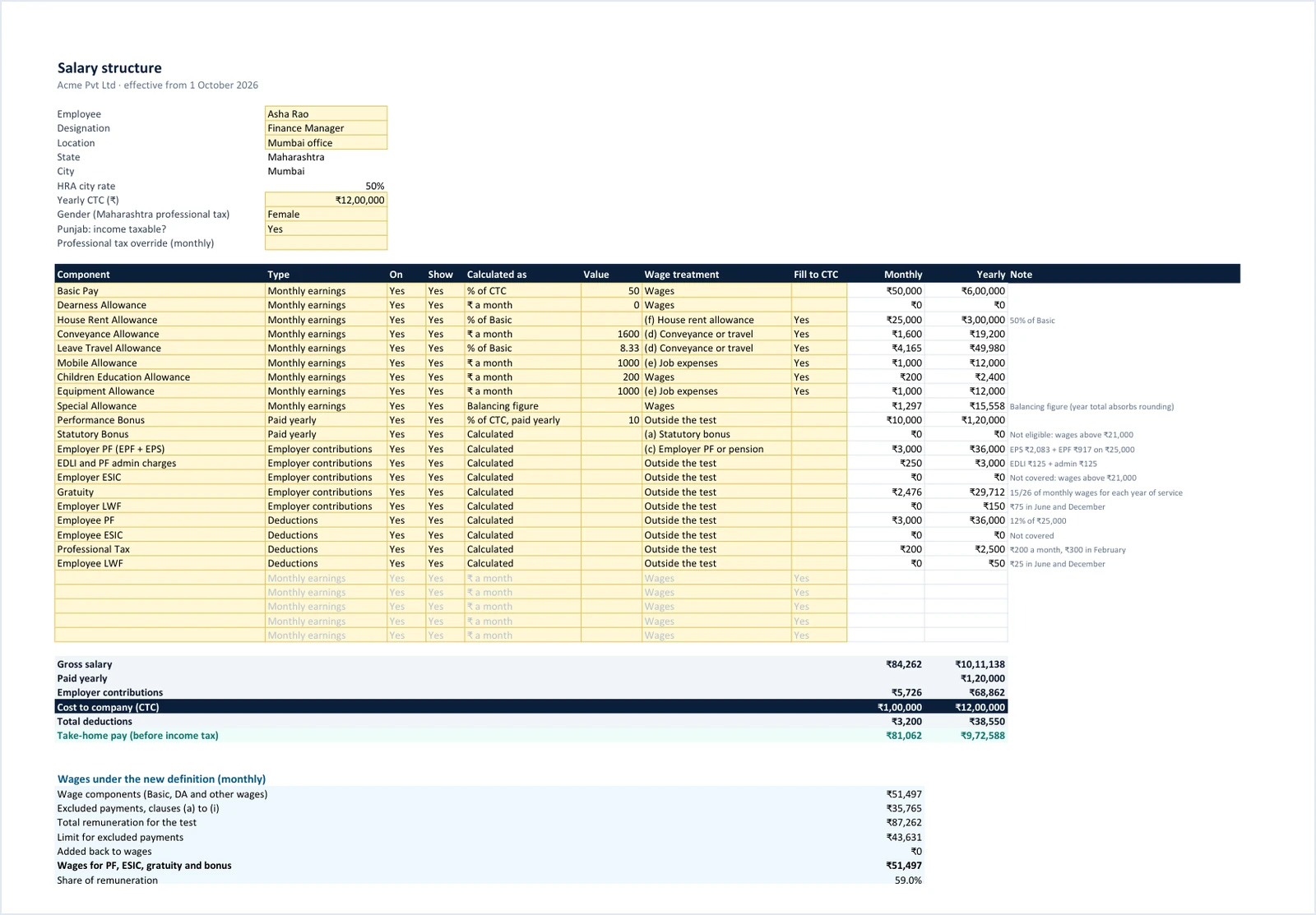
To add a component in Excel, type its name in an empty row of the table and pick its type, rule, value and wage treatment. To add a person, copy an employee sheet and type its tab name in the Salary Sheet.
Tips for a salary structure as per the new wage code
These habits keep a structure predictable, whether you build it in the salary structure calculator or by hand.
- Keep Basic and DA near half of pay. The 50% test then rarely adds anything back, and PF and gratuity stay predictable.
- Decide how you treat Special Allowance. Section 2(y) counts all remuneration except the listed exclusions, and our new wage definition guide reads a fixed Special Allowance as wages. Some advisers read the Ministry’s FAQs as putting every allowance in the 50% test instead. Switch the treatment in the salary structure calculator to see the difference, and follow your adviser.
- Watch the ₹21,000 line. An add-back can lift wages above ₹21,000 and end ESIC and statutory bonus for that employee, as example 2 shows.
- Keep reimbursements and performance pay outside. Payments against bills and annual performance incentives are not wages. A fixed allowance paid without bills is not a reimbursement.
- Match your CTC policy. Some employers keep gratuity, EDLI and admin charges outside the CTC. Switch them off in the statutory settings if you do.
- Take-home pay here is before income tax. Use the take-home salary calculator for tax under either regime, and the HRA exemption calculator if the employee claims HRA.
Please note: we update this salary structure calculator from time to time, but labour laws, rates and thresholds change and there can be a gap between a change and our update. It assists with estimates; it is not legal, tax or payroll advice. Check every figure against the latest notifications before you use it. ReconScribe is not responsible for decisions made on these figures.
Frequently asked questions
What does a salary structure calculator do?
It turns a yearly CTC into a full CTC breakup: Basic, HRA, allowances, employer contributions and deductions. This salary structure calculator also runs the 50% wage test of the new labour codes and applies PF, ESIC, professional tax, labour welfare fund, gratuity and statutory bonus for each employee's location, then gives you the result as a PDF or an Excel file.
What is the 50% wage rule in the new labour code?
Payments that Section 2(y) of the Code on Wages keeps out of wages under clauses (a) to (i), such as HRA, conveyance, overtime and commission, can be at most half of total remuneration. Any amount above that half is added back to wages, and PF, ESIC, gratuity and bonus are worked out on the higher figure.
Does Basic salary have to be 50% of CTC under the new labour code?
No. The law does not fix Basic at 50% of CTC. It says the payments kept out of wages, such as HRA, conveyance and commission, can be at most half of total remuneration, and any excess is added back to wages. Keeping Basic, DA and the other wage items near half of pay is simply the easiest way to avoid an add-back, which is why the salary structure calculator starts Basic at 50% of CTC. Total remuneration for the test is also not the same as CTC: on the Ministry's March 2026 FAQs, gratuity, ESIC and performance incentives stay outside it.
Is Special Allowance part of wages under the new definition?
A fixed Special Allowance is not in any of the listed exclusions, so on the plain reading of Section 2(y) it counts as wages, and the salary structure calculator treats it that way by default. Some advisers read the Ministry's FAQs as putting every allowance in the 50% test instead. You can switch its treatment and compare.
Is HRA counted as wages under the labour codes?
No. HRA is excluded under clause (f), but it counts towards the 50% limit. If HRA and the other exclusions come to more than half of total remuneration, the excess becomes wages.
How is PF calculated on the new salary structure?
PF is 12% from the employee and 12% from the employer on wages after the 50% test, counted up to ₹25,000 a month from 17 September 2026 unless your company pays PF on full wages. At the ceiling that is ₹3,000 a month from each side.
Will take-home salary go down under the new labour code?
It can. When wages rise, so does everything worked out on them: employee PF comes out of pay, and where employer PF and gratuity sit inside the CTC, a higher figure there leaves less for gross pay. PF is counted on wages up to ₹25,000 a month, so for employees already above that line PF stays at ₹3,000 a side unless the company pays PF on full wages. The salary structure calculator shows take-home pay before income tax for each employee, so you can compare structures before you change them.
When does ESIC apply to an employee?
When wages under the new definition are ₹21,000 a month or less. The employee pays 0.75% and the employer 3.25%. Because wages now include any add-back, an employee with a low Basic can cross the limit, so the salary structure calculator checks coverage for every employee.
Should gratuity be part of the CTC?
Many employers include a monthly gratuity provision of 4.81% of wages in the CTC, and the salary structure calculator does so by default. If your offer letters keep gratuity outside the CTC, switch it off in the statutory settings.
Which states charge labour welfare fund?
Sixteen: Andhra Pradesh, Chandigarh, Chhattisgarh, Delhi, Goa, Gujarat, Haryana, Karnataka, Kerala, Madhya Pradesh, Maharashtra, Odisha, Punjab, Tamil Nadu, Telangana and West Bengal. Most deduct in June and December or once a year in December, while Haryana, Punjab, Chandigarh and Kerala's shops fund deduct every month.
Is there a salary structure format in Excel as per the new wage code?
Yes. The Excel download from the salary structure calculator is a salary structure format built for the new wage code: one sheet per employee with live formulas for the 50% test, PF, ESIC, professional tax and LWF, a Settings sheet and a salary sheet register. It has no macros, and you can add components, change rates or copy a sheet for a new employee.
Can I import employees from a CSV file?
Yes. Download the sample CSV from the salary structure calculator, fill one row per person with the name, location, state, city, yearly CTC and gender, and import it. The file is read in your browser and never uploaded. Add a column named after any component, such as Conveyance Allowance, to fix that monthly amount for the person.
Do I need an account to download the PDF or Excel file?
Downloads are free for ReconScribe members. Sign in or create a free account when you click download; the structure you built stays in your browser, so it is still there when you come back. The salary structure calculator itself works without an account.
Is this salary structure calculator updated for 2026?
Yes. It uses the rules in force on 27 September 2026: the new wage definition from 21 November 2025, EPF on wages up to ₹25,000 from 17 September 2026, ESIC and statutory bonus for wages up to ₹21,000, the August 2026 bonus notifications, West Bengal's professional tax slabs from 1 October 2026 and the current labour welfare fund rates.
Sources
Every rate and rule in the salary structure calculator and on this page was checked against these official documents on 27 September 2026.
- Code on Wages, 2019, Section 2(y) and the bonus chapter (India Code).
- Code on Social Security, 2020, Section 2(88) (India Code).
- PIB release on the labour codes coming into force on 21 November 2025.
- Ministry of Labour and Employment FAQs on the labour codes (December 2025).
- Ministry of Labour and Employment additional FAQs (16 March 2026).
- Code on Wages (Central) Rules, 2026, G.S.R. 343(E).
- Social Security (Central) Rules, 2026, G.S.R. 344(E).
- Gazette notification S.O. 5109(E): EPF wage ceiling of ₹25,000 from 17 September 2026.
- ESIC circular on the new wage definition (11 December 2025).
- Income-tax Rules, 2026, Rule 279 (the eight 50% HRA cities).
- State labour welfare fund Acts, gazettes and board pages, linked from each state in the LWF table above.
Related tools: EPF calculator, statutory bonus calculator, gratuity calculator, professional tax calculator, take-home salary calculator and the new wage definition guide.